> ## Documentation Index
> Fetch the complete documentation index at: https://docs.cube.dev/llms.txt
> Use this file to discover all available pages before exploring further.
# Pricing in Cube Cloud
> Explains Cube Consumption Units, product tiers, and how Cube Cloud bills for infrastructure and features.
Cube Cloud pricing is based on resource consumption which we measure
using [Cube Consumption Units](#cube-consumption-unit) in 5 minute intervals.
Each [product tier](#product-tiers) has different features and functionality
that you should review as you think about what is right for your business.
## Cube Consumption Unit
*Cube Consumption Unit* (CCU) is a way to measure resource consumption
used to run Cube Cloud infrastructure and [resources](#resources) within it.
The price of a CCU is determined by the [product tier](#product-tiers) you're subscribed to.
Each product tier determines the features, scalability, availability, as well as
the [speed and scope of support][ref-support] you may receive for your deployment.
You can also set [Budgets][ref-cloud-budgets] to make sure you know your usage
is on track and as expected.
[ref-cloud-budgets]: /admin/account-billing/budgets
## Payment plans
Payment plans determine whether you have a fixed-term contract or a recurring
subscription:
* *On-demand payment plan* allows you to subscribe at any time, add your credit
card, and start using Cube Cloud right away. [Starter](#starter) and [Premium](#premium)
product tiers are available on the on-demand payment plan.
* *Commit payment plan* allows you to have a contract with a CCU amount specified
in that contract. [Premium](#premium) and [Enterprise](#enterprise) product tiers are available on the
commit payment plan. [Contact us][link-contact-us] to learn more.
## Product tiers
### Free
**Free product tier is designed for development and testing purposes.** It is not
intended for production use.
It offers up to two [Shared deployments][ref-cloud-deployment-dev-instance].
You can review its [support terms][ref-free-tier-support] and [limits][ref-cloud-limits].
### Starter
**Starter product tier targets low-scale production that is not business-critical.**
It offers a [Dedicated deployment][ref-cloud-deployment-prod-cluster], the ability
to use third-party packages from the npm registry, AWS and GCP support in select
regions, pre-aggregations of up to 150GB in size, auto-suspend controls, and
[Semantic Layer Sync][ref-sls] with a single BI tool (such as Preset or Metabase).
You can review its [pricing][cube-pricing], [support
terms][ref-starter-tier-support], and [limits][ref-cloud-limits].
### Premium
**Premium product tier is designed for basic small-scale production deployments.**
It offers everything in the [Starter product tier](#starter) as well as enabling
the use of [Multi-cluster deployments][ref-cloud-deployment-prod-multicluster],
support for [custom domains][ref-cloud-custom-domains], AWS and GCP support
in all regions. Cube Cloud provides a 99.95% uptime SLA for this product tier.
You can review its [pricing][cube-pricing], [support
terms][ref-premium-tier-support], and [limits][ref-cloud-limits].
### Enterprise
**Enterprise product tier is suitable for high-scale or mission-critical production
deployments with more significant security and compliance needs.**
It offers everything in the [Premium product tier](#premium) as well as [Semantic Layer
Sync][ref-sls] with unlimited supported BI tools, SAML
support for [single sign-on][ref-sso], Azure support for all regions, [dedicated
infrastructure][ref-dedicated-infra], [VPC peering][ref-cloud-vpc-peering],
[monitoring integrations][ref-monitoring-integrations], and [role-based access
control][ref-cloud-acl]. Cube Cloud provides a 99.99% uptime SLA for this product tier.
You can review its [pricing][cube-pricing], [support
terms][ref-enterprise-tier-support], and [limits][ref-cloud-limits].
## Resources
The following resource types incur CCU consumption and apply to *individual resources*
of deployments within a Cube Cloud account. The consumption is measured in 5-minute intervals.
| Resource type | CCUs per hour | Notes |
| ------------------------------------------------------ | :----------------: | ------------------------------------------------------------------------- |
| [Dedicated deployment][ref-production-cluster] | 4..8 | Depends on a [chosen tier](#deployment-tiers) |
| [Shared deployment][ref-development-instance] | 1..2 | Depends on a [chosen tier](#deployment-tiers) |
| Cube API Instance | 1..2 | Depends on a [chosen tier](#deployment-tiers) |
| Cube Store Worker | 1..2 | Depends on a [chosen tier](#cube-store-worker-tiers) |
| [Query History][ref-query-history] | 0..20 | Depends on a [chosen tier](#query-history-tiers) |
| [Monitoring Integrations][ref-monitoring-integrations] | — | Available as an [add-on](#monitoring-integrations) on the Enterprise plan |
The following resource types incur CCU consumption and apply to the *whole Cube Cloud
account*:
| Resource type | CCUs per hour | Notes |
| --------------------------------------------------- | :---------------: | ---------------------------------------------- |
| [Single-tenant infrastructure][ref-dedicated-infra] | 3 | — |
| [Audit Log][ref-audit-log] | 4..6 | Depends on the [chosen tier](#audit-log-tiers) |
The following resource types incur cost and apply to the *whole Cube Cloud account*:
| Resource type | Cost per month | Notes |
| ----------------------- | :------------: | ------------------------------------ |
| [AI tokens](#ai-tokens) | Varies | Depends on the number of tokens used |
### Deployment tiers
[Dedicated deployments][ref-production-cluster] (including individual API instances)
and [Shared deployments][ref-development-instance] are involved in serving
requests through [APIs & integrations][ref-apis] under the following tiers:
| Tier | CCUs per hour | CPU and memory | Dependent features |
| ---- | :-------------------------------------------------------------------------------------------------------------------------------------- | --------------------------- | ---------------------- |
| S | 4 — *for Dedicated deployment*
1 — *for Shared deployment*
1 — *for Cube API Instance* | 100% | — |
| M | 8 — *for Dedicated deployment*
2 — *for Shared deployment*
2 — *for Cube API Instance* | 200% | [DAX API][ref-dax-api] |
You can upgrade to a chosen tier in the
**Settings** of your deployment.
Upgrading to the M tier is only available on the [Enterprise][cube-pricing] product tier.
### Cube Store Worker tiers
[Cube Store workers][ref-cube-store-architecture] are involved in building
pre-aggregations and executing queries against them under the following tiers:
| Tier | CCUs per hour | Throughput | Dependent features |
| ---- | :------------------------: | ---------- | ---------------------------------------------------------------------------------------------------------------------------- |
| S | 1 | 100% | — |
| M | 2 | 200% | [Data-at-rest encryption][ref-data-at-rest-encryption] with [customer-managed keys][ref-customer-managed-keys] in Cube Store |
You can upgrade to a chosen tier in the
**Settings** of your deployment.
### Query History tiers
[Query History][ref-query-history] and [Performance Insights][ref-performance-insights]
features analyze and visualize the data available under the following tiers:
| Tier | CCUs per hour | API requests | Data retention |
| ---- | :-----------: | ------------------- | -------------- |
| XS | 0 | Up to 50,000/day | 1 day |
| S | 2 | Up to 100,000/day | 7 days |
| M | 5 | Up to 250,000/day | 14 days |
| L | 10 | Up to 500,000/day | 21 days |
| XL | 20 | Up to 1,000,000/day | 30 days |
You can upgrade to a chosen tier in the
**Settings** of your deployment.
### Monitoring Integrations
[Monitoring Integrations][ref-monitoring-integrations], including [Query History
export][ref-query-history-export], are available as an add-on on the Enterprise
plan. \[Contact us]\[cube-contact-us] for pricing.
### Audit Log tiers
[Audit Log][ref-audit-log] collects, stores, and displays security-related events
under the following tiers:
| Tier | CCUs per hour | Dependent features |
| ---- | :------------------------: | --------------------- |
| S | 4 | — |
| M | 6 | Audit Log data export |
### AI tokens
The price of AI tokens is passed through from the underlying AI service provider without
any markup. The cost depends on the number of tokens processed by your Cube Cloud account
when using AI features.
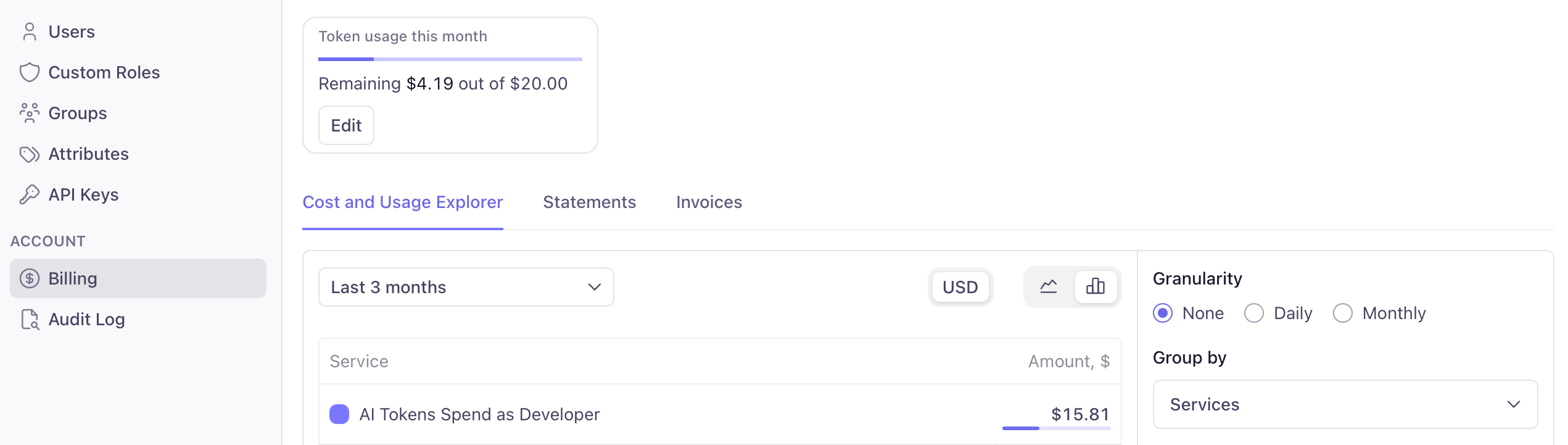
You can control the const by setting the token limit on the **Billing** page of
your Cube Cloud account. When the limit is [reached](#token-limit-exceeded), you can
increase it to continue using AI features.
## Total cost examples
The following examples provide insight into the total cost to use Cube Cloud:
* [Small-scale deployment](#small-scale-deployment) (Dedicated deployment, Premium product tier, S deployment tier).
* [Medium-scale deployment](#medium-scale-deployment) (Dedicated deployment with auto-scaling, Enterprise product tier, S deployment tier).
* [Large-scale deployment](#large-scale-deployment) (Multi-cluster deployment with single-tenant infrastructure, Enterprise product tier, M deployment tier).
### Small-scale deployment
Suppose a company uses Cube Cloud to power self-serve business intelligence for
a couple of teams in Eastern and Pacific time zones.
This organization:
* Uses the Premium product tier of Cube Cloud.
* Runs a single Dedicated deployment (S tier) that is active 24/7 but never has to auto-scale
its API instances because the usage is spread evenly with no bursts.
* Operates on a small volume of data that requires the usage of just 2 Cube Store
Workers to run queries and refresh pre-aggregations mostly during working hours,
being active approximately 50% of the time.
* Updates its data model infrequently and without using a dedicated Shared
deployment for testing purposes, with 2 data engineers spending just 1 hour a day each,
in the development mode of the Dedicated deployment.
| Resource | Usage per month | CCU per month |
| --------------------------------------------- | ------------------------------------------------------------- | ----------------------------------------------------- |
| Dedicated deployment | 1 Dedicated deployment ×
24 hours per day ×
30 days | 720 hours ×
4 CCUs per hour =
**2880 CCUs** |
| Additional Cube API Instance | — | — |
| Cube Store Worker | 2 Cube Store Workers ×
12 hours per day ×
30 days | 720 hours ×
1 CCU per hour =
**720 CCUs** |
| Shared deployment | — | — |
| Shared deployment
(for development mode) | 2 users ×
1 hour per day ×
30 days | 60 hours ×
1 CCU per hour =
**60 CCUs** |
| **Total** | | **3660 CCUs** |
### Medium-scale deployment
Suppose a company with a globally distributed workforce uses Cube Cloud to enable self-serve
exploration in multiple BI tools and AI agents; it also uses Cube Cloud to power embedded
analytics in its SaaS platform that caters to a vast worldwide customer base.
This organization:
* Uses the Enterprise product tier of Cube Cloud.
* Runs two Dedicated deployments (S tier) that are active 24/7 and auto-scale up to 8 API instances
during a peak hour every day.
* Operates on a moderate volume of data that requires the usage of 4 Cube Store
Workers by both Dedicated deployments to run queries and refresh pre-aggregations 24/7,
being active approximately 50% of the time.
* Uses a dedicated Shared deployment (S tier) for testing purposes that is active 12 hours a day.
* Has a team of 5 data engineers who frequently update the data model, with each data engineer
spending about 4 hours a day in the development mode of the dedicated Shared deployment.
| Resource | Usage per month | CCU per month |
| --------------------------------------------- | ------------------------------------------------------------------------------------------ | ------------------------------------------------------ |
| Dedicated deployment | 2 Dedicated deployments ×
24 hours per day ×
30 days | 1440 hours ×
4 CCUs per hour =
**5760 CCUs** |
| Additional Cube API Instance | 2 Dedicated deployments ×
(8 – 2) API Instances ×
1 hour per day ×
30 days | 360 hours ×
1 CCU per hour =
**360 CCUs** |
| Cube Store Worker | 2 Dedicated deployments ×
4 Cube Store Workers ×
12 hours per day ×
30 days | 2880 hours ×
1 CCU per hour =
**2880 CCUs** |
| Shared deployment | 1 Shared deployment ×
12 hours per day ×
30 days | 360 hours ×
1 CCU per hour =
**360 CCUs** |
| Shared deployment
(for development mode) | 5 users ×
4 hours per day ×
30 days | 600 hours ×
1 CCU per hour =
**600 CCUs** |
| **Total** | | **9960 CCUs** |
### Large-scale deployment
Suppose a company uses Cube Cloud as a mission-critical part of their infrastructure to enable
its globally distributed workforce, customer base, and (or) partners to operate at scale.
This organization:
* Uses the Enterprise product tier of Cube Cloud.
* Uses [single-tenant infrastructure][ref-dedicated-infra].
* Runs a Multi-cluster deployment that is active 24/7, includes 3 Dedicated deployments (M tier), with each
Dedicated deployment auto-scaling up to 10 API instances during a few peak hours every day.
* Operates on a large volume of data that requires the usage of 16 Cube Store Workers to run
queries and refresh pre-aggregations 24/7, being active approximately 50% of the time.
* Uses a dedicated Shared deployment (M tier) for testing purposes that is active 24 hours a day.
* Has a team of 10 data engineers who frequently update the data model, with each data engineer
spending about 4 hours a day in the development mode of the dedicated Shared deployment.
* Uses a [Query History tier](#query-history-tiers) with 14-day data retention to inform the work
of data engineers.
| Resource | Usage per month | CCU per month |
| --------------------------------------------- | ---------------------------------------------------------------------------------------------- | ------------------------------------------------------- |
| Single-tenant infrastructure | 1 region ×
24 hours per day ×
30 days | 720 hours ×
3 CCUs per hour =
**2160 CCUs** |
| Multi-cluster deployment | 3 Dedicated deployments ×
24 hours per day ×
30 days | 2160 hours ×
8 CCUs per hour =
**17280 CCUs** |
| Additional Cube API Instance | 3 Dedicated deployments ×
(10 – 2) API Instances ×
4 hours per day ×
30 days | 2880 hours ×
2 CCU per hour =
**5760 CCUs** |
| Cube Store Worker | 1 Multi-cluster deployment ×
16 Cube Store Workers ×
12 hours per day ×
30 days | 5760 hours ×
1 CCU per hour =
**5760 CCUs** |
| Shared deployment | 1 Shared deployment ×
24 hours per day ×
30 days | 720 hours ×
2 CCU per hour =
**1440 CCUs** |
| Shared deployment
(for development mode) | 10 users ×
4 hours per day ×
30 days | 1200 hours ×
2 CCU per hour =
**2400 CCUs** |
| Query History (M tier) | 24 hours per day ×
30 days | 720 hours ×
5 CCUs per hour =
**3600 CCUs** |
| **Total** | | **38400 CCUs** |
## Payment terms
### Upgrades
You may upgrade your CCUs to a higher-level product tier at any time by
paying the difference in per-Cube Consumption Unit pricing, or by asking to convert
the price paid for the remaining CCUs into CCUs for the higher product tier
at the CCU pricing for that product tier (resulting in a lower number of available CCUs
but upgraded to the higher product tier).
### Terms
If payment is not received within the contract terms (usually Net-30) or for
additional required payment for CCUs exceeding the balance of CCUs in your
account, services may degrade or be suspended until new CCUs are purchased.
Future purchases and upgrades are subject to the pricing that is in effect at
the time of the order. No credit is allowed for downgrading CCUs to a lower
product tier level. Payments are non-refundable.
## Troubleshooting
### `Token limit exceeded`
[On-demand](#payment-plans) customers may encounter the following error when their AI
usage exceeds the limit set for their Cube Cloud account: `Token limit exceeded. Please
purchase or allocate more tokens.`
To resolve this issue, a user with administrative permissions needs to increase the limit
for the AI token consumption at the **Billing** page of their Cube Cloud account.
 [cube-pricing]: https://cube.dev/pricing
[link-contact-us]: https://cube.dev/contact
[ref-cloud-deployment-dev-instance]: /admin/deployment/deployment-types#shared
[ref-cloud-deployment-prod-cluster]: /admin/deployment/deployment-types#dedicated
[ref-cloud-limits]: /admin/deployment/limits
[ref-monitoring-integrations]: /docs/monitoring/integrations
[ref-cloud-acl]: /admin/users-and-permissions/custom-roles
[ref-cloud-deployment-prod-multicluster]: /admin/deployment/deployment-types#multi-cluster
[ref-cloud-custom-domains]: /admin/deployment/custom-domains
[ref-cloud-vpc-peering]: /admin/deployment/dedicated
[ref-sls]: /docs/integrations/semantic-layer-sync
[ref-support]: /admin/account-billing/support
[ref-free-tier-support]: /admin/account-billing/support#free
[ref-starter-tier-support]: /admin/account-billing/support#starter
[ref-premium-tier-support]: /admin/account-billing/support#premium
[ref-enterprise-tier-support]: /admin/account-billing/support#enterprise
[ref-query-history]: /admin/monitoring/query-history
[ref-performance-insights]: /admin/monitoring/performance
[ref-audit-log]: /admin/monitoring/audit-log
[ref-dedicated-infra]: /admin/deployment/infrastructure#dedicated-infrastructure
[ref-sso]: /admin/sso
[ref-production-cluster]: /admin/deployment/deployment-types#dedicated
[ref-development-instance]: /admin/deployment/deployment-types#shared
[ref-apis]: /reference
[ref-mdx-api]: /reference/mdx-api
[ref-dax-api]: /reference/dax-api
[ref-cube-store-architecture]: /docs/pre-aggregations/running-in-production#architecture
[ref-data-at-rest-encryption]: /docs/pre-aggregations/running-in-production#data-at-rest-encryption
[ref-customer-managed-keys]: /admin/deployment/encryption-keys
[ref-query-history-export]: /admin/monitoring/monitoring-integrations#query-history-export
[cube-pricing]: https://cube.dev/pricing
[link-contact-us]: https://cube.dev/contact
[ref-cloud-deployment-dev-instance]: /admin/deployment/deployment-types#shared
[ref-cloud-deployment-prod-cluster]: /admin/deployment/deployment-types#dedicated
[ref-cloud-limits]: /admin/deployment/limits
[ref-monitoring-integrations]: /docs/monitoring/integrations
[ref-cloud-acl]: /admin/users-and-permissions/custom-roles
[ref-cloud-deployment-prod-multicluster]: /admin/deployment/deployment-types#multi-cluster
[ref-cloud-custom-domains]: /admin/deployment/custom-domains
[ref-cloud-vpc-peering]: /admin/deployment/dedicated
[ref-sls]: /docs/integrations/semantic-layer-sync
[ref-support]: /admin/account-billing/support
[ref-free-tier-support]: /admin/account-billing/support#free
[ref-starter-tier-support]: /admin/account-billing/support#starter
[ref-premium-tier-support]: /admin/account-billing/support#premium
[ref-enterprise-tier-support]: /admin/account-billing/support#enterprise
[ref-query-history]: /admin/monitoring/query-history
[ref-performance-insights]: /admin/monitoring/performance
[ref-audit-log]: /admin/monitoring/audit-log
[ref-dedicated-infra]: /admin/deployment/infrastructure#dedicated-infrastructure
[ref-sso]: /admin/sso
[ref-production-cluster]: /admin/deployment/deployment-types#dedicated
[ref-development-instance]: /admin/deployment/deployment-types#shared
[ref-apis]: /reference
[ref-mdx-api]: /reference/mdx-api
[ref-dax-api]: /reference/dax-api
[ref-cube-store-architecture]: /docs/pre-aggregations/running-in-production#architecture
[ref-data-at-rest-encryption]: /docs/pre-aggregations/running-in-production#data-at-rest-encryption
[ref-customer-managed-keys]: /admin/deployment/encryption-keys
[ref-query-history-export]: /admin/monitoring/monitoring-integrations#query-history-export