> ## Documentation Index
> Fetch the complete documentation index at: https://docs.cube.dev/llms.txt
> Use this file to discover all available pages before exploring further.
# Amazon Athena
> Give Cube IAM access to Athena, an S3 query-results path, region and catalog settings, plus optional assumed-role credentials.
## Prerequisites
* [A set of IAM credentials][aws-docs-athena-access] which allow access to [AWS
Athena][aws-athena]
* [The AWS region][aws-docs-regions]
* [The S3 bucket][aws-s3] on AWS to [store query results][aws-docs-athena-query]
## Setup
### Manual
Add the following to a `.env` file in your Cube project:
#### Static Credentials
```dotenv theme={"dark"}
CUBEJS_DB_TYPE=athena
CUBEJS_AWS_KEY=AKIA************
CUBEJS_AWS_SECRET=****************************************
CUBEJS_AWS_REGION=us-east-1
CUBEJS_AWS_S3_OUTPUT_LOCATION=s3://my-athena-output-bucket
CUBEJS_AWS_ATHENA_WORKGROUP=primary
CUBEJS_DB_NAME=my_non_default_athena_database
CUBEJS_AWS_ATHENA_CATALOG=AwsDataCatalog
```
#### IAM Role Assumption
For enhanced security, you can configure Cube to assume an IAM role to access Athena:
```dotenv theme={"dark"}
CUBEJS_DB_TYPE=athena
CUBEJS_AWS_ATHENA_ASSUME_ROLE_ARN=arn:aws:iam::123456789012:role/AthenaAccessRole
CUBEJS_AWS_REGION=us-east-1
CUBEJS_AWS_S3_OUTPUT_LOCATION=s3://my-athena-output-bucket
CUBEJS_AWS_ATHENA_WORKGROUP=primary
# Optional: if the role requires an external ID
CUBEJS_AWS_ATHENA_ASSUME_ROLE_EXTERNAL_ID=unique-external-id
```
When using role assumption:
* If running in AWS (EC2, ECS, EKS with IRSA), the driver will use the instance's IAM role or service account to assume the target role
* You can also provide [`CUBEJS_AWS_KEY`](/reference/configuration/environment-variables#cubejs_aws_key) and [`CUBEJS_AWS_SECRET`](/reference/configuration/environment-variables#cubejs_aws_secret) as master credentials for the role assumption
### Cube Cloud
In some cases you'll need to allow connections from your Cube Cloud deployment
IP address to your database. You can copy the IP address from either the
Database Setup step in deployment creation, or from **Settings →
Configuration** in your deployment.
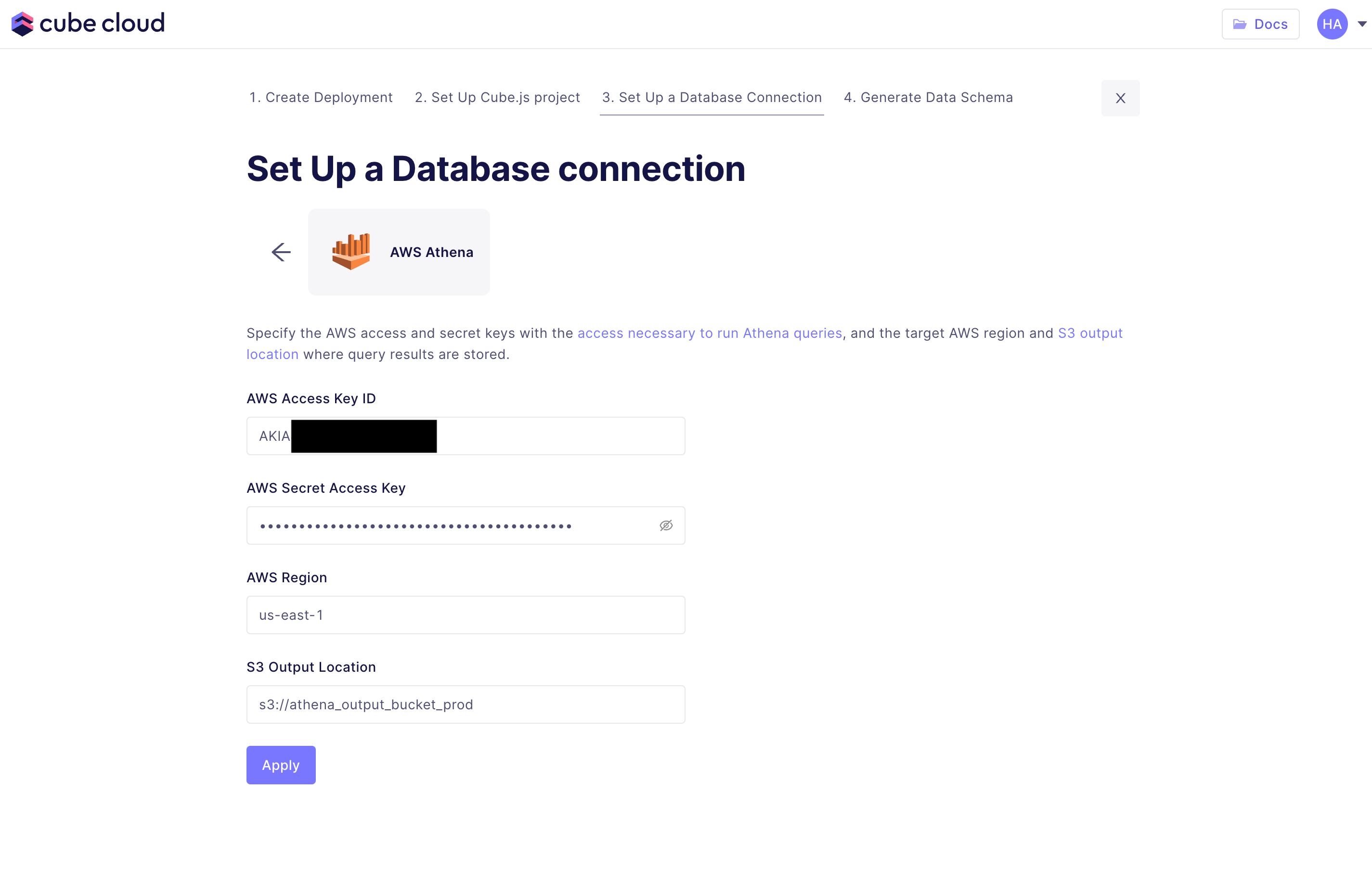
In Cube Cloud, select **AWS Athena** when creating a new deployment and fill in
the required fields:
 #### OIDC workload identity
Instead of static credentials, Cube Cloud deployments can authenticate to
Athena with [OIDC workload identity][ref-oidc-aws-athena]: an IAM role in
your account trusts Cube's OIDC issuer, and the driver assumes it through
the AWS SDK's default credential chain — no access keys to provision or
rotate.
```dotenv theme={"dark"}
CUBEJS_DB_TYPE=athena
AWS_ROLE_ARN=arn:aws:iam::123456789012:role/cube-deployment-acme
CUBEJS_AWS_REGION=us-east-1
CUBEJS_AWS_S3_OUTPUT_LOCATION=s3://my-athena-output-bucket
```
See the [AWS OIDC guide][ref-oidc-aws-athena] for the IAM role, trust
policy, and permissions setup.
Cube Cloud also supports connecting to data sources within private VPCs
if [single-tenant infrastructure][ref-dedicated-infra] is used. Check out the
[VPC connectivity guide][ref-cloud-conf-vpc] for details.
[ref-dedicated-infra]: /docs/deployment/cloud/infrastructure#dedicated-infrastructure
[ref-cloud-conf-vpc]: /docs/deployment/cloud/vpc
## Environment Variables
| Environment Variable | Description | Possible Values | Required |
| --------------------------------------------------------------------------------------------------------------------------------------- | ---------------------------------------------------------------------------------------------------------------------- | ------------------------------------------------ | :-----------: |
| [`CUBEJS_AWS_KEY`](/reference/configuration/environment-variables#cubejs_aws_key) | The AWS Access Key ID to use for database connections | A valid AWS Access Key ID | ❌1 |
| [`CUBEJS_AWS_SECRET`](/reference/configuration/environment-variables#cubejs_aws_secret) | The AWS Secret Access Key to use for database connections | A valid AWS Secret Access Key | ❌1 |
| [`CUBEJS_AWS_REGION`](/reference/configuration/environment-variables#cubejs_aws_region) | The AWS region of the Cube deployment | [A valid AWS region][aws-docs-regions] | ✅ |
| `CUBEJS_AWS_S3_OUTPUT_LOCATION` | The S3 path to store query results made by the Cube deployment | A valid S3 path | ❌ |
| [`CUBEJS_AWS_ATHENA_WORKGROUP`](/reference/configuration/environment-variables#cubejs_aws_athena_workgroup) | The name of the workgroup in which the query is being started | [A valid Athena Workgroup][aws-athena-workgroup] | ❌ |
| [`CUBEJS_AWS_ATHENA_CATALOG`](/reference/configuration/environment-variables#cubejs_aws_athena_catalog) | The name of the catalog to use by default | [A valid Athena Catalog name][awsdatacatalog] | ❌ |
| [`CUBEJS_AWS_ATHENA_ASSUME_ROLE_ARN`](/reference/configuration/environment-variables#cubejs_aws_athena_assume_role_arn) | The ARN of the IAM role to assume for Athena access | A valid IAM role ARN | ❌ |
| [`CUBEJS_AWS_ATHENA_ASSUME_ROLE_EXTERNAL_ID`](/reference/configuration/environment-variables#cubejs_aws_athena_assume_role_external_id) | The external ID to use when assuming the IAM role (if required by the role's trust policy) | A string | ❌ |
| [`CUBEJS_DB_NAME`](/reference/configuration/environment-variables#cubejs_db_name) | The name of the database to use by default | A valid Athena Database name | ❌ |
| [`CUBEJS_DB_SCHEMA`](/reference/configuration/environment-variables#cubejs_db_schema) | The name of the schema to use as `information_schema` filter. Reduces count of tables loaded during schema generation. | A valid schema name | ❌ |
| [`CUBEJS_CONCURRENCY`](/reference/configuration/environment-variables#cubejs_concurrency) | The number of [concurrent queries][ref-data-source-concurrency] to the data source | A valid number | ❌ |
1 Either provide [`CUBEJS_AWS_KEY`](/reference/configuration/environment-variables#cubejs_aws_key) and [`CUBEJS_AWS_SECRET`](/reference/configuration/environment-variables#cubejs_aws_secret) for static credentials, or use [`CUBEJS_AWS_ATHENA_ASSUME_ROLE_ARN`](/reference/configuration/environment-variables#cubejs_aws_athena_assume_role_arn) for role-based authentication. When using role assumption without static credentials, the driver will use the AWS SDK's default credential chain (IAM instance profile, EKS IRSA, or [OIDC workload identity][ref-oidc-aws-athena] in Cube Cloud).
[ref-data-source-concurrency]: /admin/connect-to-data/concurrency#data-source-concurrency
## Pre-Aggregation Feature Support
### count\_distinct\_approx
Measures of type
[`count_distinct_approx`][ref-schema-ref-types-formats-countdistinctapprox] can
be used in pre-aggregations when using AWS Athena as a source database. To learn
more about AWS Athena's support for approximate aggregate functions, [click
here][aws-athena-docs-approx-agg-fns].
## Pre-Aggregation Build Strategies
To learn more about pre-aggregation build strategies, [head
here][ref-caching-using-preaggs-build-strats].
| Feature | Works with read-only mode? | Is default? |
| ------------- | :------------------------: | :---------: |
| Batching | ❌ | ✅ |
| Export Bucket | ❌ | ❌ |
By default, AWS Athena uses a [batching][self-preaggs-batching] strategy to
build pre-aggregations.
### Batching
No extra configuration is required to configure batching for AWS Athena.
### Export Bucket
AWS Athena **only** supports using AWS S3 for export buckets.
#### AWS S3
For [improved pre-aggregation performance with large
datasets][ref-caching-large-preaggs], enable export bucket functionality by
configuring Cube with the following environment variables:
Ensure the AWS credentials are correctly configured in IAM to allow reads and
writes to the export bucket in S3.
```dotenv theme={"dark"}
CUBEJS_DB_EXPORT_BUCKET_TYPE=s3
CUBEJS_DB_EXPORT_BUCKET=my.bucket.on.s3
CUBEJS_DB_EXPORT_BUCKET_AWS_KEY=
CUBEJS_DB_EXPORT_BUCKET_AWS_SECRET=
CUBEJS_DB_EXPORT_BUCKET_AWS_REGION=
```
## SSL
Cube does not require any additional configuration to enable SSL as AWS Athena
connections are made over HTTPS.
[aws-athena]: https://aws.amazon.com/athena
[aws-athena-workgroup]: https://docs.aws.amazon.com/athena/latest/ug/workgroups-benefits.html
[awsdatacatalog]: https://docs.aws.amazon.com/athena/latest/ug/understanding-tables-databases-and-the-data-catalog.html
[aws-s3]: https://aws.amazon.com/s3/
[aws-docs-athena-access]: https://docs.aws.amazon.com/athena/latest/ug/security-iam-athena.html
[aws-docs-athena-query]: https://docs.aws.amazon.com/athena/latest/ug/querying.html
[aws-docs-regions]: https://docs.aws.amazon.com/AWSEC2/latest/UserGuide/using-regions-availability-zones.html#concepts-available-regions
[aws-athena-docs-approx-agg-fns]: https://prestodb.io/docs/current/functions/aggregate.html#approximate-aggregate-functions
[ref-caching-large-preaggs]: /docs/pre-aggregations/using-pre-aggregations#export-bucket
[ref-caching-using-preaggs-build-strats]: /docs/pre-aggregations/using-pre-aggregations#pre-aggregation-build-strategies
[ref-oidc-aws-athena]: /admin/deployment/oidc/aws#athena
[ref-schema-ref-types-formats-countdistinctapprox]: /reference/data-modeling/measures#type
[self-preaggs-batching]: #batching
#### OIDC workload identity
Instead of static credentials, Cube Cloud deployments can authenticate to
Athena with [OIDC workload identity][ref-oidc-aws-athena]: an IAM role in
your account trusts Cube's OIDC issuer, and the driver assumes it through
the AWS SDK's default credential chain — no access keys to provision or
rotate.
```dotenv theme={"dark"}
CUBEJS_DB_TYPE=athena
AWS_ROLE_ARN=arn:aws:iam::123456789012:role/cube-deployment-acme
CUBEJS_AWS_REGION=us-east-1
CUBEJS_AWS_S3_OUTPUT_LOCATION=s3://my-athena-output-bucket
```
See the [AWS OIDC guide][ref-oidc-aws-athena] for the IAM role, trust
policy, and permissions setup.
Cube Cloud also supports connecting to data sources within private VPCs
if [single-tenant infrastructure][ref-dedicated-infra] is used. Check out the
[VPC connectivity guide][ref-cloud-conf-vpc] for details.
[ref-dedicated-infra]: /docs/deployment/cloud/infrastructure#dedicated-infrastructure
[ref-cloud-conf-vpc]: /docs/deployment/cloud/vpc
## Environment Variables
| Environment Variable | Description | Possible Values | Required |
| --------------------------------------------------------------------------------------------------------------------------------------- | ---------------------------------------------------------------------------------------------------------------------- | ------------------------------------------------ | :-----------: |
| [`CUBEJS_AWS_KEY`](/reference/configuration/environment-variables#cubejs_aws_key) | The AWS Access Key ID to use for database connections | A valid AWS Access Key ID | ❌1 |
| [`CUBEJS_AWS_SECRET`](/reference/configuration/environment-variables#cubejs_aws_secret) | The AWS Secret Access Key to use for database connections | A valid AWS Secret Access Key | ❌1 |
| [`CUBEJS_AWS_REGION`](/reference/configuration/environment-variables#cubejs_aws_region) | The AWS region of the Cube deployment | [A valid AWS region][aws-docs-regions] | ✅ |
| `CUBEJS_AWS_S3_OUTPUT_LOCATION` | The S3 path to store query results made by the Cube deployment | A valid S3 path | ❌ |
| [`CUBEJS_AWS_ATHENA_WORKGROUP`](/reference/configuration/environment-variables#cubejs_aws_athena_workgroup) | The name of the workgroup in which the query is being started | [A valid Athena Workgroup][aws-athena-workgroup] | ❌ |
| [`CUBEJS_AWS_ATHENA_CATALOG`](/reference/configuration/environment-variables#cubejs_aws_athena_catalog) | The name of the catalog to use by default | [A valid Athena Catalog name][awsdatacatalog] | ❌ |
| [`CUBEJS_AWS_ATHENA_ASSUME_ROLE_ARN`](/reference/configuration/environment-variables#cubejs_aws_athena_assume_role_arn) | The ARN of the IAM role to assume for Athena access | A valid IAM role ARN | ❌ |
| [`CUBEJS_AWS_ATHENA_ASSUME_ROLE_EXTERNAL_ID`](/reference/configuration/environment-variables#cubejs_aws_athena_assume_role_external_id) | The external ID to use when assuming the IAM role (if required by the role's trust policy) | A string | ❌ |
| [`CUBEJS_DB_NAME`](/reference/configuration/environment-variables#cubejs_db_name) | The name of the database to use by default | A valid Athena Database name | ❌ |
| [`CUBEJS_DB_SCHEMA`](/reference/configuration/environment-variables#cubejs_db_schema) | The name of the schema to use as `information_schema` filter. Reduces count of tables loaded during schema generation. | A valid schema name | ❌ |
| [`CUBEJS_CONCURRENCY`](/reference/configuration/environment-variables#cubejs_concurrency) | The number of [concurrent queries][ref-data-source-concurrency] to the data source | A valid number | ❌ |
1 Either provide [`CUBEJS_AWS_KEY`](/reference/configuration/environment-variables#cubejs_aws_key) and [`CUBEJS_AWS_SECRET`](/reference/configuration/environment-variables#cubejs_aws_secret) for static credentials, or use [`CUBEJS_AWS_ATHENA_ASSUME_ROLE_ARN`](/reference/configuration/environment-variables#cubejs_aws_athena_assume_role_arn) for role-based authentication. When using role assumption without static credentials, the driver will use the AWS SDK's default credential chain (IAM instance profile, EKS IRSA, or [OIDC workload identity][ref-oidc-aws-athena] in Cube Cloud).
[ref-data-source-concurrency]: /admin/connect-to-data/concurrency#data-source-concurrency
## Pre-Aggregation Feature Support
### count\_distinct\_approx
Measures of type
[`count_distinct_approx`][ref-schema-ref-types-formats-countdistinctapprox] can
be used in pre-aggregations when using AWS Athena as a source database. To learn
more about AWS Athena's support for approximate aggregate functions, [click
here][aws-athena-docs-approx-agg-fns].
## Pre-Aggregation Build Strategies
To learn more about pre-aggregation build strategies, [head
here][ref-caching-using-preaggs-build-strats].
| Feature | Works with read-only mode? | Is default? |
| ------------- | :------------------------: | :---------: |
| Batching | ❌ | ✅ |
| Export Bucket | ❌ | ❌ |
By default, AWS Athena uses a [batching][self-preaggs-batching] strategy to
build pre-aggregations.
### Batching
No extra configuration is required to configure batching for AWS Athena.
### Export Bucket
AWS Athena **only** supports using AWS S3 for export buckets.
#### AWS S3
For [improved pre-aggregation performance with large
datasets][ref-caching-large-preaggs], enable export bucket functionality by
configuring Cube with the following environment variables:
Ensure the AWS credentials are correctly configured in IAM to allow reads and
writes to the export bucket in S3.
```dotenv theme={"dark"}
CUBEJS_DB_EXPORT_BUCKET_TYPE=s3
CUBEJS_DB_EXPORT_BUCKET=my.bucket.on.s3
CUBEJS_DB_EXPORT_BUCKET_AWS_KEY=
CUBEJS_DB_EXPORT_BUCKET_AWS_SECRET=
CUBEJS_DB_EXPORT_BUCKET_AWS_REGION=
```
## SSL
Cube does not require any additional configuration to enable SSL as AWS Athena
connections are made over HTTPS.
[aws-athena]: https://aws.amazon.com/athena
[aws-athena-workgroup]: https://docs.aws.amazon.com/athena/latest/ug/workgroups-benefits.html
[awsdatacatalog]: https://docs.aws.amazon.com/athena/latest/ug/understanding-tables-databases-and-the-data-catalog.html
[aws-s3]: https://aws.amazon.com/s3/
[aws-docs-athena-access]: https://docs.aws.amazon.com/athena/latest/ug/security-iam-athena.html
[aws-docs-athena-query]: https://docs.aws.amazon.com/athena/latest/ug/querying.html
[aws-docs-regions]: https://docs.aws.amazon.com/AWSEC2/latest/UserGuide/using-regions-availability-zones.html#concepts-available-regions
[aws-athena-docs-approx-agg-fns]: https://prestodb.io/docs/current/functions/aggregate.html#approximate-aggregate-functions
[ref-caching-large-preaggs]: /docs/pre-aggregations/using-pre-aggregations#export-bucket
[ref-caching-using-preaggs-build-strats]: /docs/pre-aggregations/using-pre-aggregations#pre-aggregation-build-strategies
[ref-oidc-aws-athena]: /admin/deployment/oidc/aws#athena
[ref-schema-ref-types-formats-countdistinctapprox]: /reference/data-modeling/measures#type
[self-preaggs-batching]: #batching