> ## Documentation Index
> Fetch the complete documentation index at: https://docs.cube.dev/llms.txt
> Use this file to discover all available pages before exploring further.
# DuckDB
> Set up Cube with DuckDB for cloud object storage, local database files, or MotherDuck-backed hybrid query execution.
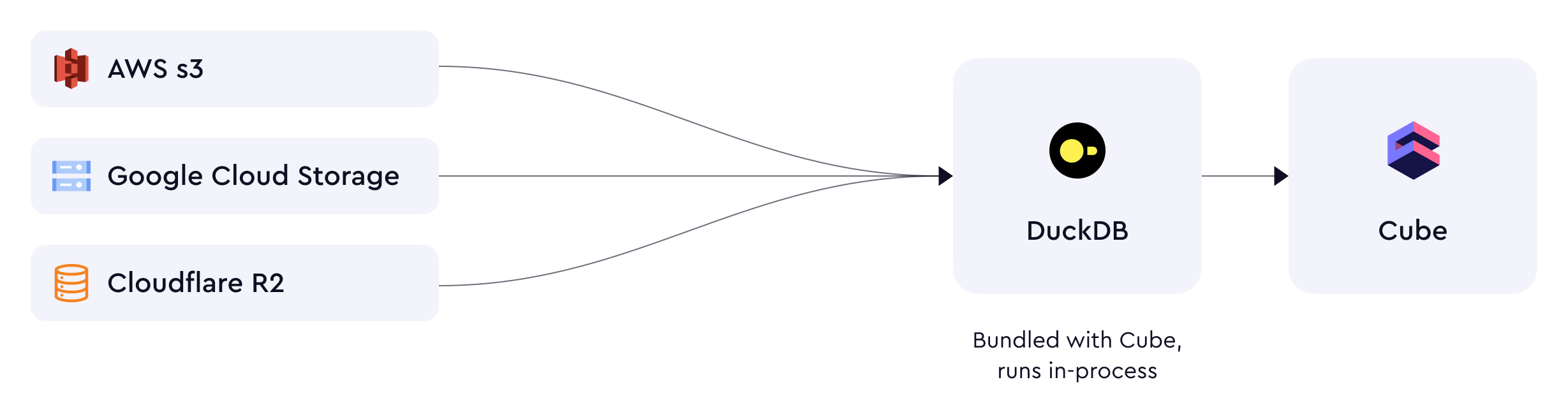
[DuckDB][duckdb] is an in-process SQL OLAP database management system, and has
support for querying data in CSV, JSON and Parquet formats from an AWS
S3-compatible blob storage. This means you can [query data stored in AWS S3,
Google Cloud Storage, or Cloudflare R2][duckdb-docs-s3-import].
You can also use the [`CUBEJS_DB_DUCKDB_DATABASE_PATH`](/reference/configuration/environment-variables#cubejs_db_duckdb_database_path) environment variable to
connect to a local DuckDB database.
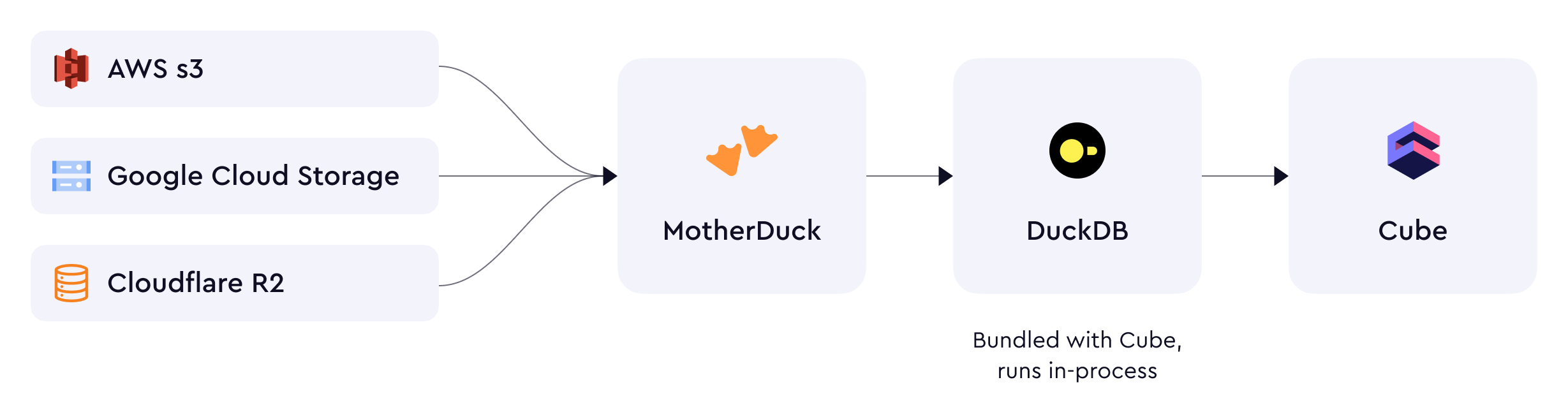
 Cube can also connect to [MotherDuck][motherduck], a cloud-based serverless
analytics platform built on DuckDB. When connected to MotherDuck, DuckDB uses
[hybrid execution][motherduck-docs-architecture] and routes queries to S3
through MotherDuck for better performance.
Cube can also connect to [MotherDuck][motherduck], a cloud-based serverless
analytics platform built on DuckDB. When connected to MotherDuck, DuckDB uses
[hybrid execution][motherduck-docs-architecture] and routes queries to S3
through MotherDuck for better performance.
 ## Prerequisites
* A set of IAM credentials which allow access to the S3-compatible data source.
Credentials are only required for private S3 buckets.
* The region of the bucket
* The name of a bucket to query data from
## Setup
### Manual
Add the following to a `.env` file in your Cube project:
```dotenv theme={"dark"}
CUBEJS_DB_TYPE=duckdb
```
### Cube Cloud
In Cube Cloud, select **DuckDB** when creating a new deployment
and fill in the required fields:
## Prerequisites
* A set of IAM credentials which allow access to the S3-compatible data source.
Credentials are only required for private S3 buckets.
* The region of the bucket
* The name of a bucket to query data from
## Setup
### Manual
Add the following to a `.env` file in your Cube project:
```dotenv theme={"dark"}
CUBEJS_DB_TYPE=duckdb
```
### Cube Cloud
In Cube Cloud, select **DuckDB** when creating a new deployment
and fill in the required fields:
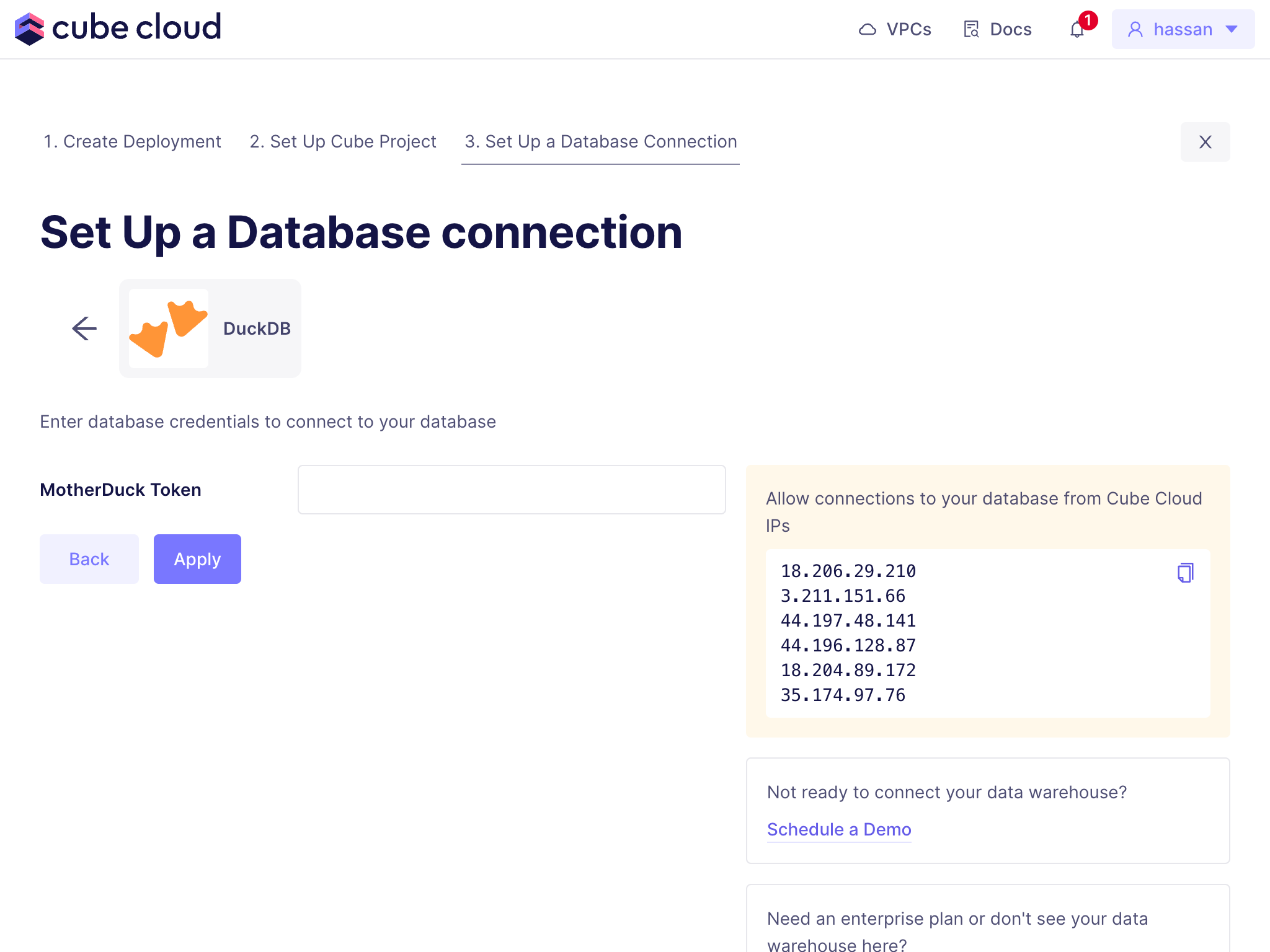 If you are not using MotherDuck, leave the **MotherDuck Token**
field blank.
You can also explore how DuckDB works with Cube if you create a [demo
deployment][ref-demo-deployment] in Cube Cloud.
## Environment Variables
| Environment Variable | Description | Possible Values | Required |
| ------------------------------------------------------------------------------------------------------------------------------- | --------------------------------------------------------------------------------------------------------------------- | ------------------------------------------------------------- | :------: |
| [`CUBEJS_DB_DUCKDB_MEMORY_LIMIT`](/reference/configuration/environment-variables#cubejs_db_duckdb_memory_limit) | The maximum memory limit for DuckDB. Equivalent to `SET memory_limit=`. Default is 75% of available RAM | A valid memory limit | ❌ |
| [`CUBEJS_DB_DUCKDB_SCHEMA`](/reference/configuration/environment-variables#cubejs_db_duckdb_schema) | The [default search schema][link-duckdb-configuration-ref] | A valid schema name | ❌ |
| [`CUBEJS_DB_DUCKDB_MOTHERDUCK_TOKEN`](/reference/configuration/environment-variables#cubejs_db_duckdb_motherduck_token) | The service token to use for connections to MotherDuck | A valid [MotherDuck service token][motherduck-docs-svc-token] | ❌ |
| [`CUBEJS_DB_DUCKDB_DATABASE_PATH`](/reference/configuration/environment-variables#cubejs_db_duckdb_database_path) | The database filepath to use for connection to a local database. | A valid duckdb database file path | ❌ |
| `CUBEJS_DB_DUCKDB_S3_ACCESS_KEY_ID` | The Access Key ID to use for database connections | A valid Access Key ID | ❌ |
| `CUBEJS_DB_DUCKDB_S3_SECRET_ACCESS_KEY` | The Secret Access Key to use for database connections | A valid Secret Access Key | ❌ |
| `CUBEJS_DB_DUCKDB_S3_ENDPOINT` | The S3 endpoint | A valid [S3 endpoint][duckdb-docs-s3-import] | ❌ |
| `CUBEJS_DB_DUCKDB_S3_REGION` | The [region of the bucket][duckdb-docs-s3-import] | A valid AWS region | ❌ |
| `CUBEJS_DB_DUCKDB_S3_USE_SSL` | Use SSL for connection | A boolean | ❌ |
| `CUBEJS_DB_DUCKDB_S3_URL_STYLE` | To choose the S3 URL style(vhost or path) | `vhost` or `path` | ❌ |
| `CUBEJS_DB_DUCKDB_S3_SESSION_TOKEN` | The token for the S3 session | A valid Session Token | ❌ |
| [`CUBEJS_DB_DUCKDB_EXTENSIONS`](/reference/configuration/environment-variables#cubejs_db_duckdb_extensions) | A comma-separated list of DuckDB extensions to install and load | A comma-separated list of DuckDB extensions | ❌ |
| [`CUBEJS_DB_DUCKDB_COMMUNITY_EXTENSIONS`](/reference/configuration/environment-variables#cubejs_db_duckdb_community_extensions) | A comma-separated list of DuckDB community extensions to install and load | A comma-separated list of DuckDB community extensions | ❌ |
| `CUBEJS_DB_DUCKDB_S3_USE_CREDENTIAL_CHAIN` | A flag to use credentials chain for secrets for S3 connections | `true`, `false`. Defaults to `false` | ❌ |
| [`CUBEJS_CONCURRENCY`](/reference/configuration/environment-variables#cubejs_concurrency) | The number of [concurrent queries][ref-data-source-concurrency] to the data source | A valid number | ❌ |
[ref-data-source-concurrency]: /admin/connect-to-data/concurrency#data-source-concurrency
## Pre-Aggregation Feature Support
### count\_distinct\_approx
Measures of type
[`count_distinct_approx`][ref-schema-ref-types-formats-countdistinctapprox] can
be used in pre-aggregations when using DuckDB as a source database. To learn
more about DuckDB's support for approximate aggregate functions, [click
here][duckdb-docs-approx-agg-fns].
## Pre-Aggregation Build Strategies
To learn more about pre-aggregation build strategies, [head
here][ref-caching-using-preaggs-build-strats].
| Feature | Works with read-only mode? | Is default? |
| ------------- | :------------------------: | :---------: |
| Batching | ❌ | ✅ |
| Export Bucket | - | - |
By default, DuckDB uses a [batching][self-preaggs-batching] strategy to build
pre-aggregations.
### Batching
No extra configuration is required to configure batching for DuckDB.
### Export Bucket
DuckDB does not support export buckets.
## SSL
Cube does not require any additional configuration to enable SSL as DuckDB
connections are made over HTTPS.
[duckdb]: https://duckdb.org/
[duckdb-docs-approx-agg-fns]: https://duckdb.org/docs/sql/aggregates.html#approximate-aggregates
[duckdb-docs-s3-import]: https://duckdb.org/docs/guides/import/s3_import
[link-duckdb-configuration-ref]: https://duckdb.org/docs/sql/configuration.html#configuration-reference
[motherduck]: https://motherduck.com/
[motherduck-docs-architecture]: https://motherduck.com/docs/architecture-and-capabilities#hybrid-execution
[motherduck-docs-svc-token]: https://motherduck.com/docs/authenticating-to-motherduck/#authentication-using-a-service-token
[ref-caching-using-preaggs-build-strats]: /docs/pre-aggregations/using-pre-aggregations#pre-aggregation-build-strategies
[ref-schema-ref-types-formats-countdistinctapprox]: /reference/data-modeling/measures#type
[self-preaggs-batching]: #batching
[ref-demo-deployment]: /docs/deployment/cloud/deployments#demo-deployments
If you are not using MotherDuck, leave the **MotherDuck Token**
field blank.
You can also explore how DuckDB works with Cube if you create a [demo
deployment][ref-demo-deployment] in Cube Cloud.
## Environment Variables
| Environment Variable | Description | Possible Values | Required |
| ------------------------------------------------------------------------------------------------------------------------------- | --------------------------------------------------------------------------------------------------------------------- | ------------------------------------------------------------- | :------: |
| [`CUBEJS_DB_DUCKDB_MEMORY_LIMIT`](/reference/configuration/environment-variables#cubejs_db_duckdb_memory_limit) | The maximum memory limit for DuckDB. Equivalent to `SET memory_limit=`. Default is 75% of available RAM | A valid memory limit | ❌ |
| [`CUBEJS_DB_DUCKDB_SCHEMA`](/reference/configuration/environment-variables#cubejs_db_duckdb_schema) | The [default search schema][link-duckdb-configuration-ref] | A valid schema name | ❌ |
| [`CUBEJS_DB_DUCKDB_MOTHERDUCK_TOKEN`](/reference/configuration/environment-variables#cubejs_db_duckdb_motherduck_token) | The service token to use for connections to MotherDuck | A valid [MotherDuck service token][motherduck-docs-svc-token] | ❌ |
| [`CUBEJS_DB_DUCKDB_DATABASE_PATH`](/reference/configuration/environment-variables#cubejs_db_duckdb_database_path) | The database filepath to use for connection to a local database. | A valid duckdb database file path | ❌ |
| `CUBEJS_DB_DUCKDB_S3_ACCESS_KEY_ID` | The Access Key ID to use for database connections | A valid Access Key ID | ❌ |
| `CUBEJS_DB_DUCKDB_S3_SECRET_ACCESS_KEY` | The Secret Access Key to use for database connections | A valid Secret Access Key | ❌ |
| `CUBEJS_DB_DUCKDB_S3_ENDPOINT` | The S3 endpoint | A valid [S3 endpoint][duckdb-docs-s3-import] | ❌ |
| `CUBEJS_DB_DUCKDB_S3_REGION` | The [region of the bucket][duckdb-docs-s3-import] | A valid AWS region | ❌ |
| `CUBEJS_DB_DUCKDB_S3_USE_SSL` | Use SSL for connection | A boolean | ❌ |
| `CUBEJS_DB_DUCKDB_S3_URL_STYLE` | To choose the S3 URL style(vhost or path) | `vhost` or `path` | ❌ |
| `CUBEJS_DB_DUCKDB_S3_SESSION_TOKEN` | The token for the S3 session | A valid Session Token | ❌ |
| [`CUBEJS_DB_DUCKDB_EXTENSIONS`](/reference/configuration/environment-variables#cubejs_db_duckdb_extensions) | A comma-separated list of DuckDB extensions to install and load | A comma-separated list of DuckDB extensions | ❌ |
| [`CUBEJS_DB_DUCKDB_COMMUNITY_EXTENSIONS`](/reference/configuration/environment-variables#cubejs_db_duckdb_community_extensions) | A comma-separated list of DuckDB community extensions to install and load | A comma-separated list of DuckDB community extensions | ❌ |
| `CUBEJS_DB_DUCKDB_S3_USE_CREDENTIAL_CHAIN` | A flag to use credentials chain for secrets for S3 connections | `true`, `false`. Defaults to `false` | ❌ |
| [`CUBEJS_CONCURRENCY`](/reference/configuration/environment-variables#cubejs_concurrency) | The number of [concurrent queries][ref-data-source-concurrency] to the data source | A valid number | ❌ |
[ref-data-source-concurrency]: /admin/connect-to-data/concurrency#data-source-concurrency
## Pre-Aggregation Feature Support
### count\_distinct\_approx
Measures of type
[`count_distinct_approx`][ref-schema-ref-types-formats-countdistinctapprox] can
be used in pre-aggregations when using DuckDB as a source database. To learn
more about DuckDB's support for approximate aggregate functions, [click
here][duckdb-docs-approx-agg-fns].
## Pre-Aggregation Build Strategies
To learn more about pre-aggregation build strategies, [head
here][ref-caching-using-preaggs-build-strats].
| Feature | Works with read-only mode? | Is default? |
| ------------- | :------------------------: | :---------: |
| Batching | ❌ | ✅ |
| Export Bucket | - | - |
By default, DuckDB uses a [batching][self-preaggs-batching] strategy to build
pre-aggregations.
### Batching
No extra configuration is required to configure batching for DuckDB.
### Export Bucket
DuckDB does not support export buckets.
## SSL
Cube does not require any additional configuration to enable SSL as DuckDB
connections are made over HTTPS.
[duckdb]: https://duckdb.org/
[duckdb-docs-approx-agg-fns]: https://duckdb.org/docs/sql/aggregates.html#approximate-aggregates
[duckdb-docs-s3-import]: https://duckdb.org/docs/guides/import/s3_import
[link-duckdb-configuration-ref]: https://duckdb.org/docs/sql/configuration.html#configuration-reference
[motherduck]: https://motherduck.com/
[motherduck-docs-architecture]: https://motherduck.com/docs/architecture-and-capabilities#hybrid-execution
[motherduck-docs-svc-token]: https://motherduck.com/docs/authenticating-to-motherduck/#authentication-using-a-service-token
[ref-caching-using-preaggs-build-strats]: /docs/pre-aggregations/using-pre-aggregations#pre-aggregation-build-strategies
[ref-schema-ref-types-formats-countdistinctapprox]: /reference/data-modeling/measures#type
[self-preaggs-batching]: #batching
[ref-demo-deployment]: /docs/deployment/cloud/deployments#demo-deployments