> ## Documentation Index
> Fetch the complete documentation index at: https://docs.cube.dev/llms.txt
> Use this file to discover all available pages before exploring further.
# Snowflake
> Snowflake is a popular cloud-based data platform.
[Snowflake][snowflake] is a popular cloud-based data platform.
## Prerequisites
In order to connect Cube to Snowflake, you need to grant certain permissions to the Snowflake role
used by Cube. Cube requires the role to have `USAGE` on databases and schemas
and `SELECT` on tables. An example configuration:
```sql theme={"dark"}
GRANT USAGE ON DATABASE ABC TO ROLE XYZ;
GRANT USAGE ON ALL SCHEMAS IN DATABASE ABC TO ROLE XYZ;
GRANT USAGE ON FUTURE SCHEMAS IN DATABASE ABC TO ROLE XYZ;
GRANT SELECT ON ALL TABLES IN DATABASE ABC TO ROLE XYZ;
GRANT SELECT ON FUTURE TABLES IN DATABASE ABC TO ROLE XYZ;
```
* [Account/Server URL][snowflake-docs-account-id] for Snowflake.
* User name and password or an RSA private key for the Snowflake account.
In Cube Cloud, you can authenticate with [OIDC workload
identity][ref-oidc-overview] instead — the same role grants apply to the
mapped service user.
* Optionally, the warehouse name, the user role, and the database name.
## Setup
If you're having Network error and Snowflake can't be reached please make sure you tried
[format 2 for an account id][snowflake-format-2].
### Manual
Add the following to a `.env` file in your Cube project:
```dotenv theme={"dark"}
CUBEJS_DB_TYPE=snowflake
CUBEJS_DB_SNOWFLAKE_ACCOUNT=XXXXXXXXX.us-east-1
CUBEJS_DB_SNOWFLAKE_WAREHOUSE=MY_SNOWFLAKE_WAREHOUSE
CUBEJS_DB_NAME=my_snowflake_database
CUBEJS_DB_USER=snowflake_user
CUBEJS_DB_PASS=**********
```
### Cube Cloud
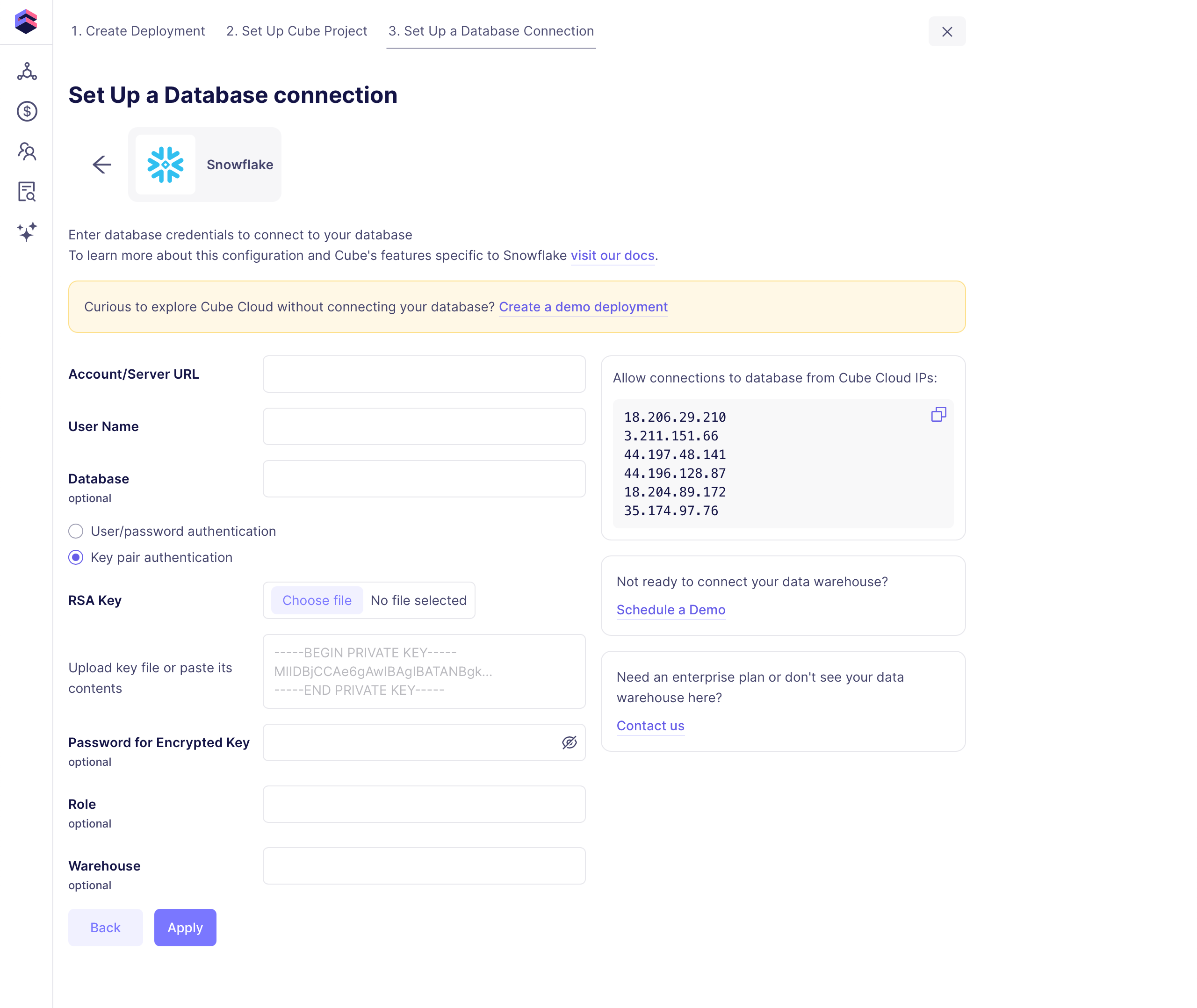
In some cases you'll need to allow connections from your Cube Cloud deployment
IP address to your database. You can copy the IP address from either the
Database Setup step in deployment creation, or from **Settings →
Configuration** in your deployment.
The following fields are required when creating a Snowflake connection:
 #### OIDC workload identity
Instead of a password or key pair, Cube Cloud deployments can authenticate
to Snowflake with [OIDC workload identity][ref-oidc-overview]: a Snowflake
External OAuth integration trusts Cube's OIDC issuer, and the driver
presents a short-lived Cube-minted JWT — no long-lived secrets to
provision or rotate. Snowflake validates each connection's token against
your tenant's public JWKS, maps the token's `sub` claim to a Snowflake
user, and authorizes the session role through the token's `scp` claim.
Start with the [OIDC overview][ref-oidc-overview] for the concepts (issuer,
token configs, custom claims, target env var) and to enable OIDC for your
tenant, then:
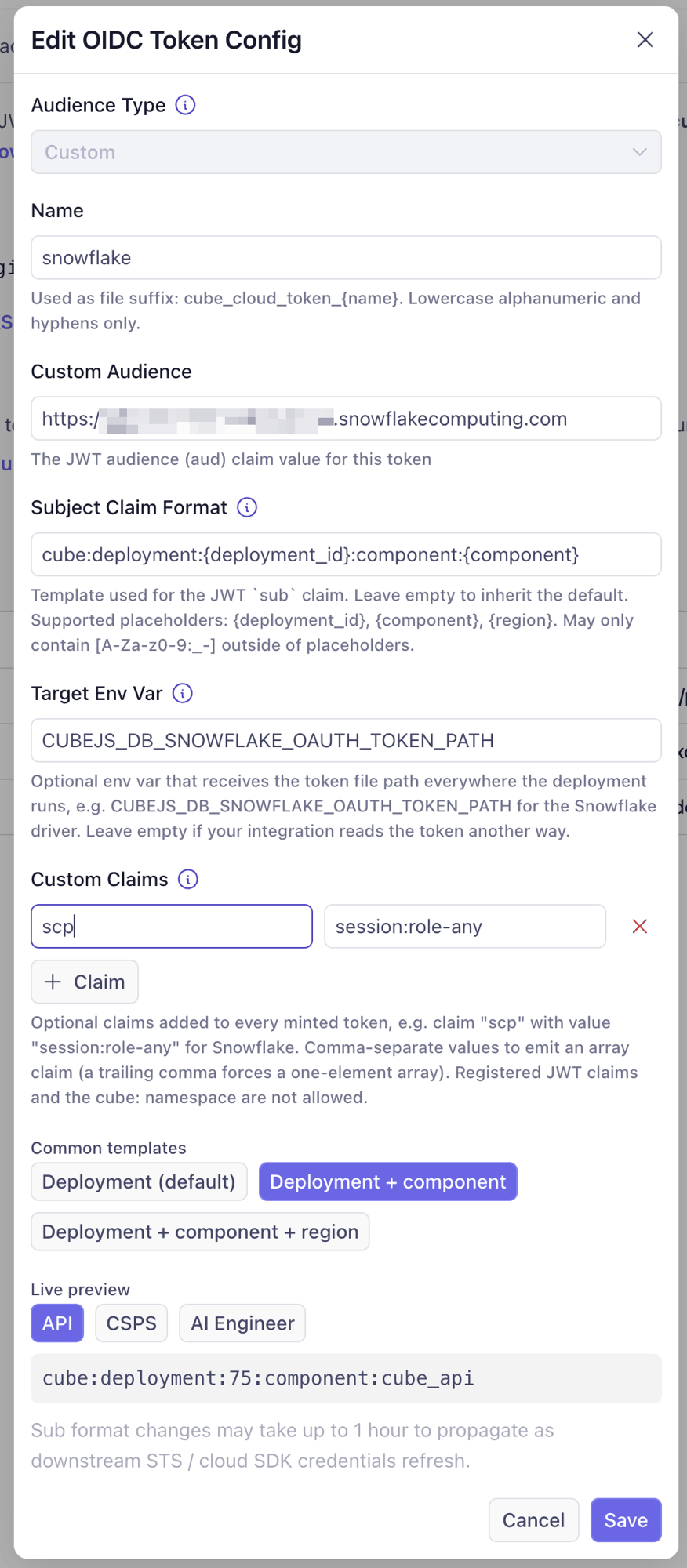
In **Admin → OIDC**, click **Add Config** and create a config with:
| Field | Value |
| ------------------------ | ------------------------------------------------------------------------------------------------------------------- |
| **Audience Type** | `Custom` |
| **Name** | `snowflake` |
| **Custom Audience** | `https://.snowflakecomputing.com` |
| **Subject Claim Format** | Keep the default, or pick a richer template — the rendered `sub` must match the Snowflake user's `LOGIN_NAME` below |
| **Custom Claims** | Claim `scp` with value `session:role-any` |
| **Target Env Var** | `CUBEJS_DB_SNOWFLAKE_OAUTH_TOKEN_PATH` |
#### OIDC workload identity
Instead of a password or key pair, Cube Cloud deployments can authenticate
to Snowflake with [OIDC workload identity][ref-oidc-overview]: a Snowflake
External OAuth integration trusts Cube's OIDC issuer, and the driver
presents a short-lived Cube-minted JWT — no long-lived secrets to
provision or rotate. Snowflake validates each connection's token against
your tenant's public JWKS, maps the token's `sub` claim to a Snowflake
user, and authorizes the session role through the token's `scp` claim.
Start with the [OIDC overview][ref-oidc-overview] for the concepts (issuer,
token configs, custom claims, target env var) and to enable OIDC for your
tenant, then:
In **Admin → OIDC**, click **Add Config** and create a config with:
| Field | Value |
| ------------------------ | ------------------------------------------------------------------------------------------------------------------- |
| **Audience Type** | `Custom` |
| **Name** | `snowflake` |
| **Custom Audience** | `https://.snowflakecomputing.com` |
| **Subject Claim Format** | Keep the default, or pick a richer template — the rendered `sub` must match the Snowflake user's `LOGIN_NAME` below |
| **Custom Claims** | Claim `scp` with value `session:role-any` |
| **Target Env Var** | `CUBEJS_DB_SNOWFLAKE_OAUTH_TOKEN_PATH` |
 The `scp` claim is the part that's easy to miss: Snowflake grants
session roles **exclusively** through it — a token without `scp`
authenticates but fails role authorization. `session:role-any` lets the
driver request any role granted to the mapped user; to pin the role
inside the token instead, use `session:role:` and
`EXTERNAL_OAUTH_ANY_ROLE_MODE = 'DISABLE'` below. The **Target Env Var**
is how the driver finds the token: Cube sets that env var to the token
file path in every execution context (deployed pods, dev mode, and test
connection each keep the file in a different place), so the path is
never written by hand.
In a Snowflake worksheet, as `ACCOUNTADMIN`:
```sql theme={"dark"}
CREATE SECURITY INTEGRATION CUBE_CLOUD_EXTERNAL_OAUTH
TYPE = EXTERNAL_OAUTH
ENABLED = TRUE
EXTERNAL_OAUTH_TYPE = CUSTOM
EXTERNAL_OAUTH_ISSUER = 'https://.cubecloud.dev'
EXTERNAL_OAUTH_JWS_KEYS_URL = 'https://.cubecloud.dev/.well-known/jwks.json'
EXTERNAL_OAUTH_AUDIENCE_LIST = ('https://.snowflakecomputing.com')
EXTERNAL_OAUTH_TOKEN_USER_MAPPING_CLAIM = 'sub'
EXTERNAL_OAUTH_SNOWFLAKE_USER_MAPPING_ATTRIBUTE = 'LOGIN_NAME'
EXTERNAL_OAUTH_ANY_ROLE_MODE = 'ENABLE';
```
The issuer and audience must match the token config exactly. Snowflake
fetches the JWKS from your tenant's public endpoint, so no key material
changes hands.
The integration maps the token's `sub` claim to a Snowflake user via
`LOGIN_NAME`. With the default subject claim format the rendered `sub`
is `cube:deployment:` — the deployment ID is the number
in your deployment's console URL. If you chose a different template,
use the token-config dialog's live preview to see the exact rendered
value.
```sql theme={"dark"}
CREATE ROLE CUBE_ROLE;
CREATE USER CUBE_SVC
TYPE = SERVICE
LOGIN_NAME = 'cube:deployment:'
DEFAULT_ROLE = CUBE_ROLE
DEFAULT_WAREHOUSE = ;
GRANT ROLE CUBE_ROLE TO USER CUBE_SVC;
GRANT USAGE ON WAREHOUSE TO ROLE CUBE_ROLE;
-- Grant the role read access to the data Cube serves, e.g.:
GRANT USAGE ON DATABASE TO ROLE CUBE_ROLE;
GRANT USAGE ON ALL SCHEMAS IN DATABASE TO ROLE CUBE_ROLE;
GRANT SELECT ON ALL TABLES IN DATABASE TO ROLE CUBE_ROLE;
```
`TYPE = SERVICE` blocks password logins for this user entirely — it
can only authenticate through the federation.
Set the `OAUTH` authenticator and omit `CUBEJS_DB_USER` /
`CUBEJS_DB_PASS`:
```dotenv theme={"dark"}
CUBEJS_DB_TYPE=snowflake
CUBEJS_DB_SNOWFLAKE_ACCOUNT=
CUBEJS_DB_SNOWFLAKE_WAREHOUSE=
CUBEJS_DB_NAME=
CUBEJS_DB_SNOWFLAKE_ROLE=CUBE_ROLE
CUBEJS_DB_SNOWFLAKE_AUTHENTICATOR=OAUTH
```
`CUBEJS_DB_SNOWFLAKE_OAUTH_TOKEN_PATH` is **not** set here — Cube
populates it automatically thanks to the **Target Env Var** from the
token config. The driver re-reads the file on every new connection, so
the broker's automatic refresh is picked up without restarts.
To verify, run any query against the Snowflake data source. On the
Snowflake side, a successful federation shows up in the login history with
`OAUTH_ACCESS_TOKEN` as the authentication factor:
```sql theme={"dark"}
SELECT event_timestamp, user_name, first_authentication_factor, is_success
FROM TABLE(SNOWFLAKE.INFORMATION_SCHEMA.LOGIN_HISTORY_BY_USER(USER_NAME => 'CUBE_SVC'))
ORDER BY event_timestamp DESC;
```
Common failure modes:
| Error | Cause |
| ------------------------------------------------------------------------ | ------------------------------------------------------------------------------------------------------------------------------------------ |
| `Invalid OAuth access token` | Issuer or audience mismatch between the token config and the security integration, or the JWKS URL is unreachable. |
| `The role … is not listed in the Access Token or was filtered` | The `scp` custom claim is missing from the token config, or the role isn't granted to the mapped user. |
| `User … not found` / mapping errors | The rendered `sub` doesn't match the Snowflake user's `LOGIN_NAME` — compare against the dialog's live preview. |
| `File … provided by CUBEJS_DB_SNOWFLAKE_OAUTH_TOKEN_PATH does not exist` | The **Target Env Var** isn't set on the token config (or a stale hand-written path is configured), or the deployment is still starting up. |
Cube Cloud also supports connecting to data sources within private VPCs
if [single-tenant infrastructure][ref-dedicated-infra] is used. Check out the
[VPC connectivity guide][ref-cloud-conf-vpc] for details.
[ref-dedicated-infra]: /docs/deployment/cloud/infrastructure#dedicated-infrastructure
[ref-cloud-conf-vpc]: /docs/deployment/cloud/vpc
## Environment Variables
| Environment Variable | Description | Possible Values | Required |
| --------------------------------------------------------------------------------------------------------------------------------------------------------- | --------------------------------------------------------------------------------------------------------------------------------------------------- | ---------------------------------------------------------------------- | :-----------: |
| [`CUBEJS_DB_SNOWFLAKE_ACCOUNT`](/reference/configuration/environment-variables#cubejs_db_snowflake_account) | The Snowflake account identifier to use when connecting to the database | [A valid Snowflake account ID][snowflake-docs-account-id] | ✅ |
| [`CUBEJS_DB_SNOWFLAKE_REGION`](/reference/configuration/environment-variables#cubejs_db_snowflake_region) | The Snowflake region to use when connecting to the database | [A valid Snowflake region][snowflake-docs-regions] | ❌ |
| [`CUBEJS_DB_SNOWFLAKE_WAREHOUSE`](/reference/configuration/environment-variables#cubejs_db_snowflake_warehouse) | The Snowflake warehouse to use when connecting to the database | [A valid Snowflake warehouse][snowflake-docs-warehouse] in the account | ✅ |
| [`CUBEJS_DB_SNOWFLAKE_ROLE`](/reference/configuration/environment-variables#cubejs_db_snowflake_role) | The Snowflake role to use when connecting to the database | [A valid Snowflake role][snowflake-docs-roles] in the account | ❌ |
| [`CUBEJS_DB_SNOWFLAKE_CLIENT_SESSION_KEEP_ALIVE`](/reference/configuration/environment-variables#cubejs_db_snowflake_client_session_keep_alive) | If `true`, [keep the Snowflake connection alive indefinitely][snowflake-docs-connection-options] | `true`, `false` | ❌ |
| [`CUBEJS_DB_NAME`](/reference/configuration/environment-variables#cubejs_db_name) | The name of the database to connect to | A valid database name | ✅ |
| [`CUBEJS_DB_USER`](/reference/configuration/environment-variables#cubejs_db_user) | The username used to connect to the database | A valid database username | ✅1 |
| [`CUBEJS_DB_PASS`](/reference/configuration/environment-variables#cubejs_db_pass) | The password used to connect to the database | A valid database password | ✅1 |
| [`CUBEJS_DB_SNOWFLAKE_AUTHENTICATOR`](/reference/configuration/environment-variables#cubejs_db_snowflake_authenticator) | The type of authenticator to use with Snowflake. Use `SNOWFLAKE` with username/password, or `SNOWFLAKE_JWT` with key pairs. Defaults to `SNOWFLAKE` | `SNOWFLAKE`, `SNOWFLAKE_JWT`, `OAUTH` | ❌ |
| [`CUBEJS_DB_SNOWFLAKE_PRIVATE_KEY`](/reference/configuration/environment-variables#cubejs_db_snowflake_private_key) | The content of the private RSA key | Content of the private RSA key (encrypted or not) | ❌ |
| [`CUBEJS_DB_SNOWFLAKE_PRIVATE_KEY_PATH`](/reference/configuration/environment-variables#cubejs_db_snowflake_private_key_path) | The path to the private RSA key | A valid path to the private RSA key | ❌ |
| [`CUBEJS_DB_SNOWFLAKE_PRIVATE_KEY_PASS`](/reference/configuration/environment-variables#cubejs_db_snowflake_private_key_pass) | The password for the private RSA key. Only required for encrypted keys | A valid password for the encrypted private RSA key | ❌ |
| [`CUBEJS_DB_SNOWFLAKE_OAUTH_TOKEN`](/reference/configuration/environment-variables#cubejs_db_snowflake_oauth_token) | The OAuth token | A valid OAuth token (string) | ❌ |
| [`CUBEJS_DB_SNOWFLAKE_OAUTH_TOKEN_PATH`](/reference/configuration/environment-variables#cubejs_db_snowflake_oauth_token_path) | The path to the valid oauth toket file | A valid path for the oauth token file | ❌ |
| [`CUBEJS_DB_SNOWFLAKE_HOST`](/reference/configuration/environment-variables#cubejs_db_snowflake_host) | Host address to which the driver should connect | A valid hostname | ❌ |
| [`CUBEJS_DB_SNOWFLAKE_QUOTED_IDENTIFIERS_IGNORE_CASE`](/reference/configuration/environment-variables#cubejs_db_snowflake_quoted_identifiers_ignore_case) | Whether or not [quoted identifiers should be case insensitive][link-snowflake-quoted-identifiers]. Default is `false` | `true`, `false` | ❌ |
| [`CUBEJS_DB_MAX_POOL`](/reference/configuration/environment-variables#cubejs_db_max_pool) | The maximum number of concurrent database connections to pool. Default is `20` | A valid number | ❌ |
| [`CUBEJS_CONCURRENCY`](/reference/configuration/environment-variables#cubejs_concurrency) | The number of [concurrent queries][ref-data-source-concurrency] to the data source | A valid number | ❌ |
1 Required when using password-based authentication. Not required with `SNOWFLAKE_JWT` (key pair) or with `OAUTH` — including [OIDC workload identity](#oidc-workload-identity) in Cube Cloud, where the driver reads a Cube-minted token from [`CUBEJS_DB_SNOWFLAKE_OAUTH_TOKEN_PATH`](/reference/configuration/environment-variables#cubejs_db_snowflake_oauth_token_path).
[ref-data-source-concurrency]: /admin/connect-to-data/concurrency#data-source-concurrency
## Pre-Aggregation Feature Support
### count\_distinct\_approx
Measures of type
[`count_distinct_approx`][ref-schema-ref-types-formats-countdistinctapprox] can
be used in pre-aggregations when using Snowflake as a source database. To learn
more about Snowflake's support for approximate aggregate functions, [click
here][snowflake-docs-approx-agg-fns].
## Pre-Aggregation Build Strategies
To learn more about pre-aggregation build strategies, [head
here][ref-caching-using-preaggs-build-strats].
| Feature | Works with read-only mode? | Is default? |
| ------------- | :------------------------: | :---------: |
| Batching | ❌ | ✅ |
| Export Bucket | ❌ | ❌ |
By default, Snowflake uses [batching][self-preaggs-batching] to build
pre-aggregations.
### Batching
No extra configuration is required to configure batching for Snowflake.
### Export Bucket
Snowflake supports using both [AWS S3][aws-s3] and [Google Cloud
Storage][google-cloud-storage] for export bucket functionality.
#### AWS S3
Ensure proper IAM privileges are configured for S3 bucket reads and writes, using either
storage integration or user credentials for Snowflake and either IAM roles/IRSA or user
credentials for Cube Store, with mixed configurations supported.
Using IAM user credentials for both:
```dotenv theme={"dark"}
CUBEJS_DB_EXPORT_BUCKET_TYPE=s3
CUBEJS_DB_EXPORT_BUCKET=my.bucket.on.s3
CUBEJS_DB_EXPORT_BUCKET_AWS_KEY=
CUBEJS_DB_EXPORT_BUCKET_AWS_SECRET=
CUBEJS_DB_EXPORT_BUCKET_AWS_REGION=
```
Using a [Storage Integration][snowflake-docs-aws-integration] to write to export buckets and
user credentials to read from Cube Store:
```dotenv theme={"dark"}
CUBEJS_DB_EXPORT_BUCKET_TYPE=s3
CUBEJS_DB_EXPORT_BUCKET=my.bucket.on.s3
CUBEJS_DB_EXPORT_INTEGRATION=aws_int
CUBEJS_DB_EXPORT_BUCKET_AWS_KEY=
CUBEJS_DB_EXPORT_BUCKET_AWS_SECRET=
CUBEJS_DB_EXPORT_BUCKET_AWS_REGION=
```
Using a Storage Integration to write to export bucket and IAM role/IRSA to read from Cube Store:\*\*
```dotenv theme={"dark"}
CUBEJS_DB_EXPORT_BUCKET_TYPE=s3
CUBEJS_DB_EXPORT_BUCKET=my.bucket.on.s3
CUBEJS_DB_EXPORT_INTEGRATION=aws_int
CUBEJS_DB_EXPORT_BUCKET_AWS_REGION=
```
#### Google Cloud Storage
When using an export bucket, remember to assign the **Storage Object Admin**
role to your Google Cloud credentials ([`CUBEJS_DB_EXPORT_GCS_CREDENTIALS`](/reference/configuration/environment-variables#cubejs_db_export_gcs_credentials)).
Before configuring Cube, an [integration must be created and configured in
Snowflake][snowflake-docs-gcs-integration]. Take note of the integration name
(`gcs_int` from the example link) as you'll need it to configure Cube.
Once the Snowflake integration is set up, configure Cube using the following:
```dotenv theme={"dark"}
CUBEJS_DB_EXPORT_BUCKET=snowflake-export-bucket
CUBEJS_DB_EXPORT_BUCKET_TYPE=gcs
CUBEJS_DB_EXPORT_GCS_CREDENTIALS=
CUBEJS_DB_EXPORT_INTEGRATION=gcs_int
```
#### Azure
To use Azure Blob Storage as an export bucket, follow [the guide on
using a Snowflake storage integration (Option 1)][snowflake-docs-azure].
Take note of the integration name (`azure_int` from the example link)
as you'll need it to configure Cube.
[Retrieve the storage account access key][azure-bs-docs-get-key] from your Azure
account.
Once the Snowflake integration is set up, configure Cube using the following:
```dotenv theme={"dark"}
CUBEJS_DB_EXPORT_BUCKET_TYPE=azure
CUBEJS_DB_EXPORT_BUCKET=wasbs://my-container@my-storage-account.blob.core.windows.net
CUBEJS_DB_EXPORT_BUCKET_AZURE_KEY=
CUBEJS_DB_EXPORT_INTEGRATION=azure_int
```
## SSL
Cube does not require any additional configuration to enable SSL as Snowflake
connections are made over HTTPS.
[aws-s3]: https://aws.amazon.com/s3/
[google-cloud-storage]: https://cloud.google.com/storage
[ref-caching-using-preaggs-build-strats]: /docs/pre-aggregations/using-pre-aggregations#pre-aggregation-build-strategies
[ref-schema-ref-types-formats-countdistinctapprox]: /reference/data-modeling/measures#type
[ref-oidc-overview]: /admin/deployment/oidc
[self-preaggs-batching]: #batching
[snowflake]: https://www.snowflake.com/
[snowflake-docs-account-id]: https://docs.snowflake.com/en/user-guide/admin-account-identifier.html
[snowflake-docs-connection-options]: https://docs.snowflake.com/en/developer-guide/node-js/nodejs-driver-options#additional-connection-options
[snowflake-docs-aws-integration]: https://docs.snowflake.com/en/user-guide/data-load-s3-config-storage-integration
[snowflake-docs-gcs-integration]: https://docs.snowflake.com/en/user-guide/data-load-gcs-config.html
[snowflake-docs-regions]: https://docs.snowflake.com/en/user-guide/intro-regions.html
[snowflake-docs-roles]: https://docs.snowflake.com/en/user-guide/security-access-control-overview.html#roles
[snowflake-docs-approx-agg-fns]: https://docs.snowflake.com/en/sql-reference/functions/approx_count_distinct.html
[snowflake-docs-warehouse]: https://docs.snowflake.com/en/user-guide/warehouses.html
[snowflake-format-2]: https://docs.snowflake.com/en/user-guide/admin-account-identifier#format-2-account-locator-in-a-region
[snowflake-docs-azure]: https://docs.snowflake.com/en/user-guide/data-load-azure-config#option-1-configuring-a-snowflake-storage-integration
[azure-bs-docs-get-key]: https://docs.microsoft.com/en-us/azure/storage/common/storage-account-keys-manage?toc=%2Fazure%2Fstorage%2Fblobs%2Ftoc.json&tabs=azure-portal#view-account-access-keys
[link-snowflake-quoted-identifiers]: https://docs.snowflake.com/en/sql-reference/identifiers-syntax#double-quoted-identifiers
The `scp` claim is the part that's easy to miss: Snowflake grants
session roles **exclusively** through it — a token without `scp`
authenticates but fails role authorization. `session:role-any` lets the
driver request any role granted to the mapped user; to pin the role
inside the token instead, use `session:role:` and
`EXTERNAL_OAUTH_ANY_ROLE_MODE = 'DISABLE'` below. The **Target Env Var**
is how the driver finds the token: Cube sets that env var to the token
file path in every execution context (deployed pods, dev mode, and test
connection each keep the file in a different place), so the path is
never written by hand.
In a Snowflake worksheet, as `ACCOUNTADMIN`:
```sql theme={"dark"}
CREATE SECURITY INTEGRATION CUBE_CLOUD_EXTERNAL_OAUTH
TYPE = EXTERNAL_OAUTH
ENABLED = TRUE
EXTERNAL_OAUTH_TYPE = CUSTOM
EXTERNAL_OAUTH_ISSUER = 'https://.cubecloud.dev'
EXTERNAL_OAUTH_JWS_KEYS_URL = 'https://.cubecloud.dev/.well-known/jwks.json'
EXTERNAL_OAUTH_AUDIENCE_LIST = ('https://.snowflakecomputing.com')
EXTERNAL_OAUTH_TOKEN_USER_MAPPING_CLAIM = 'sub'
EXTERNAL_OAUTH_SNOWFLAKE_USER_MAPPING_ATTRIBUTE = 'LOGIN_NAME'
EXTERNAL_OAUTH_ANY_ROLE_MODE = 'ENABLE';
```
The issuer and audience must match the token config exactly. Snowflake
fetches the JWKS from your tenant's public endpoint, so no key material
changes hands.
The integration maps the token's `sub` claim to a Snowflake user via
`LOGIN_NAME`. With the default subject claim format the rendered `sub`
is `cube:deployment:` — the deployment ID is the number
in your deployment's console URL. If you chose a different template,
use the token-config dialog's live preview to see the exact rendered
value.
```sql theme={"dark"}
CREATE ROLE CUBE_ROLE;
CREATE USER CUBE_SVC
TYPE = SERVICE
LOGIN_NAME = 'cube:deployment:'
DEFAULT_ROLE = CUBE_ROLE
DEFAULT_WAREHOUSE = ;
GRANT ROLE CUBE_ROLE TO USER CUBE_SVC;
GRANT USAGE ON WAREHOUSE TO ROLE CUBE_ROLE;
-- Grant the role read access to the data Cube serves, e.g.:
GRANT USAGE ON DATABASE TO ROLE CUBE_ROLE;
GRANT USAGE ON ALL SCHEMAS IN DATABASE TO ROLE CUBE_ROLE;
GRANT SELECT ON ALL TABLES IN DATABASE TO ROLE CUBE_ROLE;
```
`TYPE = SERVICE` blocks password logins for this user entirely — it
can only authenticate through the federation.
Set the `OAUTH` authenticator and omit `CUBEJS_DB_USER` /
`CUBEJS_DB_PASS`:
```dotenv theme={"dark"}
CUBEJS_DB_TYPE=snowflake
CUBEJS_DB_SNOWFLAKE_ACCOUNT=
CUBEJS_DB_SNOWFLAKE_WAREHOUSE=
CUBEJS_DB_NAME=
CUBEJS_DB_SNOWFLAKE_ROLE=CUBE_ROLE
CUBEJS_DB_SNOWFLAKE_AUTHENTICATOR=OAUTH
```
`CUBEJS_DB_SNOWFLAKE_OAUTH_TOKEN_PATH` is **not** set here — Cube
populates it automatically thanks to the **Target Env Var** from the
token config. The driver re-reads the file on every new connection, so
the broker's automatic refresh is picked up without restarts.
To verify, run any query against the Snowflake data source. On the
Snowflake side, a successful federation shows up in the login history with
`OAUTH_ACCESS_TOKEN` as the authentication factor:
```sql theme={"dark"}
SELECT event_timestamp, user_name, first_authentication_factor, is_success
FROM TABLE(SNOWFLAKE.INFORMATION_SCHEMA.LOGIN_HISTORY_BY_USER(USER_NAME => 'CUBE_SVC'))
ORDER BY event_timestamp DESC;
```
Common failure modes:
| Error | Cause |
| ------------------------------------------------------------------------ | ------------------------------------------------------------------------------------------------------------------------------------------ |
| `Invalid OAuth access token` | Issuer or audience mismatch between the token config and the security integration, or the JWKS URL is unreachable. |
| `The role … is not listed in the Access Token or was filtered` | The `scp` custom claim is missing from the token config, or the role isn't granted to the mapped user. |
| `User … not found` / mapping errors | The rendered `sub` doesn't match the Snowflake user's `LOGIN_NAME` — compare against the dialog's live preview. |
| `File … provided by CUBEJS_DB_SNOWFLAKE_OAUTH_TOKEN_PATH does not exist` | The **Target Env Var** isn't set on the token config (or a stale hand-written path is configured), or the deployment is still starting up. |
Cube Cloud also supports connecting to data sources within private VPCs
if [single-tenant infrastructure][ref-dedicated-infra] is used. Check out the
[VPC connectivity guide][ref-cloud-conf-vpc] for details.
[ref-dedicated-infra]: /docs/deployment/cloud/infrastructure#dedicated-infrastructure
[ref-cloud-conf-vpc]: /docs/deployment/cloud/vpc
## Environment Variables
| Environment Variable | Description | Possible Values | Required |
| --------------------------------------------------------------------------------------------------------------------------------------------------------- | --------------------------------------------------------------------------------------------------------------------------------------------------- | ---------------------------------------------------------------------- | :-----------: |
| [`CUBEJS_DB_SNOWFLAKE_ACCOUNT`](/reference/configuration/environment-variables#cubejs_db_snowflake_account) | The Snowflake account identifier to use when connecting to the database | [A valid Snowflake account ID][snowflake-docs-account-id] | ✅ |
| [`CUBEJS_DB_SNOWFLAKE_REGION`](/reference/configuration/environment-variables#cubejs_db_snowflake_region) | The Snowflake region to use when connecting to the database | [A valid Snowflake region][snowflake-docs-regions] | ❌ |
| [`CUBEJS_DB_SNOWFLAKE_WAREHOUSE`](/reference/configuration/environment-variables#cubejs_db_snowflake_warehouse) | The Snowflake warehouse to use when connecting to the database | [A valid Snowflake warehouse][snowflake-docs-warehouse] in the account | ✅ |
| [`CUBEJS_DB_SNOWFLAKE_ROLE`](/reference/configuration/environment-variables#cubejs_db_snowflake_role) | The Snowflake role to use when connecting to the database | [A valid Snowflake role][snowflake-docs-roles] in the account | ❌ |
| [`CUBEJS_DB_SNOWFLAKE_CLIENT_SESSION_KEEP_ALIVE`](/reference/configuration/environment-variables#cubejs_db_snowflake_client_session_keep_alive) | If `true`, [keep the Snowflake connection alive indefinitely][snowflake-docs-connection-options] | `true`, `false` | ❌ |
| [`CUBEJS_DB_NAME`](/reference/configuration/environment-variables#cubejs_db_name) | The name of the database to connect to | A valid database name | ✅ |
| [`CUBEJS_DB_USER`](/reference/configuration/environment-variables#cubejs_db_user) | The username used to connect to the database | A valid database username | ✅1 |
| [`CUBEJS_DB_PASS`](/reference/configuration/environment-variables#cubejs_db_pass) | The password used to connect to the database | A valid database password | ✅1 |
| [`CUBEJS_DB_SNOWFLAKE_AUTHENTICATOR`](/reference/configuration/environment-variables#cubejs_db_snowflake_authenticator) | The type of authenticator to use with Snowflake. Use `SNOWFLAKE` with username/password, or `SNOWFLAKE_JWT` with key pairs. Defaults to `SNOWFLAKE` | `SNOWFLAKE`, `SNOWFLAKE_JWT`, `OAUTH` | ❌ |
| [`CUBEJS_DB_SNOWFLAKE_PRIVATE_KEY`](/reference/configuration/environment-variables#cubejs_db_snowflake_private_key) | The content of the private RSA key | Content of the private RSA key (encrypted or not) | ❌ |
| [`CUBEJS_DB_SNOWFLAKE_PRIVATE_KEY_PATH`](/reference/configuration/environment-variables#cubejs_db_snowflake_private_key_path) | The path to the private RSA key | A valid path to the private RSA key | ❌ |
| [`CUBEJS_DB_SNOWFLAKE_PRIVATE_KEY_PASS`](/reference/configuration/environment-variables#cubejs_db_snowflake_private_key_pass) | The password for the private RSA key. Only required for encrypted keys | A valid password for the encrypted private RSA key | ❌ |
| [`CUBEJS_DB_SNOWFLAKE_OAUTH_TOKEN`](/reference/configuration/environment-variables#cubejs_db_snowflake_oauth_token) | The OAuth token | A valid OAuth token (string) | ❌ |
| [`CUBEJS_DB_SNOWFLAKE_OAUTH_TOKEN_PATH`](/reference/configuration/environment-variables#cubejs_db_snowflake_oauth_token_path) | The path to the valid oauth toket file | A valid path for the oauth token file | ❌ |
| [`CUBEJS_DB_SNOWFLAKE_HOST`](/reference/configuration/environment-variables#cubejs_db_snowflake_host) | Host address to which the driver should connect | A valid hostname | ❌ |
| [`CUBEJS_DB_SNOWFLAKE_QUOTED_IDENTIFIERS_IGNORE_CASE`](/reference/configuration/environment-variables#cubejs_db_snowflake_quoted_identifiers_ignore_case) | Whether or not [quoted identifiers should be case insensitive][link-snowflake-quoted-identifiers]. Default is `false` | `true`, `false` | ❌ |
| [`CUBEJS_DB_MAX_POOL`](/reference/configuration/environment-variables#cubejs_db_max_pool) | The maximum number of concurrent database connections to pool. Default is `20` | A valid number | ❌ |
| [`CUBEJS_CONCURRENCY`](/reference/configuration/environment-variables#cubejs_concurrency) | The number of [concurrent queries][ref-data-source-concurrency] to the data source | A valid number | ❌ |
1 Required when using password-based authentication. Not required with `SNOWFLAKE_JWT` (key pair) or with `OAUTH` — including [OIDC workload identity](#oidc-workload-identity) in Cube Cloud, where the driver reads a Cube-minted token from [`CUBEJS_DB_SNOWFLAKE_OAUTH_TOKEN_PATH`](/reference/configuration/environment-variables#cubejs_db_snowflake_oauth_token_path).
[ref-data-source-concurrency]: /admin/connect-to-data/concurrency#data-source-concurrency
## Pre-Aggregation Feature Support
### count\_distinct\_approx
Measures of type
[`count_distinct_approx`][ref-schema-ref-types-formats-countdistinctapprox] can
be used in pre-aggregations when using Snowflake as a source database. To learn
more about Snowflake's support for approximate aggregate functions, [click
here][snowflake-docs-approx-agg-fns].
## Pre-Aggregation Build Strategies
To learn more about pre-aggregation build strategies, [head
here][ref-caching-using-preaggs-build-strats].
| Feature | Works with read-only mode? | Is default? |
| ------------- | :------------------------: | :---------: |
| Batching | ❌ | ✅ |
| Export Bucket | ❌ | ❌ |
By default, Snowflake uses [batching][self-preaggs-batching] to build
pre-aggregations.
### Batching
No extra configuration is required to configure batching for Snowflake.
### Export Bucket
Snowflake supports using both [AWS S3][aws-s3] and [Google Cloud
Storage][google-cloud-storage] for export bucket functionality.
#### AWS S3
Ensure proper IAM privileges are configured for S3 bucket reads and writes, using either
storage integration or user credentials for Snowflake and either IAM roles/IRSA or user
credentials for Cube Store, with mixed configurations supported.
Using IAM user credentials for both:
```dotenv theme={"dark"}
CUBEJS_DB_EXPORT_BUCKET_TYPE=s3
CUBEJS_DB_EXPORT_BUCKET=my.bucket.on.s3
CUBEJS_DB_EXPORT_BUCKET_AWS_KEY=
CUBEJS_DB_EXPORT_BUCKET_AWS_SECRET=
CUBEJS_DB_EXPORT_BUCKET_AWS_REGION=
```
Using a [Storage Integration][snowflake-docs-aws-integration] to write to export buckets and
user credentials to read from Cube Store:
```dotenv theme={"dark"}
CUBEJS_DB_EXPORT_BUCKET_TYPE=s3
CUBEJS_DB_EXPORT_BUCKET=my.bucket.on.s3
CUBEJS_DB_EXPORT_INTEGRATION=aws_int
CUBEJS_DB_EXPORT_BUCKET_AWS_KEY=
CUBEJS_DB_EXPORT_BUCKET_AWS_SECRET=
CUBEJS_DB_EXPORT_BUCKET_AWS_REGION=
```
Using a Storage Integration to write to export bucket and IAM role/IRSA to read from Cube Store:\*\*
```dotenv theme={"dark"}
CUBEJS_DB_EXPORT_BUCKET_TYPE=s3
CUBEJS_DB_EXPORT_BUCKET=my.bucket.on.s3
CUBEJS_DB_EXPORT_INTEGRATION=aws_int
CUBEJS_DB_EXPORT_BUCKET_AWS_REGION=
```
#### Google Cloud Storage
When using an export bucket, remember to assign the **Storage Object Admin**
role to your Google Cloud credentials ([`CUBEJS_DB_EXPORT_GCS_CREDENTIALS`](/reference/configuration/environment-variables#cubejs_db_export_gcs_credentials)).
Before configuring Cube, an [integration must be created and configured in
Snowflake][snowflake-docs-gcs-integration]. Take note of the integration name
(`gcs_int` from the example link) as you'll need it to configure Cube.
Once the Snowflake integration is set up, configure Cube using the following:
```dotenv theme={"dark"}
CUBEJS_DB_EXPORT_BUCKET=snowflake-export-bucket
CUBEJS_DB_EXPORT_BUCKET_TYPE=gcs
CUBEJS_DB_EXPORT_GCS_CREDENTIALS=
CUBEJS_DB_EXPORT_INTEGRATION=gcs_int
```
#### Azure
To use Azure Blob Storage as an export bucket, follow [the guide on
using a Snowflake storage integration (Option 1)][snowflake-docs-azure].
Take note of the integration name (`azure_int` from the example link)
as you'll need it to configure Cube.
[Retrieve the storage account access key][azure-bs-docs-get-key] from your Azure
account.
Once the Snowflake integration is set up, configure Cube using the following:
```dotenv theme={"dark"}
CUBEJS_DB_EXPORT_BUCKET_TYPE=azure
CUBEJS_DB_EXPORT_BUCKET=wasbs://my-container@my-storage-account.blob.core.windows.net
CUBEJS_DB_EXPORT_BUCKET_AZURE_KEY=
CUBEJS_DB_EXPORT_INTEGRATION=azure_int
```
## SSL
Cube does not require any additional configuration to enable SSL as Snowflake
connections are made over HTTPS.
[aws-s3]: https://aws.amazon.com/s3/
[google-cloud-storage]: https://cloud.google.com/storage
[ref-caching-using-preaggs-build-strats]: /docs/pre-aggregations/using-pre-aggregations#pre-aggregation-build-strategies
[ref-schema-ref-types-formats-countdistinctapprox]: /reference/data-modeling/measures#type
[ref-oidc-overview]: /admin/deployment/oidc
[self-preaggs-batching]: #batching
[snowflake]: https://www.snowflake.com/
[snowflake-docs-account-id]: https://docs.snowflake.com/en/user-guide/admin-account-identifier.html
[snowflake-docs-connection-options]: https://docs.snowflake.com/en/developer-guide/node-js/nodejs-driver-options#additional-connection-options
[snowflake-docs-aws-integration]: https://docs.snowflake.com/en/user-guide/data-load-s3-config-storage-integration
[snowflake-docs-gcs-integration]: https://docs.snowflake.com/en/user-guide/data-load-gcs-config.html
[snowflake-docs-regions]: https://docs.snowflake.com/en/user-guide/intro-regions.html
[snowflake-docs-roles]: https://docs.snowflake.com/en/user-guide/security-access-control-overview.html#roles
[snowflake-docs-approx-agg-fns]: https://docs.snowflake.com/en/sql-reference/functions/approx_count_distinct.html
[snowflake-docs-warehouse]: https://docs.snowflake.com/en/user-guide/warehouses.html
[snowflake-format-2]: https://docs.snowflake.com/en/user-guide/admin-account-identifier#format-2-account-locator-in-a-region
[snowflake-docs-azure]: https://docs.snowflake.com/en/user-guide/data-load-azure-config#option-1-configuring-a-snowflake-storage-integration
[azure-bs-docs-get-key]: https://docs.microsoft.com/en-us/azure/storage/common/storage-account-keys-manage?toc=%2Fazure%2Fstorage%2Fblobs%2Ftoc.json&tabs=azure-portal#view-account-access-keys
[link-snowflake-quoted-identifiers]: https://docs.snowflake.com/en/sql-reference/identifiers-syntax#double-quoted-identifiers