> ## Documentation Index
> Fetch the complete documentation index at: https://docs.cube.dev/llms.txt
> Use this file to discover all available pages before exploring further.
# Auto-suspension
> Available on Starter and above plans.
Available on [Starter and above plans](https://cube.dev/pricing).
Cube Cloud can automatically suspend deployments when not in use to reduce
[resource consumption][ref-deployment-pricing], which helps manage your spend.
Auto-suspension is useful for deployments that are not used 24/7, such as
staging deployments. However, **auto-suspension shall not be used for production
deployments**. See [effects on experience][self-effects] for details.
Auto-suspension is not avaiable for [Multi-cluster deployments][ref-prod-multi-cluster].
Auto-suspension will hibernate the deployment when **no** API
requests are received after a period of time, and automatically resume the
deployment when API requests start coming in again:
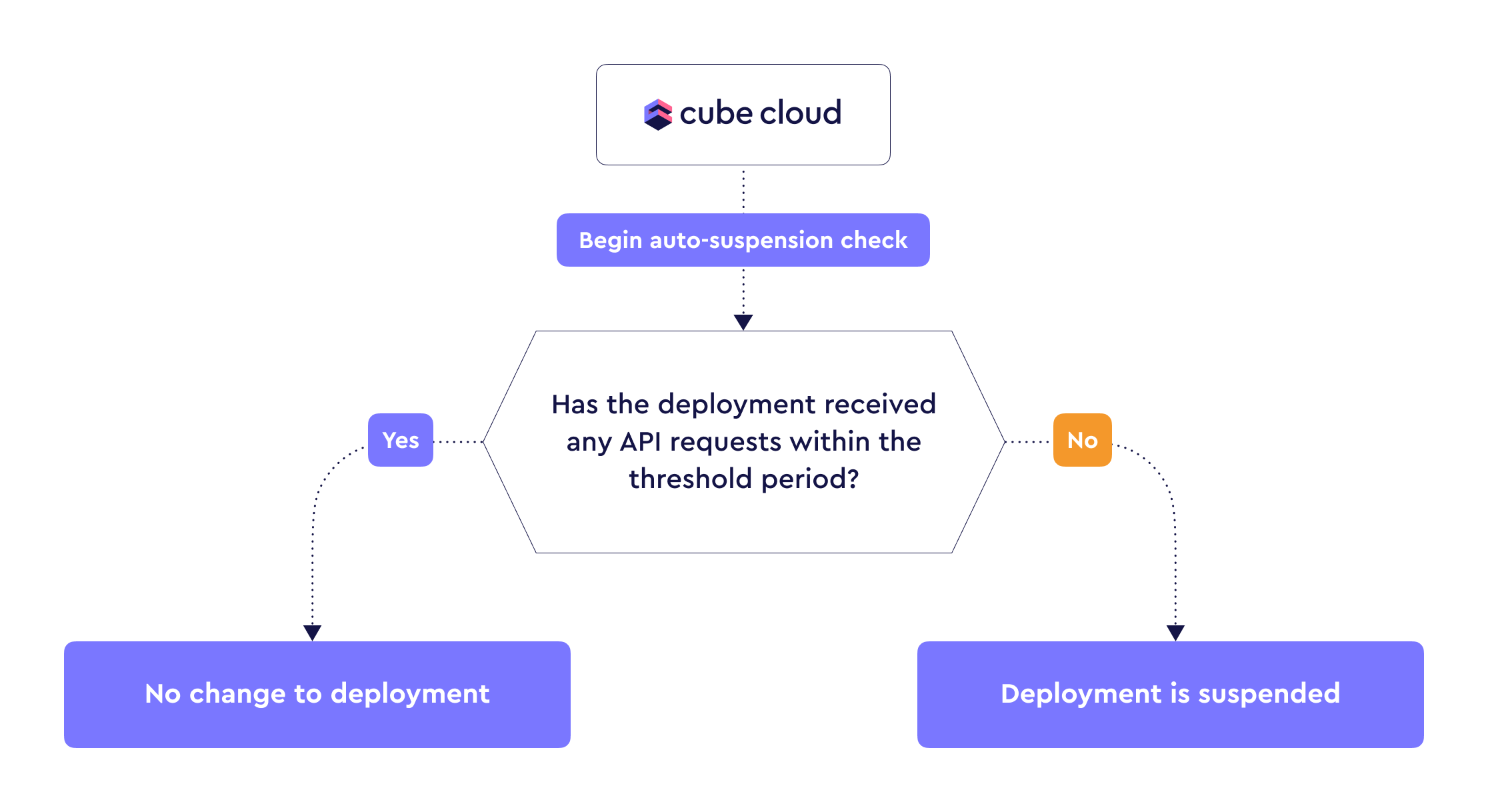 [Shared deployments][ref-deployment-dev-instance] are auto-suspended
automatically when not in use for 30 minutes, whereas [Dedicated
deployments][ref-deployment-prod-cluster] can auto-suspend after no API
requests were received within a configurable time period.
During auto-suspension, resources are monitored in 5 minute intervals. This
means that if a deployment was suspended 4 minutes ago, and a request comes in,
the deployment will resume immediately and 5 minute of CCU usage will be billed.
## Effects on experience
If auto-suspension is enabled, the behavior of your Cube Cloud deployment will
experience some notable changes.
When a deployment is auto-suspended:
* [Data model][ref-data-model] compilation artifacts are discarded since the
API instances are de-provisioned.
* [Refresh worker][ref-refresh-worker] is suspended, which stops pre-aggregation
builds and prevents the pre-aggregations from being kept up-to-date.
* [Semantic Layer Sync][ref-sls] is suspended, which prevents scheduled syncs
from running.
* [Monitoring integrations][ref-monitoring] are also suspended, which prevents
the export of metrics and logs.
When a deployment is [resumed](#resuming-a-suspended-deployment) from auto-suspension:
* [Data model][ref-data-model] compilation would need to be done from scratch.
It applies to all tenants in case [multitenancy][ref-multitenancy] is set up.
Consequently, one or more requests served after a deployment is resumed from
auto-suspension are likely to have suboptimal performance.
* [Refresh worker][ref-refresh-worker] would need to refresh all
pre-aggregations that became stale during the suspension, competing for the
query queue with API instances and compromising the end-user experience.
* Until the deployment is fully resumed, the requests will be served by transient,
on-demand API instances with limited performance. There are no guarantees for the
[version][ref-cube-version] of Cube these API instances will be running.
## Configuration
To enable auto-suspension, navigate to **Settings → Configuration**
of your Cube Cloud deployment and ensure that **Enable auto-suspend**
is turned on:
[Shared deployments][ref-deployment-dev-instance] are auto-suspended
automatically when not in use for 30 minutes, whereas [Dedicated
deployments][ref-deployment-prod-cluster] can auto-suspend after no API
requests were received within a configurable time period.
During auto-suspension, resources are monitored in 5 minute intervals. This
means that if a deployment was suspended 4 minutes ago, and a request comes in,
the deployment will resume immediately and 5 minute of CCU usage will be billed.
## Effects on experience
If auto-suspension is enabled, the behavior of your Cube Cloud deployment will
experience some notable changes.
When a deployment is auto-suspended:
* [Data model][ref-data-model] compilation artifacts are discarded since the
API instances are de-provisioned.
* [Refresh worker][ref-refresh-worker] is suspended, which stops pre-aggregation
builds and prevents the pre-aggregations from being kept up-to-date.
* [Semantic Layer Sync][ref-sls] is suspended, which prevents scheduled syncs
from running.
* [Monitoring integrations][ref-monitoring] are also suspended, which prevents
the export of metrics and logs.
When a deployment is [resumed](#resuming-a-suspended-deployment) from auto-suspension:
* [Data model][ref-data-model] compilation would need to be done from scratch.
It applies to all tenants in case [multitenancy][ref-multitenancy] is set up.
Consequently, one or more requests served after a deployment is resumed from
auto-suspension are likely to have suboptimal performance.
* [Refresh worker][ref-refresh-worker] would need to refresh all
pre-aggregations that became stale during the suspension, competing for the
query queue with API instances and compromising the end-user experience.
* Until the deployment is fully resumed, the requests will be served by transient,
on-demand API instances with limited performance. There are no guarantees for the
[version][ref-cube-version] of Cube these API instances will be running.
## Configuration
To enable auto-suspension, navigate to **Settings → Configuration**
of your Cube Cloud deployment and ensure that **Enable auto-suspend**
is turned on:
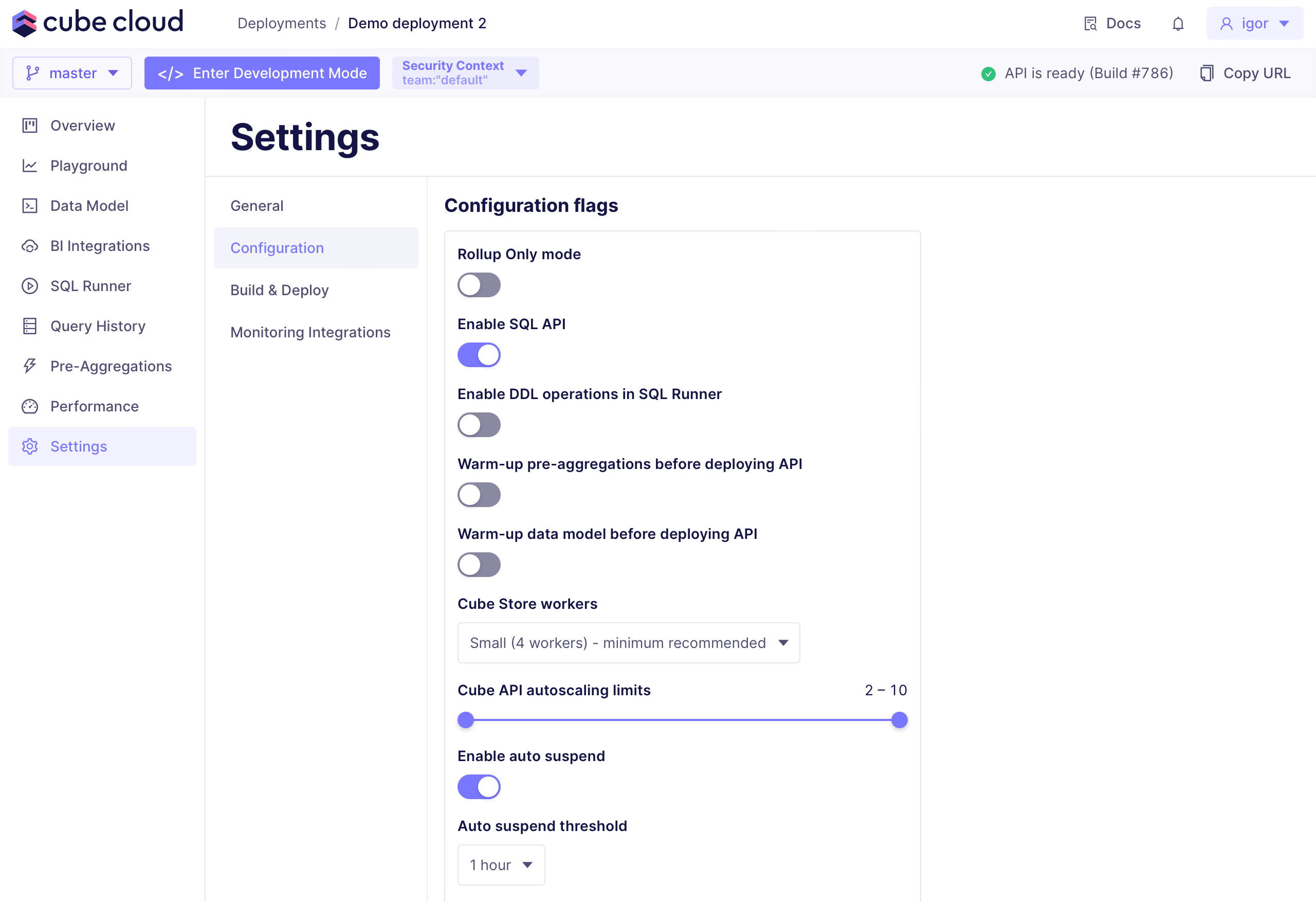 To configure how long Cube Cloud should wait before suspending
the deployment, adjust **Auto-suspend threshold**. For best experience,
it's not recommended to choose anything below 1 hour.
The deployment will temporarily become unavailable for reconfiguration; this
usually takes less than a minute.
## Resuming a suspended deployment
To resume a suspended deployment, send a query to Cube using the API or by
navigating to the deployment in Cube Cloud.
Currently, Cube Cloud's auto-suspension feature cannot guarantee a 100% resume
rate on the first query or a specific time frame for resume. While in most
cases, deployment resumes within several seconds of the first query, there is
still a possibility that it may take longer to resume your deployment. This can
potentially lead to an error response code for the initial query.
Deployments typically resume in under 30 seconds, but can take significantly
longer in certain situations depending on two major factors:
* **Data model:** How many cubes and views are defined.
* **Query complexity:** How complicated the queries being sent to the API are
Complex data models take more time to compile, and complex queries can cause
response times to be significantly longer than usual.
[ref-deployment-dev-instance]: /admin/deployment/deployment-types#shared
[ref-deployment-prod-cluster]: /admin/deployment/deployment-types#dedicated
[ref-prod-multi-cluster]: /admin/deployment/deployment-types#multi-cluster
[ref-deployment-pricing]: /admin/account-billing/pricing
[ref-monitoring]: /admin/monitoring/monitoring-integrations
[ref-data-model]: /docs/data-modeling/overview
[ref-multitenancy]: /embedding/multitenancy
[self-effects]: #effects-on-experience
[ref-refresh-worker]: /cube-core/architecture#refresh-worker
[ref-sls]: /docs/integrations/semantic-layer-sync#on-schedule
[ref-cube-version]: /admin/deployment/index#cube-version
To configure how long Cube Cloud should wait before suspending
the deployment, adjust **Auto-suspend threshold**. For best experience,
it's not recommended to choose anything below 1 hour.
The deployment will temporarily become unavailable for reconfiguration; this
usually takes less than a minute.
## Resuming a suspended deployment
To resume a suspended deployment, send a query to Cube using the API or by
navigating to the deployment in Cube Cloud.
Currently, Cube Cloud's auto-suspension feature cannot guarantee a 100% resume
rate on the first query or a specific time frame for resume. While in most
cases, deployment resumes within several seconds of the first query, there is
still a possibility that it may take longer to resume your deployment. This can
potentially lead to an error response code for the initial query.
Deployments typically resume in under 30 seconds, but can take significantly
longer in certain situations depending on two major factors:
* **Data model:** How many cubes and views are defined.
* **Query complexity:** How complicated the queries being sent to the API are
Complex data models take more time to compile, and complex queries can cause
response times to be significantly longer than usual.
[ref-deployment-dev-instance]: /admin/deployment/deployment-types#shared
[ref-deployment-prod-cluster]: /admin/deployment/deployment-types#dedicated
[ref-prod-multi-cluster]: /admin/deployment/deployment-types#multi-cluster
[ref-deployment-pricing]: /admin/account-billing/pricing
[ref-monitoring]: /admin/monitoring/monitoring-integrations
[ref-data-model]: /docs/data-modeling/overview
[ref-multitenancy]: /embedding/multitenancy
[self-effects]: #effects-on-experience
[ref-refresh-worker]: /cube-core/architecture#refresh-worker
[ref-sls]: /docs/integrations/semantic-layer-sync#on-schedule
[ref-cube-version]: /admin/deployment/index#cube-version