> ## Documentation Index
> Fetch the complete documentation index at: https://docs.cube.dev/llms.txt
> Use this file to discover all available pages before exploring further.
# Bring Your Own Cloud on Azure
> Azure BYOC architecture, provisioner app access, and AKS-based onboarding for deploying Cube inside your own Azure subscription.
With Bring Your Own Cloud (BYOC) on Azure, all the components interacting with private data are deployed on
the customer infrastructure on Azure and managed by the Cube Control Plane via the Cube Operator.
This document provides step-by-step instructions for deploying Cube BYOC on Azure.
## Overall Design
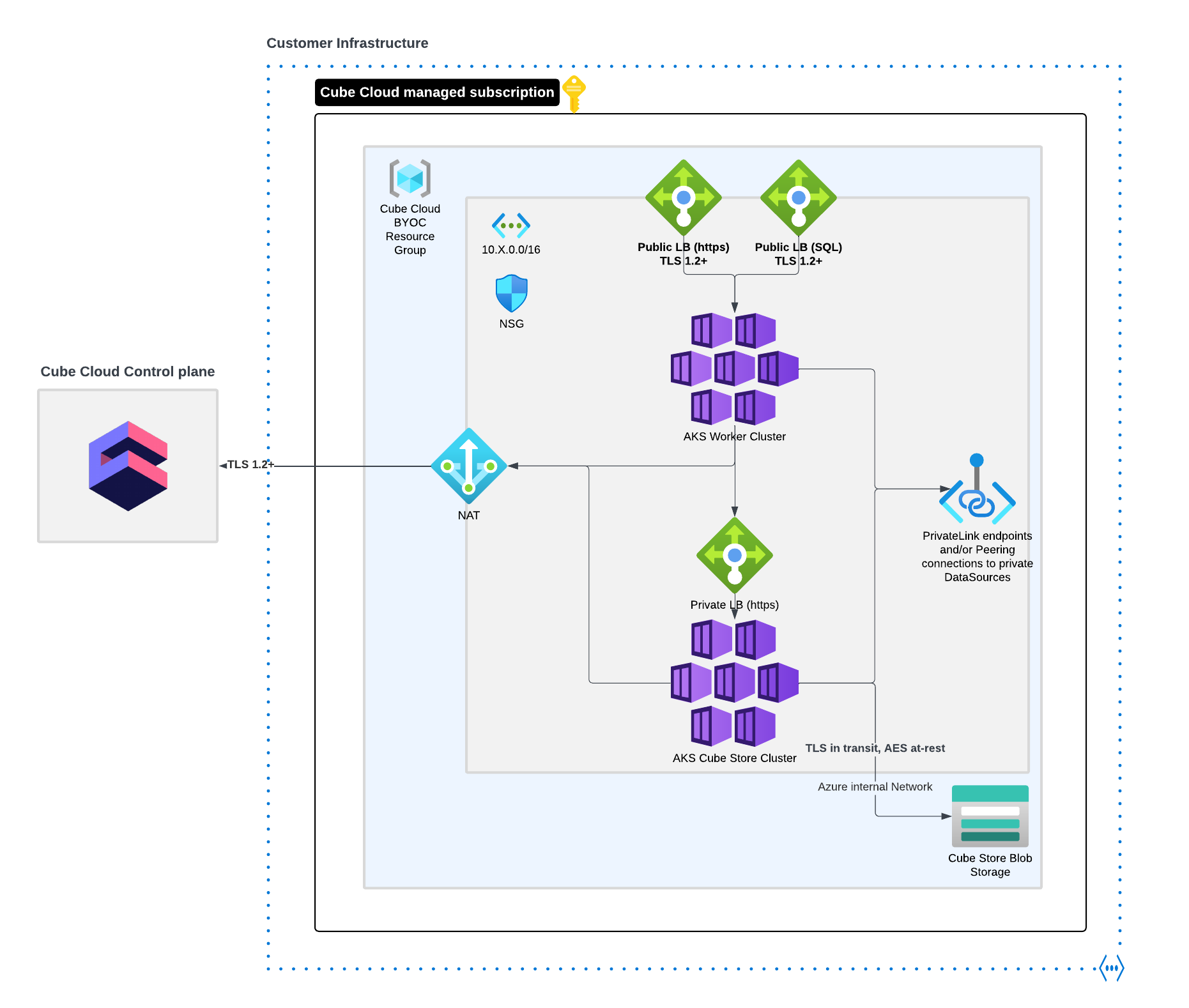
Cube will gain access to your Azure account via the Cube Provisioner Enterprise App.
It will leverage a dedicated subscription where it will create a new Resource
Group and bootstrap all the necessary infrastructure. At the center of the BYOC
infrastructure are two AKS clusters that provide compute resources for Cube
Store and all Cube deployments you configure in the Cube UI. These AKS
clusters will have a Cube Operator installed in them that is connected to
the Cube Control Plane. The Cube Operator receives instructions from the
Control Plane and dynamically creates or destroys all the necessary
Kubernetes resources required to support your Cube deployments.
## Prerequisites
The bulk of provisioning work will be done remotely by Cube automation.
However, to get started, you'll need to provide Cube with the necessary access
along with some additional information that includes:
* **Azure Tenant ID** - the Entra ID of your Azure account
* **Azure Subscription ID** - The target subscription where Cube will be granted admin permissions to provision the BYOC infrastructure
* **Region** - The target Azure region where Cube BYOC will be installed
## Provisioning access
### Add Cube tenant to your organization
First you should add the Cube tenant to your organization. To do this,
open the [Azure Portal][azure-console] and go to **Azure Active
Directory** → **External Identities** → **Cross-tenant
access settings** → **Organizational Settings**
→ **Add Organization**.
For Tenant ID, enter `197e5263-87f4-4ce1-96c4-351b0c0c714a`.
Make sure that **B2B Collaboration** → **Inbound Access**
→ **Applications** is set to **Allows access**.
### Register Cube service principal at your organization
To register the Cube service principal for your organization, follow these
steps:
1. Log in with an account that has permissions to register Enterprise
applications.
2. Open a browser tab and go to the following URL, replacing `` with
your tenant ID:
`https://login.microsoftonline.com//oauth2/authorize?client_id=0c5d0d4b-6cee-402e-9a08-e5b79f199481&response_type=code&redirect_uri=https%3A%2F%2Fwww.microsoft.com%2F`
3. The Cube service principal has specific credentials. Check that the
following details match exactly what you see on the dialog box that pops up:
* Client ID: `d1c59948-4d4a-43dc-8d04-c0df8795ae19`
* Name: `cube-cloud-byoc-provisioner`
Once you have confirmed that all the information is correct,
select **Consent on behalf of your organization** and
click **Accept**.
### Grant admin permissions on your BYOC Azure Subscription to the cube-cloud-byoc-provisioner
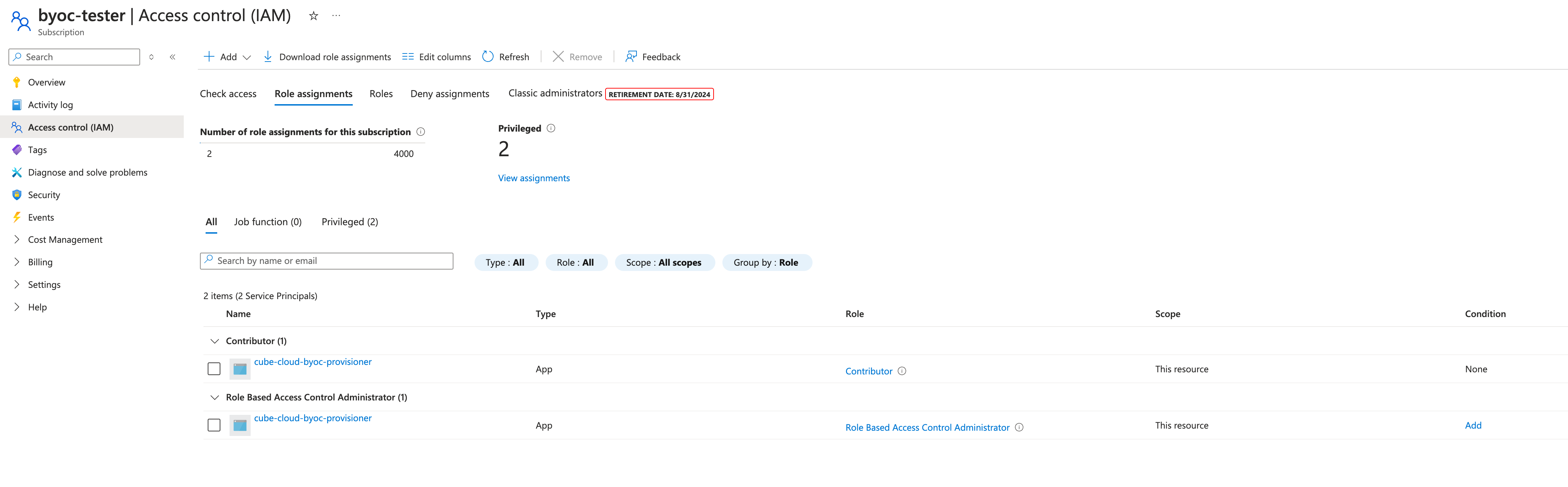
On the [Azure Portal][azure-console], go to **Subscriptions**
→ *Your BYOC Subscription* → **IAM**→ **Role Assignment**
and assing `Contributor` and `Role Based Access Control Administrator` to the `cube-cloud-byoc-provisioner`
Service Principal.
 ## Deployment
The actual deployment will be done by Cube automation. All that's left to
do is notify your Cube contact point that access has been granted, and pass
along your Azure Tenant/Subscription/Region information.
[azure-console]: https://portal.azure.com
## Deployment
The actual deployment will be done by Cube automation. All that's left to
do is notify your Cube contact point that access has been granted, and pass
along your Azure Tenant/Subscription/Region information.
[azure-console]: https://portal.azure.com