> ## Documentation Index
> Fetch the complete documentation index at: https://docs.cube.dev/llms.txt
> Use this file to discover all available pages before exploring further.
# Deployment environments
> Outlines production, staging, and per-developer environments and how they differ inside one Cube deployment.
Every Cube Cloud deployment provides a number of environments:
* A single [production environment](#production-environment).
* Multiple [staging environments](#staging-environments).
* Per-user [development environments](#development-environments).
## Production environment
This is the main environment. It runs the data model from the *main branch*.
### Availability
The production environment is *always available* unless [suspended][ref-suspend].
### Resources and costs
Depending on the [deployment type][ref-deployment-types], the production environment
either runs on a Shared deployment or on a Dedicated deployment with [multiple API
instances][ref-api-instance-scalability], incurring [relevant
costs][ref-pricing-deployment-tiers].
### Cube version
Production environments run a [Cube version][ref-version] from the selected
[update channel][ref-version-channel].
## Staging environments
Staging environments are activated automatically for specific source code branches
when a branch is switched to in the Cube Cloud UI. Any [development mode][ref-dev-mode]
changes must be committed to a branch to be available in this environment.
### Availability
By default, they are only active and accessible while viewed by at least one user.
When no users are viewing the branch, the environment becomes inactive and inaccessible.
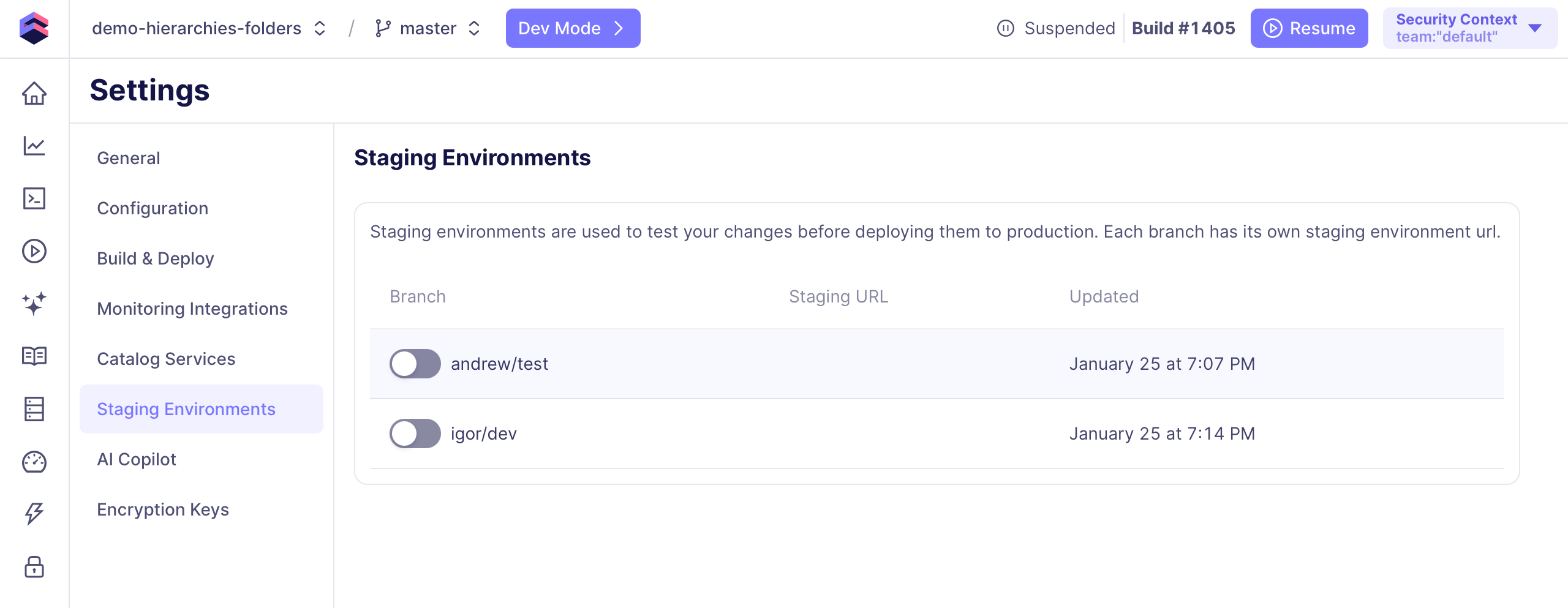
If you'd like to update this setting for a specific branch (e.g., for testing purposes),
go to **Settings → Staging Environments** and check the toggle next to it:
* **Toggle off** (default). A staging environment is only active when viewed by users.
When no users are viewing the branch, queries to this environment will fail.
* **Toggle on**. A staging environment remains *always active* and accessible,
regardless of user activity.
 ### Resources and costs
Staging environments run on Shared deployments, incurring [relevant
costs][ref-pricing-deployment-tiers]. However, they automatically suspend after 10 minutes
of inactivity, regardless of the [availability](#availability) setting, so you are only
charged for the time when staging environments are being used.
### Cube version
Staging environments always run the *most up-to-date* Cube version.
## Development environments
A development environment is activated automatically when a user enters the [development
mode][ref-dev-mode] on a specific branch of the source code. It updates automatically
when a user saves changes to the data model.
Only one development environment is allocated per user.
### Availability
A development environment is only active and accessible while viewed by a user in the
development mode. Otherwise, queries to this environment will fail.
### Resources and costs
Development environments run on Shared deployments, incurring [relevant
costs][ref-pricing-deployment-tiers]. However, they automatically suspend after 10 minutes
of inactivity, so you are only charged for the time when development environments are
being used.
### Cube version
Development environments always run the *most up-to-date* Cube version.
## API endpoints
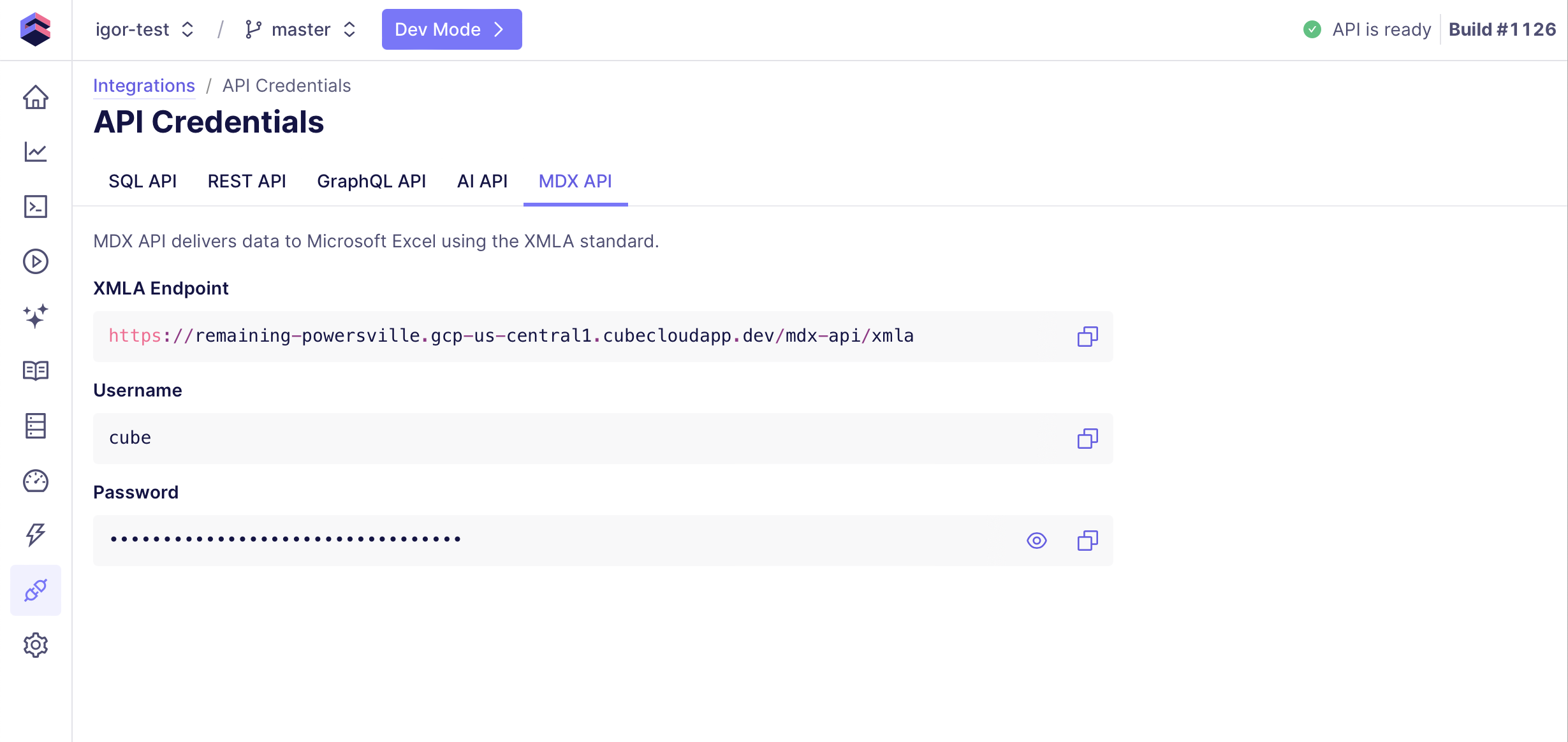
Each environment provides its own set of API endpoints.
You can access them on the [**Overview** page][ref-overview] of your deployment
or by navigating to the **Integrations** page and [clicking **API
credentials**][ref-credentials].
### Resources and costs
Staging environments run on Shared deployments, incurring [relevant
costs][ref-pricing-deployment-tiers]. However, they automatically suspend after 10 minutes
of inactivity, regardless of the [availability](#availability) setting, so you are only
charged for the time when staging environments are being used.
### Cube version
Staging environments always run the *most up-to-date* Cube version.
## Development environments
A development environment is activated automatically when a user enters the [development
mode][ref-dev-mode] on a specific branch of the source code. It updates automatically
when a user saves changes to the data model.
Only one development environment is allocated per user.
### Availability
A development environment is only active and accessible while viewed by a user in the
development mode. Otherwise, queries to this environment will fail.
### Resources and costs
Development environments run on Shared deployments, incurring [relevant
costs][ref-pricing-deployment-tiers]. However, they automatically suspend after 10 minutes
of inactivity, so you are only charged for the time when development environments are
being used.
### Cube version
Development environments always run the *most up-to-date* Cube version.
## API endpoints
Each environment provides its own set of API endpoints.
You can access them on the [**Overview** page][ref-overview] of your deployment
or by navigating to the **Integrations** page and [clicking **API
credentials**][ref-credentials].
 [ref-dev-mode]: /docs/data-modeling/dev-mode
[ref-deployment-types]: /admin/deployment/deployment-types
[ref-api-instance-scalability]: /admin/deployment/scalability#auto-scaling-of-api-instances
[ref-pricing-deployment-tiers]: /admin/account-billing/pricing
[ref-suspend]: /admin/deployment/auto-suspension
[ref-overview]: /docs/workspace/integrations#review-integrations
[ref-credentials]: /docs/workspace/integrations#view-api-credentials
[ref-version]: /admin/deployment/index#cube-version
[ref-version-channel]: /admin/deployment/index#update-channels
[ref-dev-mode]: /docs/data-modeling/dev-mode
[ref-deployment-types]: /admin/deployment/deployment-types
[ref-api-instance-scalability]: /admin/deployment/scalability#auto-scaling-of-api-instances
[ref-pricing-deployment-tiers]: /admin/account-billing/pricing
[ref-suspend]: /admin/deployment/auto-suspension
[ref-overview]: /docs/workspace/integrations#review-integrations
[ref-credentials]: /docs/workspace/integrations#view-api-credentials
[ref-version]: /admin/deployment/index#cube-version
[ref-version-channel]: /admin/deployment/index#update-channels