> ## Documentation Index
> Fetch the complete documentation index at: https://docs.cube.dev/llms.txt
> Use this file to discover all available pages before exploring further.
# Access Policies viewer
> Audit row-level, member-level, and member-masking access policies that govern your data model from the Cube Cloud UI, grouped by user group.
The Access Policies viewer surfaces, in one place, every [access policy][ref-access-policies]
defined in your [data model][ref-data-modeling] — row-level filters, member-level
restrictions, and member masking — broken down by the user [groups][ref-user-groups]
they apply to.
Use it to audit who can see which cubes and views, and how each policy is composed,
without grepping through `cube` files or running test queries.
The viewer is read-only. Access policies themselves are authored in the
[data model][ref-access-policies] using `access_policy` blocks; this page
visualizes the resolved rules so you can review and debug them.
## Opening the viewer
In Cube Cloud, navigate to the **Model** module and click **Access Policies** in
the sub-sidebar. The viewer reflects whichever branch and build you are currently
viewing, so policies you are editing in [development mode][ref-dev-mode] appear
alongside what is live in production.
You need the `PlaygroundRead` permission to open the viewer.
## List view
The list view shows one row per group declared anywhere in the data model:
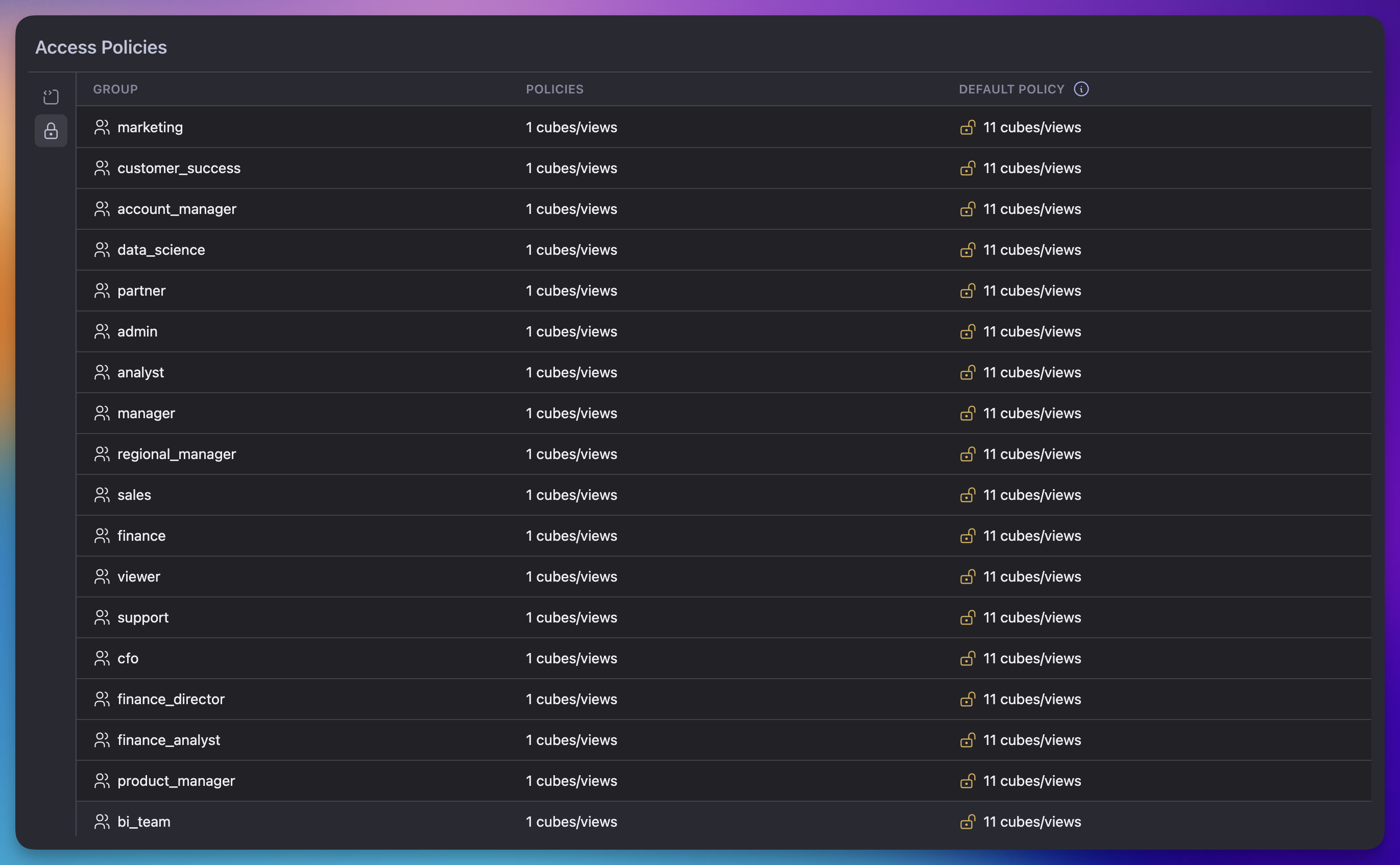 | Column | What it shows |
| ------------------ | ---------------------------------------------------------------------------------------------------------------------------------------------------------------------------- |
| **Group** | Name of the group. The wildcard entry `*` is rendered as **All Groups** — this is the catch-all default policy applied when no other policy matches. |
| **Policies** | Number of cubes and views with an explicit policy for this group. Hover the cell to see the full list of cube and view names. |
| **Default Policy** | Number of cubes and views this group can access without an explicit policy — the union of cubes covered by the wildcard `*` policy and any cubes that have no policy at all. |
Cubes and views with no `access_policy` block defined are considered fully open;
they appear under **Default Policy** for every group.
Click a row to drill into the per-cube breakdown for that group.
## Per-policy detail view
The detail view shows one row per cube or view that the selected group can
access, with the resolved policy expanded across four columns:
| Column | What it shows |
| ----------------------- | ---------------------------------------------------------------------------------------------------------------------------------------------------------------------------------------------------------- |
| **Cube / View** | Name of the cube or view, with an icon distinguishing the two. |
| **Condition** | The number of [`condition`][ref-policy-condition] expressions on the policy, or `—` if the policy applies unconditionally. Conditions are arbitrary expressions defined in the model. |
| **Member-level Access** | One of three states: **Allow All** (no member-level restrictions), **Deny All** (member access is fully denied), or **Allow:** followed by the resolved set of allowed dimensions, segments, and measures. |
| **Member Masking** | `—` if no [member masking][ref-mls-masking] applies, otherwise the list of masked dimensions. |
| **Row-level Access** | Either **Allow All**, or **Filters on:** followed by the dimensions referenced by the row-level filter. |
Member names are shortened to the last path segment for readability — for
example, `orders.user.email` is shown as `email`.
## What the viewer does not do
The viewer is intentionally scoped to inspecting policies that are already
defined in the model. It does not:
* Create, edit, or delete access policies. Edit `access_policy` blocks in your
data model and commit through your normal Git workflow.
* Show which individual users belong to a given group. See
[User groups][ref-user-groups] for membership management.
* Run preview queries against a policy. To verify behavior end-to-end, switch
the security context and issue queries against your development API.
[ref-data-modeling]: /docs/data-modeling/overview
[ref-access-policies]: /docs/data-modeling/data-access-policies
[ref-policy-condition]: /reference/data-modeling/data-access-policies#conditions
[ref-mls-masking]: /docs/data-modeling/data-access-policies#data-masking
[ref-dev-mode]: /docs/data-modeling/dev-mode
[ref-user-groups]: /admin/users-and-permissions/user-groups
| Column | What it shows |
| ------------------ | ---------------------------------------------------------------------------------------------------------------------------------------------------------------------------- |
| **Group** | Name of the group. The wildcard entry `*` is rendered as **All Groups** — this is the catch-all default policy applied when no other policy matches. |
| **Policies** | Number of cubes and views with an explicit policy for this group. Hover the cell to see the full list of cube and view names. |
| **Default Policy** | Number of cubes and views this group can access without an explicit policy — the union of cubes covered by the wildcard `*` policy and any cubes that have no policy at all. |
Cubes and views with no `access_policy` block defined are considered fully open;
they appear under **Default Policy** for every group.
Click a row to drill into the per-cube breakdown for that group.
## Per-policy detail view
The detail view shows one row per cube or view that the selected group can
access, with the resolved policy expanded across four columns:
| Column | What it shows |
| ----------------------- | ---------------------------------------------------------------------------------------------------------------------------------------------------------------------------------------------------------- |
| **Cube / View** | Name of the cube or view, with an icon distinguishing the two. |
| **Condition** | The number of [`condition`][ref-policy-condition] expressions on the policy, or `—` if the policy applies unconditionally. Conditions are arbitrary expressions defined in the model. |
| **Member-level Access** | One of three states: **Allow All** (no member-level restrictions), **Deny All** (member access is fully denied), or **Allow:** followed by the resolved set of allowed dimensions, segments, and measures. |
| **Member Masking** | `—` if no [member masking][ref-mls-masking] applies, otherwise the list of masked dimensions. |
| **Row-level Access** | Either **Allow All**, or **Filters on:** followed by the dimensions referenced by the row-level filter. |
Member names are shortened to the last path segment for readability — for
example, `orders.user.email` is shown as `email`.
## What the viewer does not do
The viewer is intentionally scoped to inspecting policies that are already
defined in the model. It does not:
* Create, edit, or delete access policies. Edit `access_policy` blocks in your
data model and commit through your normal Git workflow.
* Show which individual users belong to a given group. See
[User groups][ref-user-groups] for membership management.
* Run preview queries against a policy. To verify behavior end-to-end, switch
the security context and issue queries against your development API.
[ref-data-modeling]: /docs/data-modeling/overview
[ref-access-policies]: /docs/data-modeling/data-access-policies
[ref-policy-condition]: /reference/data-modeling/data-access-policies#conditions
[ref-mls-masking]: /docs/data-modeling/data-access-policies#data-masking
[ref-dev-mode]: /docs/data-modeling/dev-mode
[ref-user-groups]: /admin/users-and-permissions/user-groups