> ## Documentation Index
> Fetch the complete documentation index at: https://docs.cube.dev/llms.txt
> Use this file to discover all available pages before exploring further.
# Joins
> Joins define relationships between cubes, allowing Cube to automatically generate multi-table SQL queries when views combine data from multiple cubes.
Joins define how cubes connect to each other. When a [view][ref-views]
includes members from multiple cubes, Cube uses these relationships to
automatically generate SQL `JOIN` clauses — so end-users can explore data
across tables without writing SQL.
See the [joins reference][ref-schema-ref-joins-relationship] for the full
list of parameters and configuration options.
## Relationship types
Cube supports three relationship types: `one_to_one`, `one_to_many`, and
`many_to_one`. The relationship type determines which table becomes the left
side of the `LEFT JOIN` in the generated SQL.
Consider two cubes, `orders` and `customers`. An order belongs to one
customer, but a customer can have many orders:
```yaml title="YAML" theme={"dark"}
cubes:
- name: orders
sql_table: orders
joins:
- name: customers
relationship: many_to_one
sql: "{CUBE}.customer_id = {customers.id}"
dimensions:
- name: id
sql: id
type: number
primary_key: true
- name: status
sql: status
type: string
measures:
- name: count
type: count
- name: customers
sql_table: customers
dimensions:
- name: id
sql: id
type: number
primary_key: true
- name: company
sql: company
type: string
```
```javascript title="JavaScript" theme={"dark"}
cube(`orders`, {
sql_table: `orders`,
joins: {
customers: {
relationship: `many_to_one`,
sql: `${CUBE}.customer_id = ${customers.id}`
}
},
dimensions: {
id: { sql: `id`, type: `number`, primary_key: true },
status: { sql: `status`, type: `string` }
},
measures: {
count: { type: `count` }
}
})
cube(`customers`, {
sql_table: `customers`,
dimensions: {
id: { sql: `id`, type: `number`, primary_key: true },
company: { sql: `company`, type: `string` }
}
})
```
The `many_to_one` join on `orders` means: many orders belong to one customer.
When a view includes members from both cubes, Cube generates SQL with `orders`
on the left and `customers` on the right:
```sql theme={"dark"}
SELECT
"orders".status,
"customers".company,
COUNT("orders".id)
FROM orders AS "orders"
LEFT JOIN customers AS "customers"
ON "orders".customer_id = "customers".id
GROUP BY 1, 2
```
Because `orders` is on the left side of the `LEFT JOIN`, all orders are
preserved — including guest checkouts with no matching customer.
As a rule of thumb, define joins on the **fact table** (e.g., `orders`)
pointing toward the **dimension table** (e.g., `customers`) using
`many_to_one`. This ensures the fact table is always the base of the query,
preserving all its rows.
### Many-to-many relationships
A many-to-many relationship requires an associative (junction) table. For
example, `posts` and `topics` are connected through a `post_topics` table:
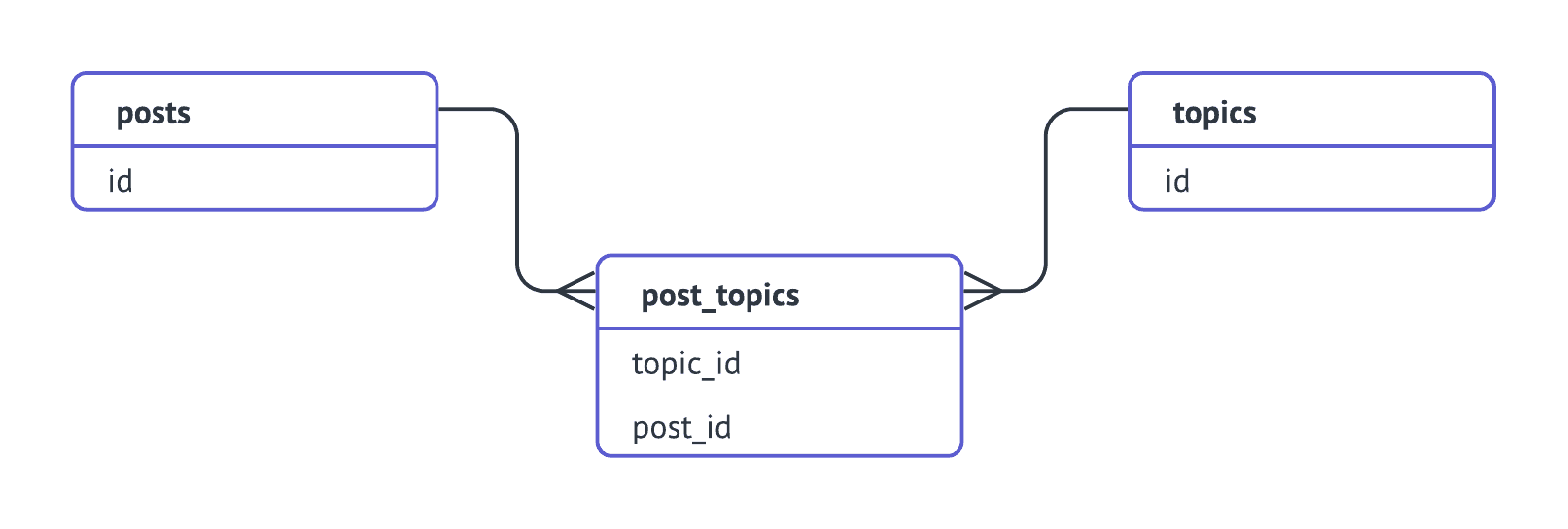 Model this with an associative cube, chaining the joins so they flow in one
direction (`posts → post_topics → topics`):
```yaml title="YAML" theme={"dark"}
cubes:
- name: posts
sql_table: posts
joins:
- name: post_topics
relationship: one_to_many
sql: "{CUBE}.id = {post_topics.post_id}"
- name: post_topics
sql_table: post_topics
joins:
- name: topics
relationship: many_to_one
sql: "{CUBE}.topic_id = {topics.id}"
dimensions:
- name: id
sql: "CONCAT({CUBE}.post_id, {CUBE}.topic_id)"
type: string
primary_key: true
- name: topics
sql_table: topics
dimensions:
- name: id
sql: id
type: string
primary_key: true
- name: name
sql: name
type: string
```
```javascript title="JavaScript" theme={"dark"}
cube(`posts`, {
sql_table: `posts`,
joins: {
post_topics: {
relationship: `one_to_many`,
sql: `${CUBE}.id = ${post_topics.post_id}`
}
}
})
cube(`post_topics`, {
sql_table: `post_topics`,
joins: {
topics: {
relationship: `many_to_one`,
sql: `${CUBE}.topic_id = ${topics.id}`
}
},
dimensions: {
id: {
sql: `CONCAT(${CUBE}.post_id, ${CUBE}.topic_id)`,
type: `string`,
primary_key: true
}
}
})
cube(`topics`, {
sql_table: `topics`,
dimensions: {
id: { sql: `id`, type: `string`, primary_key: true },
name: { sql: `name`, type: `string` }
}
})
```
A view can then expose this through the `join_path`:
```yaml theme={"dark"}
views:
- name: posts_with_topics
cubes:
- join_path: posts
includes:
- title
- count
- join_path: posts.post_topics.topics
prefix: true
includes:
- name
```
## Direction of joins
**All joins are directed.** They flow from the source cube (where the join
is defined) to the target cube (the one referenced). Cube places the source
cube on the left side of the `LEFT JOIN` and the target on the right.
This matters because the left table preserves all its rows, while the right
table contributes matching rows or `NULL`. The direction you choose affects
which records appear in the result set.
For example, if `orders` defines a `many_to_one` join to `customers`:
* `orders` is the base → all orders are preserved, even guest checkouts
* `customers` without orders won't appear
If instead `customers` defined a `one_to_many` join to `orders`:
* `customers` is the base → all customers are preserved, even those without orders
* Guest checkout orders (with no matching customer) won't appear
### Using views to control direction
Views let you control which join path is followed via the
[`join_path`][ref-view-join-path] parameter. This is the recommended way to
handle cases where you need different join directions for different use cases:
```yaml title="YAML" theme={"dark"}
cubes:
- name: orders
sql_table: orders
joins:
- name: customers
sql: "{CUBE}.customer_id = {customers.id}"
relationship: many_to_one
measures:
- name: count
type: count
- name: total_revenue
sql: revenue
type: sum
dimensions:
- name: id
sql: id
type: number
primary_key: true
- name: customers
sql_table: customers
joins:
- name: orders
sql: "{CUBE}.id = {orders.customer_id}"
relationship: one_to_many
measures:
- name: count
type: count
dimensions:
- name: id
sql: id
type: number
primary_key: true
- name: name
sql: name
type: string
```
```javascript title="JavaScript" theme={"dark"}
cube(`orders`, {
sql_table: `orders`,
joins: {
customers: {
sql: `${CUBE}.customer_id = ${customers.id}`,
relationship: `many_to_one`
}
},
measures: {
count: { type: `count` },
total_revenue: { sql: `revenue`, type: `sum` }
},
dimensions: {
id: { sql: `id`, type: `number`, primary_key: true }
}
})
cube(`customers`, {
sql_table: `customers`,
joins: {
orders: {
sql: `${CUBE}.id = ${orders.customer_id}`,
relationship: `one_to_many`
}
},
measures: {
count: { type: `count` }
},
dimensions: {
id: { sql: `id`, type: `number`, primary_key: true },
name: { sql: `name`, type: `string` }
}
})
```
Now you can create two views for two different analytical needs:
```yaml title="YAML" theme={"dark"}
views:
- name: revenue_per_customer
description: All orders with customer details. Includes guest checkouts.
cubes:
- join_path: orders
includes:
- count
- total_revenue
- join_path: orders.customers
includes:
- name
- name: customer_activity
description: All customers with their order activity. Includes customers without orders.
cubes:
- join_path: customers
includes:
- name
- count
- join_path: customers.orders
prefix: true
includes:
- count
- total_revenue
```
```javascript title="JavaScript" theme={"dark"}
view(`revenue_per_customer`, {
description: `All orders with customer details. Includes guest checkouts.`,
cubes: [
{
join_path: orders,
includes: [`count`, `total_revenue`]
},
{
join_path: orders.customers,
includes: [`name`]
}
]
})
view(`customer_activity`, {
description: `All customers with their order activity. Includes customers without orders.`,
cubes: [
{
join_path: customers,
includes: [`name`, `count`]
},
{
join_path: customers.orders,
prefix: true,
includes: [`count`, `total_revenue`]
}
]
})
```
The `revenue_per_customer` view follows the `orders → customers` path, so all
orders are preserved. The `customer_activity` view follows
`customers → orders`, so all customers are preserved.
## Diamond subgraphs
A *diamond subgraph* occurs when there's more than one join path between two
cubes — for example, `users.schools.countries` and
`users.employers.countries`. This can lead to ambiguous query generation.
Views resolve this ambiguity by specifying the exact `join_path` for each
included cube. For example, if cube `a` joins to both `b` and `c`, and both
`b` and `c` join to `d`, a view can specify which path to follow:
```yaml theme={"dark"}
views:
- name: a_with_d_via_b
cubes:
- join_path: a
includes: "*"
- join_path: a.b.d
prefix: true
includes:
- value
- name: a_with_d_via_c
cubes:
- join_path: a
includes: "*"
- join_path: a.c.d
prefix: true
includes:
- value
```
Each view follows a specific, unambiguous path through the data graph.
## Join paths in calculated members
When referencing a member of another cube in a [calculated member][ref-calculated-members],
you can use a join path to specify the exact route. This uses dot-separated
cube names:
```yaml title="YAML" theme={"dark"}
cubes:
- name: orders
# ...
dimensions:
- name: customer_country
sql: "{customers.country}"
type: string
- name: shipping_country
sql: "{shipping_addresses.country}"
type: string
```
```javascript title="JavaScript" theme={"dark"}
cube(`orders`, {
// ...
dimensions: {
customer_country: {
sql: `${customers.country}`,
type: `string`
},
shipping_country: {
sql: `${shipping_addresses.country}`,
type: `string`
}
}
})
```
## Troubleshooting
### `Can't find join path`
The error `Can't find join path to join 'cube_a', 'cube_b'` means the cubes
included in a view or query can't be connected through the defined joins.
Check that:
* Joins are defined with the correct [direction](#direction-of-joins)
* There is a continuous path from the source cube to the target cube
* You're using the [`join_path`][ref-view-join-path] parameter in views to
specify the exact path
### `Primary key is required when join is defined`
Cube uses primary keys to avoid fanouts — when rows get duplicated during
joins and aggregates are over-counted. Define a [primary key][ref-primary-key]
dimension in every cube that participates in joins.
If your data doesn't have a natural primary key, create a composite one:
```yaml theme={"dark"}
cubes:
- name: events
# ...
dimensions:
- name: composite_key
sql: CONCAT(column_a, '-', column_b, '-', column_c)
type: string
primary_key: true
```
[ref-schema-ref-joins-relationship]: /reference/data-modeling/joins
[ref-views]: /docs/data-modeling/views
[ref-view-join-path]: /reference/data-modeling/view#join_path
[ref-calculated-members]: /docs/data-modeling/measures#calculated-measures
[ref-primary-key]: /reference/data-modeling/dimensions#primary_key
[ref-visual-model]: /docs/data-modeling/visual-modeler
Model this with an associative cube, chaining the joins so they flow in one
direction (`posts → post_topics → topics`):
```yaml title="YAML" theme={"dark"}
cubes:
- name: posts
sql_table: posts
joins:
- name: post_topics
relationship: one_to_many
sql: "{CUBE}.id = {post_topics.post_id}"
- name: post_topics
sql_table: post_topics
joins:
- name: topics
relationship: many_to_one
sql: "{CUBE}.topic_id = {topics.id}"
dimensions:
- name: id
sql: "CONCAT({CUBE}.post_id, {CUBE}.topic_id)"
type: string
primary_key: true
- name: topics
sql_table: topics
dimensions:
- name: id
sql: id
type: string
primary_key: true
- name: name
sql: name
type: string
```
```javascript title="JavaScript" theme={"dark"}
cube(`posts`, {
sql_table: `posts`,
joins: {
post_topics: {
relationship: `one_to_many`,
sql: `${CUBE}.id = ${post_topics.post_id}`
}
}
})
cube(`post_topics`, {
sql_table: `post_topics`,
joins: {
topics: {
relationship: `many_to_one`,
sql: `${CUBE}.topic_id = ${topics.id}`
}
},
dimensions: {
id: {
sql: `CONCAT(${CUBE}.post_id, ${CUBE}.topic_id)`,
type: `string`,
primary_key: true
}
}
})
cube(`topics`, {
sql_table: `topics`,
dimensions: {
id: { sql: `id`, type: `string`, primary_key: true },
name: { sql: `name`, type: `string` }
}
})
```
A view can then expose this through the `join_path`:
```yaml theme={"dark"}
views:
- name: posts_with_topics
cubes:
- join_path: posts
includes:
- title
- count
- join_path: posts.post_topics.topics
prefix: true
includes:
- name
```
## Direction of joins
**All joins are directed.** They flow from the source cube (where the join
is defined) to the target cube (the one referenced). Cube places the source
cube on the left side of the `LEFT JOIN` and the target on the right.
This matters because the left table preserves all its rows, while the right
table contributes matching rows or `NULL`. The direction you choose affects
which records appear in the result set.
For example, if `orders` defines a `many_to_one` join to `customers`:
* `orders` is the base → all orders are preserved, even guest checkouts
* `customers` without orders won't appear
If instead `customers` defined a `one_to_many` join to `orders`:
* `customers` is the base → all customers are preserved, even those without orders
* Guest checkout orders (with no matching customer) won't appear
### Using views to control direction
Views let you control which join path is followed via the
[`join_path`][ref-view-join-path] parameter. This is the recommended way to
handle cases where you need different join directions for different use cases:
```yaml title="YAML" theme={"dark"}
cubes:
- name: orders
sql_table: orders
joins:
- name: customers
sql: "{CUBE}.customer_id = {customers.id}"
relationship: many_to_one
measures:
- name: count
type: count
- name: total_revenue
sql: revenue
type: sum
dimensions:
- name: id
sql: id
type: number
primary_key: true
- name: customers
sql_table: customers
joins:
- name: orders
sql: "{CUBE}.id = {orders.customer_id}"
relationship: one_to_many
measures:
- name: count
type: count
dimensions:
- name: id
sql: id
type: number
primary_key: true
- name: name
sql: name
type: string
```
```javascript title="JavaScript" theme={"dark"}
cube(`orders`, {
sql_table: `orders`,
joins: {
customers: {
sql: `${CUBE}.customer_id = ${customers.id}`,
relationship: `many_to_one`
}
},
measures: {
count: { type: `count` },
total_revenue: { sql: `revenue`, type: `sum` }
},
dimensions: {
id: { sql: `id`, type: `number`, primary_key: true }
}
})
cube(`customers`, {
sql_table: `customers`,
joins: {
orders: {
sql: `${CUBE}.id = ${orders.customer_id}`,
relationship: `one_to_many`
}
},
measures: {
count: { type: `count` }
},
dimensions: {
id: { sql: `id`, type: `number`, primary_key: true },
name: { sql: `name`, type: `string` }
}
})
```
Now you can create two views for two different analytical needs:
```yaml title="YAML" theme={"dark"}
views:
- name: revenue_per_customer
description: All orders with customer details. Includes guest checkouts.
cubes:
- join_path: orders
includes:
- count
- total_revenue
- join_path: orders.customers
includes:
- name
- name: customer_activity
description: All customers with their order activity. Includes customers without orders.
cubes:
- join_path: customers
includes:
- name
- count
- join_path: customers.orders
prefix: true
includes:
- count
- total_revenue
```
```javascript title="JavaScript" theme={"dark"}
view(`revenue_per_customer`, {
description: `All orders with customer details. Includes guest checkouts.`,
cubes: [
{
join_path: orders,
includes: [`count`, `total_revenue`]
},
{
join_path: orders.customers,
includes: [`name`]
}
]
})
view(`customer_activity`, {
description: `All customers with their order activity. Includes customers without orders.`,
cubes: [
{
join_path: customers,
includes: [`name`, `count`]
},
{
join_path: customers.orders,
prefix: true,
includes: [`count`, `total_revenue`]
}
]
})
```
The `revenue_per_customer` view follows the `orders → customers` path, so all
orders are preserved. The `customer_activity` view follows
`customers → orders`, so all customers are preserved.
## Diamond subgraphs
A *diamond subgraph* occurs when there's more than one join path between two
cubes — for example, `users.schools.countries` and
`users.employers.countries`. This can lead to ambiguous query generation.
Views resolve this ambiguity by specifying the exact `join_path` for each
included cube. For example, if cube `a` joins to both `b` and `c`, and both
`b` and `c` join to `d`, a view can specify which path to follow:
```yaml theme={"dark"}
views:
- name: a_with_d_via_b
cubes:
- join_path: a
includes: "*"
- join_path: a.b.d
prefix: true
includes:
- value
- name: a_with_d_via_c
cubes:
- join_path: a
includes: "*"
- join_path: a.c.d
prefix: true
includes:
- value
```
Each view follows a specific, unambiguous path through the data graph.
## Join paths in calculated members
When referencing a member of another cube in a [calculated member][ref-calculated-members],
you can use a join path to specify the exact route. This uses dot-separated
cube names:
```yaml title="YAML" theme={"dark"}
cubes:
- name: orders
# ...
dimensions:
- name: customer_country
sql: "{customers.country}"
type: string
- name: shipping_country
sql: "{shipping_addresses.country}"
type: string
```
```javascript title="JavaScript" theme={"dark"}
cube(`orders`, {
// ...
dimensions: {
customer_country: {
sql: `${customers.country}`,
type: `string`
},
shipping_country: {
sql: `${shipping_addresses.country}`,
type: `string`
}
}
})
```
## Troubleshooting
### `Can't find join path`
The error `Can't find join path to join 'cube_a', 'cube_b'` means the cubes
included in a view or query can't be connected through the defined joins.
Check that:
* Joins are defined with the correct [direction](#direction-of-joins)
* There is a continuous path from the source cube to the target cube
* You're using the [`join_path`][ref-view-join-path] parameter in views to
specify the exact path
### `Primary key is required when join is defined`
Cube uses primary keys to avoid fanouts — when rows get duplicated during
joins and aggregates are over-counted. Define a [primary key][ref-primary-key]
dimension in every cube that participates in joins.
If your data doesn't have a natural primary key, create a composite one:
```yaml theme={"dark"}
cubes:
- name: events
# ...
dimensions:
- name: composite_key
sql: CONCAT(column_a, '-', column_b, '-', column_c)
type: string
primary_key: true
```
[ref-schema-ref-joins-relationship]: /reference/data-modeling/joins
[ref-views]: /docs/data-modeling/views
[ref-view-join-path]: /reference/data-modeling/view#join_path
[ref-calculated-members]: /docs/data-modeling/measures#calculated-measures
[ref-primary-key]: /reference/data-modeling/dimensions#primary_key
[ref-visual-model]: /docs/data-modeling/visual-modeler