> ## Documentation Index
> Fetch the complete documentation index at: https://docs.cube.dev/llms.txt
> Use this file to discover all available pages before exploring further.
# Views
> Views are curated datasets that sit on top of cubes and create a user-friendly facade of your data model for downstream consumers, AI agents, and embedded analytics.
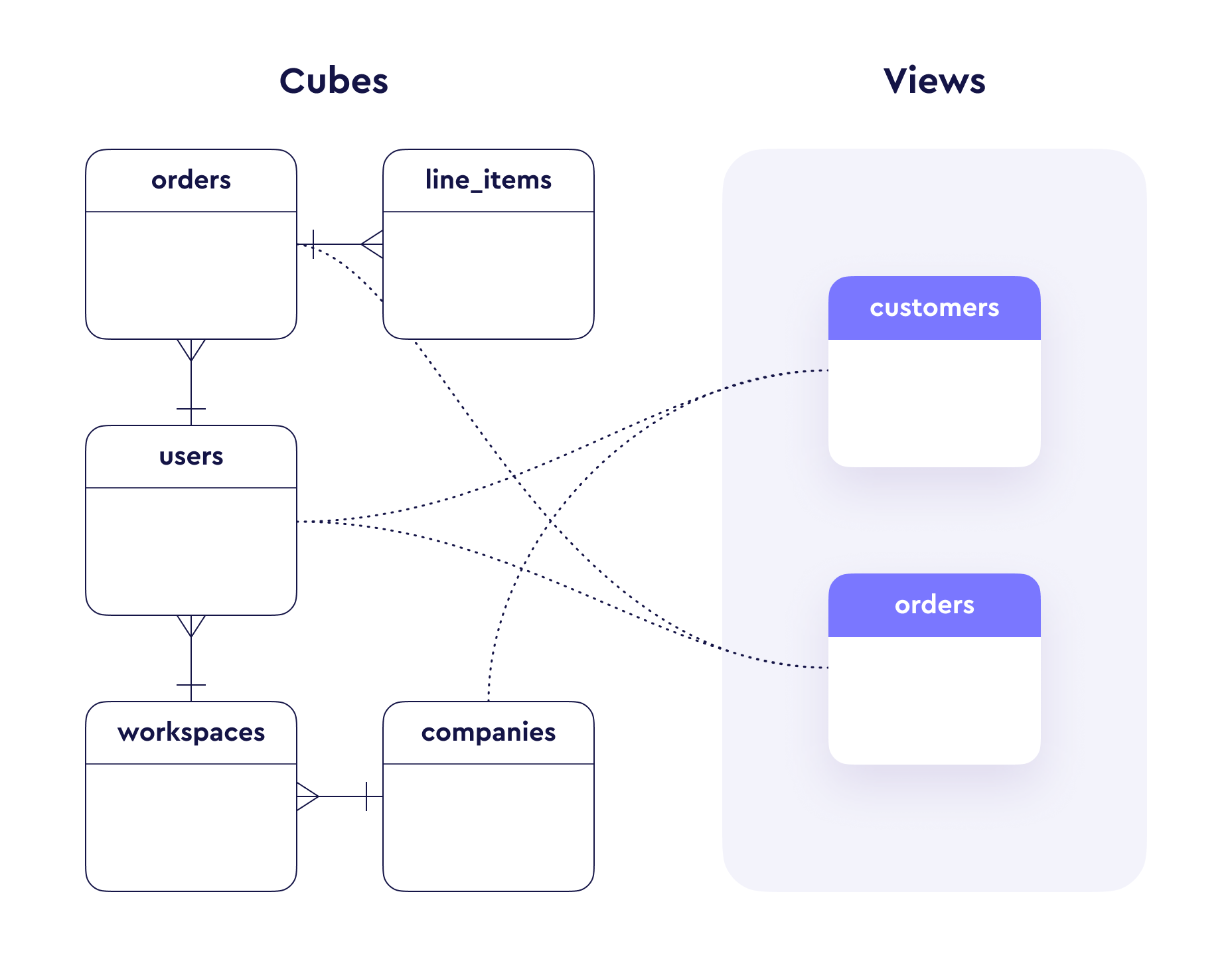
Views sit on top of the data graph of [cubes][ref-cubes] and create a facade
of your whole data model with which data consumers can interact. They bring
together relevant measures, dimensions, and join paths into a logical
structure that matches how business users think about their data.
 See the [view reference][ref-view-reference] for the full list of
parameters and configuration options.
## Why views matter
Views are the primary interface between your data model and your users.
While cubes model the raw relationships and logic in your warehouse, views
reshape that model into business-friendly datasets for easier exploration.
Views shield end-users from complex database schemas, table
relationships, and raw SQL. Business users can pick fields from
a curated dataset in [Explore][ref-explore] or
[Workbooks][ref-workbooks] without needing to understand the joins
or cube structure underneath.
For example, an analyst could pick `product`, `total_amount`, and
`users_city` from an `orders` view without thinking about the underlying
join path from `base_orders` through `line_items` to `products`.
[AI agents][ref-ai-context] query your data model through views.
By curating which members are included and providing descriptive
metadata via `description` and `meta.ai_context`, you control the
context AI uses to generate accurate queries. Well-designed views
with clear naming and descriptions lead to significantly better
AI results.
Views give you fine-grained control over what users can see.
Each view can be scoped with [access policies][ref-access-policies]
to enforce row-level and member-level security. You can also set
`public: false` to hide internal views or use
[COMPILE\_CONTEXT][ref-compile-context] for dynamic visibility
based on the security context.
In complex data models, the same pair of cubes might be reachable
through multiple join paths. Views eliminate this ambiguity by
specifying the exact `join_path` for each included cube, ensuring
queries always follow the intended path.
Views are a natural fit for [embedded analytics][ref-embedding].
Different customer tiers can get access to different views,
allowing you to tailor the analytics experience to your
monetization strategy without duplicating cubes.
## How views work
Views do **not** define their own members. Instead, they reference cubes by
specific join paths and selectively include measures, dimensions, hierarchies,
and segments from those cubes.
```yaml title="YAML" theme={"dark"}
views:
- name: orders
cubes:
- join_path: base_orders
includes:
- status
- created_date
- total_amount
- count
- average_order_value
- join_path: base_orders.line_items.products
includes:
- name: name
alias: product
- join_path: base_orders.users
prefix: true
includes: "*"
excludes:
- company
```
```javascript title="JavaScript" theme={"dark"}
view(`orders`, {
cubes: [
{
join_path: base_orders,
includes: [
`status`,
`created_date`,
`total_amount`,
`count`,
`average_order_value`
]
},
{
join_path: base_orders.line_items.products,
includes: [
{
name: `name`,
alias: `product`
}
]
},
{
join_path: base_orders.users,
prefix: true,
includes: `*`,
excludes: [`company`]
}
]
})
```
In this example, the `orders` view pulls in members from three cubes
along their join paths. End-users see a flat list of fields — `status`,
`created_date`, `product`, `users_city`, etc. — without being exposed to
the underlying cube structure.
## Designing effective views
### Build for your audience
Design views around how your business users think about data, not around
how your database is structured. Group related fields into views that align
with departments or use cases — for example, `sales_overview`,
`customer_360`, or `product_analytics`.
A single cube can be included in multiple views. For example, a `users`
cube might appear in both a `customer_360` view and a `sales_overview`
view, with different fields exposed in each.
### Favor focused views
Smaller, focused views are easier to navigate and lead to better AI
results. Rather than one massive view with hundreds of fields, create
several purpose-built views:
* Views are easier for business users to understand when they're
scoped to a specific domain
* AI agents perform better with focused context
* Simpler views translate to simpler SQL queries with fewer joins
### Curate with metadata
Help your users understand what a view is for and how to use it:
* Set a clear [`description`][ref-view-description] to explain the
view's purpose
* Use [`title`][ref-view-title] for user-friendly display names
* Add [`meta.ai_context`][ref-ai-context] to guide AI agents
* Organize fields into [`folders`][ref-view-folders] for logical
grouping
```yaml title="YAML" theme={"dark"}
views:
- name: sales_overview
description: >
Revenue and order metrics for the sales team.
Includes order status, product details, and customer segments.
meta:
ai_context: >
Use this view for questions about sales performance,
revenue trends, and order analysis. The total_revenue
measure includes only completed orders.
cubes:
- join_path: orders
includes:
- status
- total_revenue
- count
- created_date
- join_path: orders.customers
prefix: true
includes:
- segment
- region
folders:
- name: Order Metrics
includes:
- total_revenue
- count
- status
- name: Customer Info
includes:
- customers_segment
- customers_region
```
```javascript title="JavaScript" theme={"dark"}
view(`sales_overview`, {
description: `Revenue and order metrics for the sales team.
Includes order status, product details, and customer segments.`,
meta: {
ai_context: `Use this view for questions about sales performance,
revenue trends, and order analysis. The total_revenue
measure includes only completed orders.`
},
cubes: [
{
join_path: orders,
includes: [
`status`,
`total_revenue`,
`count`,
`created_date`
]
},
{
join_path: orders.customers,
prefix: true,
includes: [
`segment`,
`region`
]
}
],
folders: [
{
name: `Order Metrics`,
includes: [
`total_revenue`,
`count`,
`status`
]
},
{
name: `Customer Info`,
includes: [
`customers_segment`,
`customers_region`
]
}
]
})
```
### Keep shared logic in cubes
Views are a curation layer. All business logic — SQL definitions, measure
calculations, join relationships — should live in cubes. Views should only
control which members are exposed, how they're named, and how they're
organized. This keeps your model [DRY][wiki-dry] and makes maintenance
straightforward.
### Control visibility
Not every view should be publicly accessible. Use [`public`][ref-view-public]
to hide views that are meant for internal use or are still in development:
```yaml title="YAML" theme={"dark"}
views:
- name: internal_diagnostics
public: false
cubes:
- join_path: system_metrics
includes: "*"
```
```javascript title="JavaScript" theme={"dark"}
view(`internal_diagnostics`, {
public: false,
cubes: [
{
join_path: system_metrics,
includes: `*`
}
]
})
```
For dynamic visibility based on user roles, use `COMPILE_CONTEXT`:
```yaml title="YAML" theme={"dark"}
views:
- name: arr
description: Annual Recurring Revenue
public: COMPILE_CONTEXT.security_context.is_finance
cubes:
- join_path: revenue
includes:
- arr
- date
```
```javascript title="JavaScript" theme={"dark"}
view(`arr`, {
description: `Annual Recurring Revenue`,
public: COMPILE_CONTEXT.security_context.is_finance,
cubes: [
{
join_path: revenue,
includes: [`arr`, `date`]
}
]
})
```
## Organizing members with folders
When a view includes many fields, [folders][ref-view-folders] help organize
them into logical groups. Cube supports both flat and nested folder
structures:
```yaml title="YAML" theme={"dark"}
views:
- name: customers
cubes:
- join_path: users
includes: "*"
- join_path: users.orders
prefix: true
includes:
- status
- price
- count
folders:
- name: Personal Details
includes:
- name
- gender
- created_at
- name: Order Analytics
includes:
- orders_status
- orders_price
- orders_count
```
```javascript title="JavaScript" theme={"dark"}
view(`customers`, {
cubes: [
{
join_path: `users`,
includes: `*`
},
{
join_path: `users.orders`,
prefix: true,
includes: [`status`, `price`, `count`]
}
],
folders: [
{
name: `Personal Details`,
includes: [`name`, `gender`, `created_at`]
},
{
name: `Order Analytics`,
includes: [
`orders_status`,
`orders_price`,
`orders_count`
]
}
]
})
```
Folders are displayed in supported [visualization tools][ref-viz-tools].
Check [APIs & Integrations][ref-apis-support] for details on folder
support. For tools that don't support nested folders, the structure is
automatically flattened.
## Grouping views with view groups
When a data model contains many views, [view groups][ref-view-groups] help
organize them into named collections by domain or purpose — for example,
`sales`, `finance`, or `people`. They're exposed through the
[`/v1/meta`][ref-meta-endpoint] API so downstream tools, AI agents, and
embedded analytics can present a navigable catalog.
See [View groups][ref-view-groups] for the full guide and the
[view group reference][ref-view-group-ref] for the complete list of
parameters.
## Next steps
* See the [view reference][ref-view-reference] for the full list of
parameters
* Learn about [view groups][ref-view-groups] to organize views into
named collections
* Learn about [access policies][ref-access-policies] to govern view access
* Explore [AI context][ref-ai-context] to improve AI query accuracy
* Use the [Semantic Model IDE][ref-ide] to develop views interactively
[ref-cubes]: /docs/data-modeling/cubes
[ref-view-reference]: /reference/data-modeling/view
[ref-view-description]: /reference/data-modeling/view#description
[ref-view-title]: /reference/data-modeling/view#title
[ref-view-public]: /reference/data-modeling/view#public
[ref-view-folders]: /reference/data-modeling/view#folders
[ref-access-policies]: /reference/data-modeling/data-access-policies
[ref-ai-context]: /docs/data-modeling/ai-context
[ref-compile-context]: /docs/data-modeling/access-control/context
[ref-explore]: /analytics/explore
[ref-workbooks]: /analytics/workbooks
[ref-embedding]: /docs/embedding
[ref-ide]: /docs/data-modeling/data-model-ide
[ref-viz-tools]: /admin/connect-to-data/visualization-tools
[ref-apis-support]: /reference#data-modeling
[ref-view-groups]: /docs/data-modeling/view-groups
[ref-view-group-ref]: /reference/data-modeling/view-group
[ref-meta-endpoint]: /reference/core-data-apis/rest-api/reference
[wiki-dry]: https://en.wikipedia.org/wiki/Don%27t_repeat_yourself
See the [view reference][ref-view-reference] for the full list of
parameters and configuration options.
## Why views matter
Views are the primary interface between your data model and your users.
While cubes model the raw relationships and logic in your warehouse, views
reshape that model into business-friendly datasets for easier exploration.
Views shield end-users from complex database schemas, table
relationships, and raw SQL. Business users can pick fields from
a curated dataset in [Explore][ref-explore] or
[Workbooks][ref-workbooks] without needing to understand the joins
or cube structure underneath.
For example, an analyst could pick `product`, `total_amount`, and
`users_city` from an `orders` view without thinking about the underlying
join path from `base_orders` through `line_items` to `products`.
[AI agents][ref-ai-context] query your data model through views.
By curating which members are included and providing descriptive
metadata via `description` and `meta.ai_context`, you control the
context AI uses to generate accurate queries. Well-designed views
with clear naming and descriptions lead to significantly better
AI results.
Views give you fine-grained control over what users can see.
Each view can be scoped with [access policies][ref-access-policies]
to enforce row-level and member-level security. You can also set
`public: false` to hide internal views or use
[COMPILE\_CONTEXT][ref-compile-context] for dynamic visibility
based on the security context.
In complex data models, the same pair of cubes might be reachable
through multiple join paths. Views eliminate this ambiguity by
specifying the exact `join_path` for each included cube, ensuring
queries always follow the intended path.
Views are a natural fit for [embedded analytics][ref-embedding].
Different customer tiers can get access to different views,
allowing you to tailor the analytics experience to your
monetization strategy without duplicating cubes.
## How views work
Views do **not** define their own members. Instead, they reference cubes by
specific join paths and selectively include measures, dimensions, hierarchies,
and segments from those cubes.
```yaml title="YAML" theme={"dark"}
views:
- name: orders
cubes:
- join_path: base_orders
includes:
- status
- created_date
- total_amount
- count
- average_order_value
- join_path: base_orders.line_items.products
includes:
- name: name
alias: product
- join_path: base_orders.users
prefix: true
includes: "*"
excludes:
- company
```
```javascript title="JavaScript" theme={"dark"}
view(`orders`, {
cubes: [
{
join_path: base_orders,
includes: [
`status`,
`created_date`,
`total_amount`,
`count`,
`average_order_value`
]
},
{
join_path: base_orders.line_items.products,
includes: [
{
name: `name`,
alias: `product`
}
]
},
{
join_path: base_orders.users,
prefix: true,
includes: `*`,
excludes: [`company`]
}
]
})
```
In this example, the `orders` view pulls in members from three cubes
along their join paths. End-users see a flat list of fields — `status`,
`created_date`, `product`, `users_city`, etc. — without being exposed to
the underlying cube structure.
## Designing effective views
### Build for your audience
Design views around how your business users think about data, not around
how your database is structured. Group related fields into views that align
with departments or use cases — for example, `sales_overview`,
`customer_360`, or `product_analytics`.
A single cube can be included in multiple views. For example, a `users`
cube might appear in both a `customer_360` view and a `sales_overview`
view, with different fields exposed in each.
### Favor focused views
Smaller, focused views are easier to navigate and lead to better AI
results. Rather than one massive view with hundreds of fields, create
several purpose-built views:
* Views are easier for business users to understand when they're
scoped to a specific domain
* AI agents perform better with focused context
* Simpler views translate to simpler SQL queries with fewer joins
### Curate with metadata
Help your users understand what a view is for and how to use it:
* Set a clear [`description`][ref-view-description] to explain the
view's purpose
* Use [`title`][ref-view-title] for user-friendly display names
* Add [`meta.ai_context`][ref-ai-context] to guide AI agents
* Organize fields into [`folders`][ref-view-folders] for logical
grouping
```yaml title="YAML" theme={"dark"}
views:
- name: sales_overview
description: >
Revenue and order metrics for the sales team.
Includes order status, product details, and customer segments.
meta:
ai_context: >
Use this view for questions about sales performance,
revenue trends, and order analysis. The total_revenue
measure includes only completed orders.
cubes:
- join_path: orders
includes:
- status
- total_revenue
- count
- created_date
- join_path: orders.customers
prefix: true
includes:
- segment
- region
folders:
- name: Order Metrics
includes:
- total_revenue
- count
- status
- name: Customer Info
includes:
- customers_segment
- customers_region
```
```javascript title="JavaScript" theme={"dark"}
view(`sales_overview`, {
description: `Revenue and order metrics for the sales team.
Includes order status, product details, and customer segments.`,
meta: {
ai_context: `Use this view for questions about sales performance,
revenue trends, and order analysis. The total_revenue
measure includes only completed orders.`
},
cubes: [
{
join_path: orders,
includes: [
`status`,
`total_revenue`,
`count`,
`created_date`
]
},
{
join_path: orders.customers,
prefix: true,
includes: [
`segment`,
`region`
]
}
],
folders: [
{
name: `Order Metrics`,
includes: [
`total_revenue`,
`count`,
`status`
]
},
{
name: `Customer Info`,
includes: [
`customers_segment`,
`customers_region`
]
}
]
})
```
### Keep shared logic in cubes
Views are a curation layer. All business logic — SQL definitions, measure
calculations, join relationships — should live in cubes. Views should only
control which members are exposed, how they're named, and how they're
organized. This keeps your model [DRY][wiki-dry] and makes maintenance
straightforward.
### Control visibility
Not every view should be publicly accessible. Use [`public`][ref-view-public]
to hide views that are meant for internal use or are still in development:
```yaml title="YAML" theme={"dark"}
views:
- name: internal_diagnostics
public: false
cubes:
- join_path: system_metrics
includes: "*"
```
```javascript title="JavaScript" theme={"dark"}
view(`internal_diagnostics`, {
public: false,
cubes: [
{
join_path: system_metrics,
includes: `*`
}
]
})
```
For dynamic visibility based on user roles, use `COMPILE_CONTEXT`:
```yaml title="YAML" theme={"dark"}
views:
- name: arr
description: Annual Recurring Revenue
public: COMPILE_CONTEXT.security_context.is_finance
cubes:
- join_path: revenue
includes:
- arr
- date
```
```javascript title="JavaScript" theme={"dark"}
view(`arr`, {
description: `Annual Recurring Revenue`,
public: COMPILE_CONTEXT.security_context.is_finance,
cubes: [
{
join_path: revenue,
includes: [`arr`, `date`]
}
]
})
```
## Organizing members with folders
When a view includes many fields, [folders][ref-view-folders] help organize
them into logical groups. Cube supports both flat and nested folder
structures:
```yaml title="YAML" theme={"dark"}
views:
- name: customers
cubes:
- join_path: users
includes: "*"
- join_path: users.orders
prefix: true
includes:
- status
- price
- count
folders:
- name: Personal Details
includes:
- name
- gender
- created_at
- name: Order Analytics
includes:
- orders_status
- orders_price
- orders_count
```
```javascript title="JavaScript" theme={"dark"}
view(`customers`, {
cubes: [
{
join_path: `users`,
includes: `*`
},
{
join_path: `users.orders`,
prefix: true,
includes: [`status`, `price`, `count`]
}
],
folders: [
{
name: `Personal Details`,
includes: [`name`, `gender`, `created_at`]
},
{
name: `Order Analytics`,
includes: [
`orders_status`,
`orders_price`,
`orders_count`
]
}
]
})
```
Folders are displayed in supported [visualization tools][ref-viz-tools].
Check [APIs & Integrations][ref-apis-support] for details on folder
support. For tools that don't support nested folders, the structure is
automatically flattened.
## Grouping views with view groups
When a data model contains many views, [view groups][ref-view-groups] help
organize them into named collections by domain or purpose — for example,
`sales`, `finance`, or `people`. They're exposed through the
[`/v1/meta`][ref-meta-endpoint] API so downstream tools, AI agents, and
embedded analytics can present a navigable catalog.
See [View groups][ref-view-groups] for the full guide and the
[view group reference][ref-view-group-ref] for the complete list of
parameters.
## Next steps
* See the [view reference][ref-view-reference] for the full list of
parameters
* Learn about [view groups][ref-view-groups] to organize views into
named collections
* Learn about [access policies][ref-access-policies] to govern view access
* Explore [AI context][ref-ai-context] to improve AI query accuracy
* Use the [Semantic Model IDE][ref-ide] to develop views interactively
[ref-cubes]: /docs/data-modeling/cubes
[ref-view-reference]: /reference/data-modeling/view
[ref-view-description]: /reference/data-modeling/view#description
[ref-view-title]: /reference/data-modeling/view#title
[ref-view-public]: /reference/data-modeling/view#public
[ref-view-folders]: /reference/data-modeling/view#folders
[ref-access-policies]: /reference/data-modeling/data-access-policies
[ref-ai-context]: /docs/data-modeling/ai-context
[ref-compile-context]: /docs/data-modeling/access-control/context
[ref-explore]: /analytics/explore
[ref-workbooks]: /analytics/workbooks
[ref-embedding]: /docs/embedding
[ref-ide]: /docs/data-modeling/data-model-ide
[ref-viz-tools]: /admin/connect-to-data/visualization-tools
[ref-apis-support]: /reference#data-modeling
[ref-view-groups]: /docs/data-modeling/view-groups
[ref-view-group-ref]: /reference/data-modeling/view-group
[ref-meta-endpoint]: /reference/core-data-apis/rest-api/reference
[wiki-dry]: https://en.wikipedia.org/wiki/Don%27t_repeat_yourself