> ## Documentation Index
> Fetch the complete documentation index at: https://docs.cube.dev/llms.txt
> Use this file to discover all available pages before exploring further.
# Visual Modelerer
> Walks through Cube Cloud’s browser-based Visual Modeler for no-code modeling, including setup, workflow, and known limitations versus the code editor.
Visual Modeler editor provides the visual, no-code experience for building and enhancing
the [data model][ref-data-modeling] of your semantic layer from within your web browser.
Unlike the code-first [data model][ref-data-model] editor, Visual Modeler allows non-technical
users to participate in data modeling without writing code. However, it does not support
some advanced data modeling features listed as known [limitations](#limitations).
Available on [Premium and above plans](https://cube.dev/pricing).
Visual Modeler extends and replaces the [Data Graph](https://cube.dev/blog/introducing-data-graph)
feature.
## Prerequisites
Visual Modeler integrates with the [development mode][ref-dev-mode],
[environments][ref-environments], and [continuous deployment][ref-continuous-deployment]
in Cube Cloud.
Once you start editing the data model in Visual Modeler editor, you will automatically
enter the development mode, so you can safely make changes and test them in
[Playground][ref-playground] without affecting your production deployment.
When you are ready to deploy your changes, it is recommended to create a pull request,
which should be reviewed before merging to the production environment.
## Working with cubes
You can see [cubes][ref-cubes] on the **Cubes** tab of Visual Modeler.
Cubes are represented as rectangles on the canvas with [joins][ref-joins] between them as
an [entity-relationship diagram][wiki-erd] (ERD). You can pan and zoom the canvas and
search cubes using the input box.
### Adding cubes
To add a cube from scratch, click the **+ Add Cube** button.
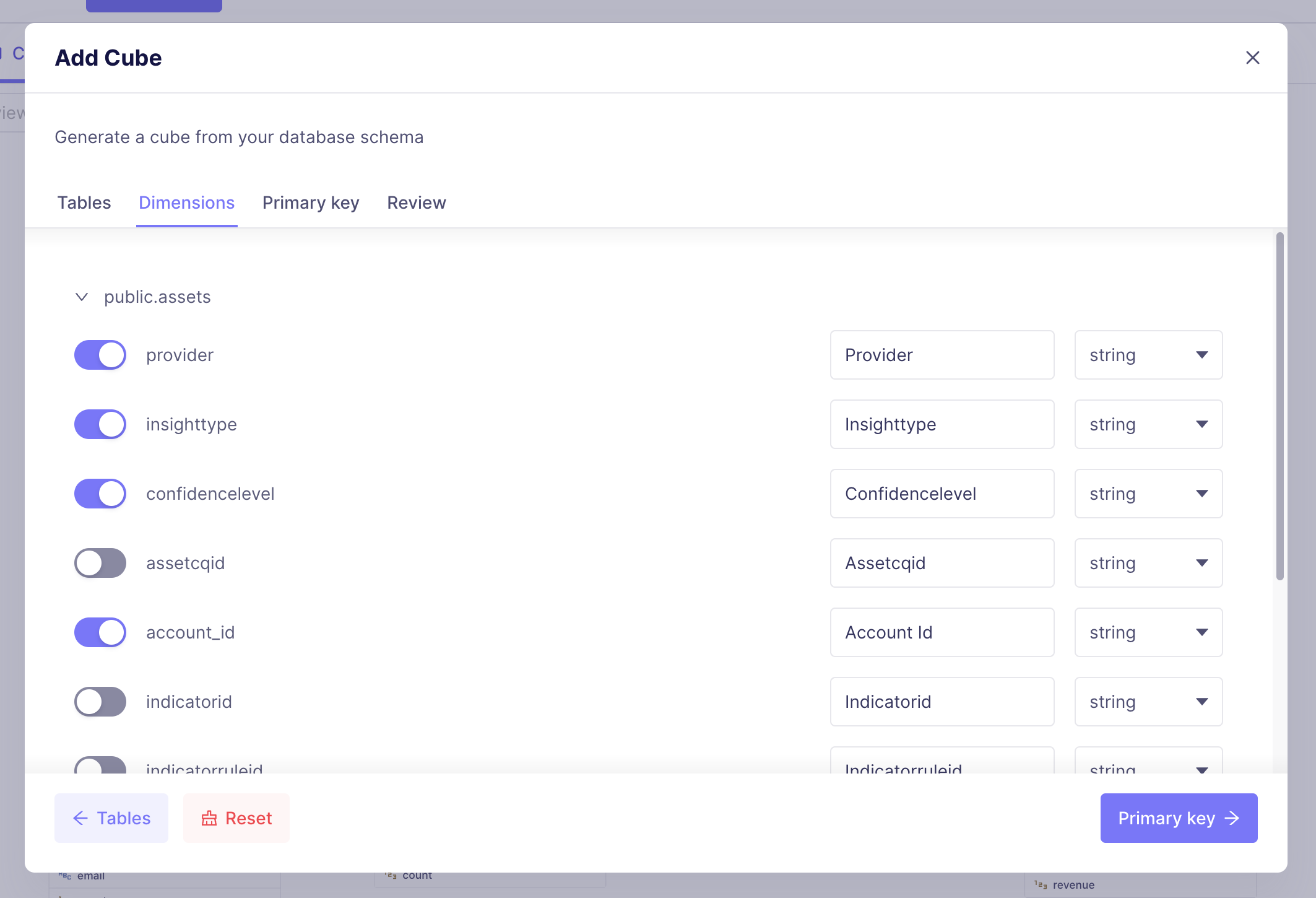
You can also generate the data model for a new cube based on the database schema.
To do so, click the **+ Generate Cube** button. It will bring up the
modal window where you can select a table from your data source:
 ### Editing cubes
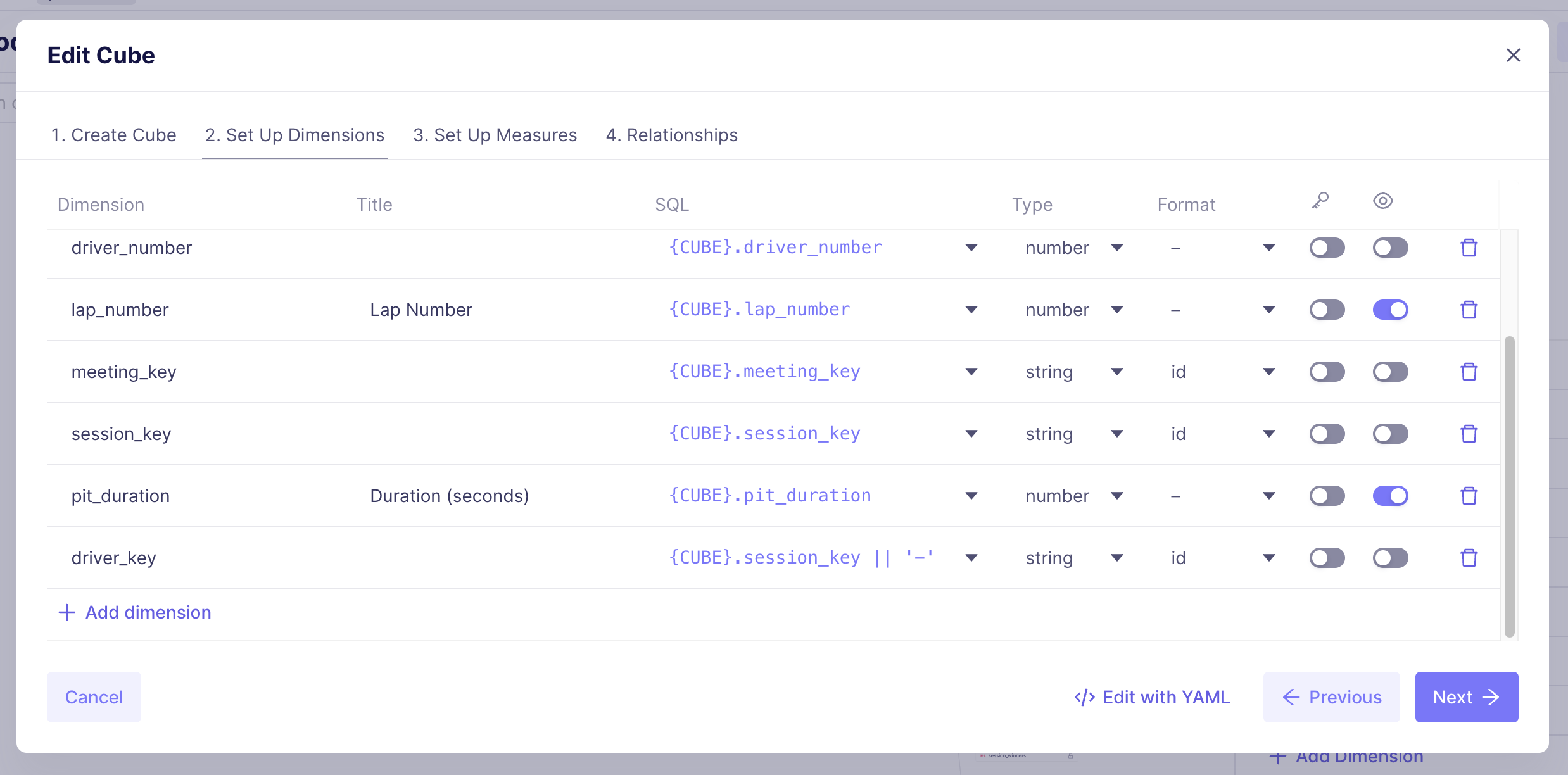
To edit a cube, click it on the canvas. Then, in the sidebar, click the **Edit**
button. This will bring up the modal window where you can edit the cube's details:
### Editing cubes
To edit a cube, click it on the canvas. Then, in the sidebar, click the **Edit**
button. This will bring up the modal window where you can edit the cube's details:
 Yu can also click **+ Add → Dimension**, **+ Add → Measure**, or
**+ Add → Access Policy** to quickly add respective members to the cube.
### Working with joins
You can add or edit joins via the **Relationships** tab while you're
[editing a cube](#editing-cube).
You can also add joins visually by dragging a line on the canvas from the side of one
dimension to another:
## Working with views
You can see views on the **Views** tab of Visual Modeler.
Views are represented as rectangles on the canvas. Cubes that are involved in a view
and provide members for it, are shown to the left of the view.
### Adding views
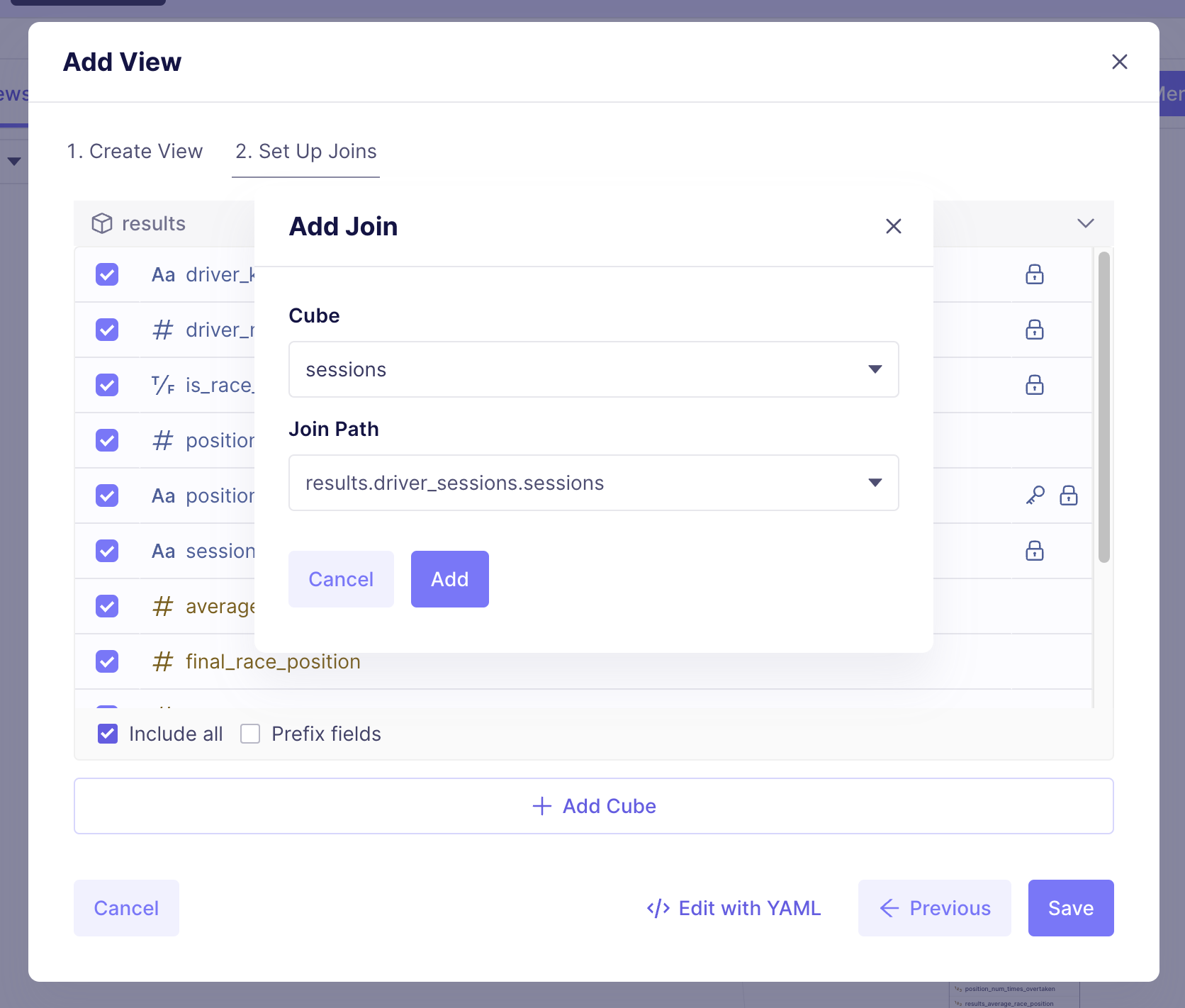
To add a view, click the **+ Add View** button. It will bring up a dialog where you
can choose the base cube, set the view details such as name and title, and add join paths.
Yu can also click **+ Add → Dimension**, **+ Add → Measure**, or
**+ Add → Access Policy** to quickly add respective members to the cube.
### Working with joins
You can add or edit joins via the **Relationships** tab while you're
[editing a cube](#editing-cube).
You can also add joins visually by dragging a line on the canvas from the side of one
dimension to another:
## Working with views
You can see views on the **Views** tab of Visual Modeler.
Views are represented as rectangles on the canvas. Cubes that are involved in a view
and provide members for it, are shown to the left of the view.
### Adding views
To add a view, click the **+ Add View** button. It will bring up a dialog where you
can choose the base cube, set the view details such as name and title, and add join paths.
 ### Editing views
To edit a views, click it on the canvas. Then, in the sidebar, click the **Edit**
button.
## YAML mode
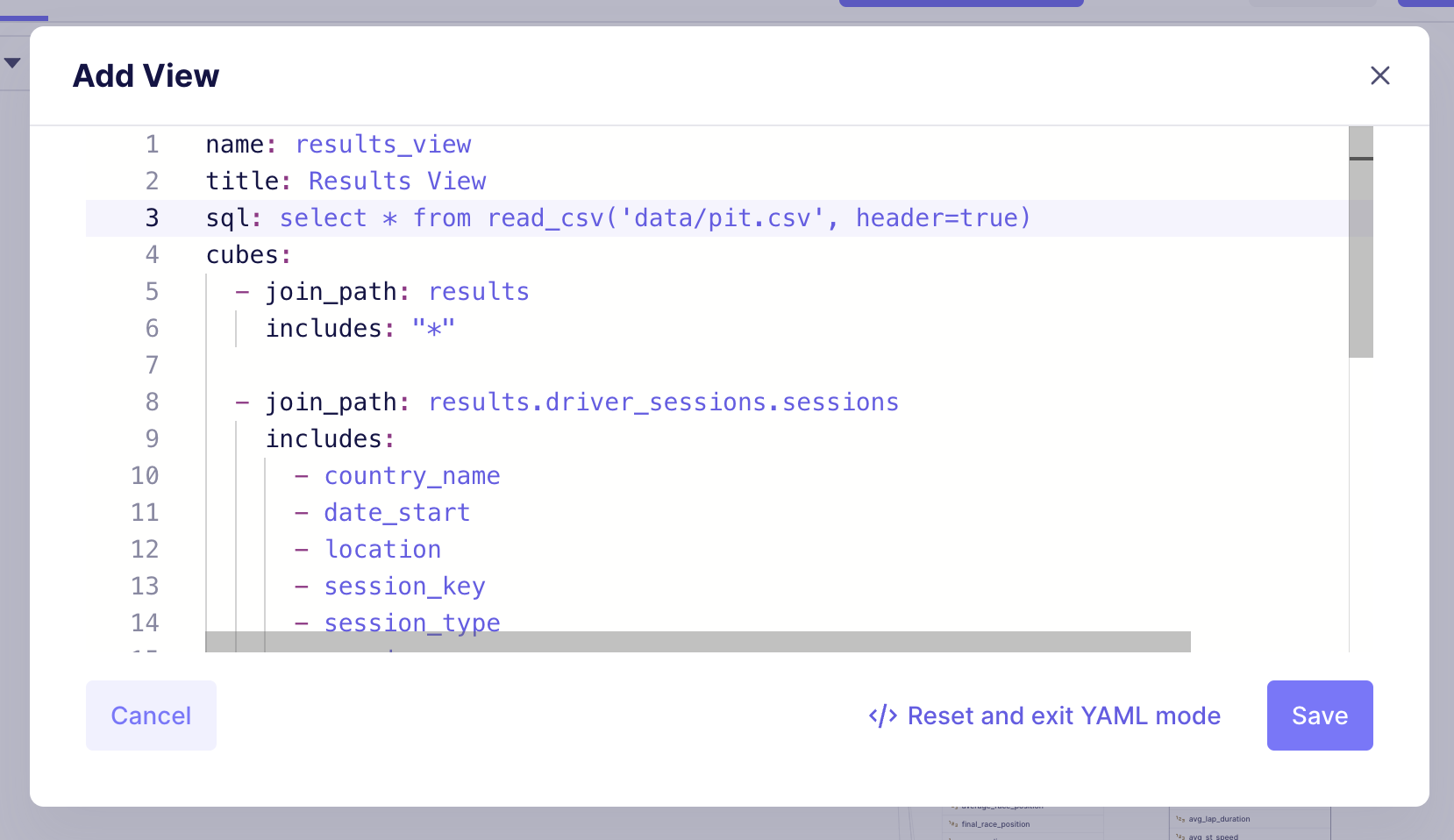
All modal windows mentioned above provide the option to use the *YAML mode* which can be
entered by clicking the **Edit with YAML** button.
In this mode, you can see and edit the data model represented using the [YAML syntax][ref-yaml-syntax].
That allows you to work around known [limitations](#limitations) and use all data modeling
features while staying in Visual Modeler editor.
### Editing views
To edit a views, click it on the canvas. Then, in the sidebar, click the **Edit**
button.
## YAML mode
All modal windows mentioned above provide the option to use the *YAML mode* which can be
entered by clicking the **Edit with YAML** button.
In this mode, you can see and edit the data model represented using the [YAML syntax][ref-yaml-syntax].
That allows you to work around known [limitations](#limitations) and use all data modeling
features while staying in Visual Modeler editor.
 ## Limitations
Visual Modeler does not intend to support all available data modeling features.
You always have options to use the [YAML mode](#yaml-mode) in Visual Modeler or switch the
code-first [data model editor][ref-data-model].
Currently, Visual Modeler does not support the following features in its UI:
* Editing of [meta information][ref-meta] for cubes, views, and their members.
* Editing [segments][ref-segments], [hierarchies][ref-hierarchies], and [refresh keys][ref-refresh-keys] in cubes.
* Editing [folders][ref-folders] in views.
* Adding [subquery dimensions][ref-sub-query] and time dimensions with [custom granularities][ref-granularities] in cubes.
* Adding [drill members][ref-drill-members] and [rolling window][ref-rolling-window] measures in cubes.
* Adding [pre-aggregations][ref-pre-aggregations].
* Removing cubes and views.
Cubes and views using these data modeling features will still be displayed in
Visual Modeler. However, those features can only be edited via the [YAML mode](#yaml-mode)
or in the code-forst data model editor.
Additionally, Visual Modeler only allows editing of cubes and views that are
defined using the [YAML syntax][ref-yaml-syntax] (not JavaScript). Also, it does not
allow editing of [dynamic data models][ref-dynamic-data-models] or models which use
[Jinja][ref-jinja].
[ref-data-modeling]: /docs/data-modeling/overview
[ref-data-model]: /docs/data-modeling/data-model-ide
[ref-meta]: /reference/data-modeling/cube#meta
[ref-segments]: /reference/data-modeling/segments
[ref-hierarchies]: /reference/data-modeling/hierarchies
[ref-folders]: /reference/data-modeling/view#folders
[ref-refresh-keys]: /reference/data-modeling/cube#refresh_key
[ref-pre-aggregations]: /reference/data-modeling/pre-aggregations
[ref-sub-query]: /reference/data-modeling/dimensions#sub_query
[ref-granularities]: /reference/data-modeling/dimensions#granularities
[ref-drill-members]: /reference/data-modeling/measures#drill_members
[ref-rolling-window]: /reference/data-modeling/measures#rolling_window
[ref-dynamic-data-models]: /docs/data-modeling/dynamic
[ref-jinja]: /docs/data-modeling/dynamic/jinja
[ref-continuous-deployment]: /docs/deployment/cloud/continuous-deployment
[ref-yaml-syntax]: /docs/data-modeling/syntax#model-syntax
[ref-dev-mode]: /docs/data-modeling/dev-mode
[ref-environments]: /admin/deployment/environments
[ref-playground]: /docs/workspace/playground
[ref-cubes]: /reference/data-modeling/cube
[ref-joins]: /reference/data-modeling/joins
[wiki-erd]: https://en.wikipedia.org/wiki/Entity–relationship_model
## Limitations
Visual Modeler does not intend to support all available data modeling features.
You always have options to use the [YAML mode](#yaml-mode) in Visual Modeler or switch the
code-first [data model editor][ref-data-model].
Currently, Visual Modeler does not support the following features in its UI:
* Editing of [meta information][ref-meta] for cubes, views, and their members.
* Editing [segments][ref-segments], [hierarchies][ref-hierarchies], and [refresh keys][ref-refresh-keys] in cubes.
* Editing [folders][ref-folders] in views.
* Adding [subquery dimensions][ref-sub-query] and time dimensions with [custom granularities][ref-granularities] in cubes.
* Adding [drill members][ref-drill-members] and [rolling window][ref-rolling-window] measures in cubes.
* Adding [pre-aggregations][ref-pre-aggregations].
* Removing cubes and views.
Cubes and views using these data modeling features will still be displayed in
Visual Modeler. However, those features can only be edited via the [YAML mode](#yaml-mode)
or in the code-forst data model editor.
Additionally, Visual Modeler only allows editing of cubes and views that are
defined using the [YAML syntax][ref-yaml-syntax] (not JavaScript). Also, it does not
allow editing of [dynamic data models][ref-dynamic-data-models] or models which use
[Jinja][ref-jinja].
[ref-data-modeling]: /docs/data-modeling/overview
[ref-data-model]: /docs/data-modeling/data-model-ide
[ref-meta]: /reference/data-modeling/cube#meta
[ref-segments]: /reference/data-modeling/segments
[ref-hierarchies]: /reference/data-modeling/hierarchies
[ref-folders]: /reference/data-modeling/view#folders
[ref-refresh-keys]: /reference/data-modeling/cube#refresh_key
[ref-pre-aggregations]: /reference/data-modeling/pre-aggregations
[ref-sub-query]: /reference/data-modeling/dimensions#sub_query
[ref-granularities]: /reference/data-modeling/dimensions#granularities
[ref-drill-members]: /reference/data-modeling/measures#drill_members
[ref-rolling-window]: /reference/data-modeling/measures#rolling_window
[ref-dynamic-data-models]: /docs/data-modeling/dynamic
[ref-jinja]: /docs/data-modeling/dynamic/jinja
[ref-continuous-deployment]: /docs/deployment/cloud/continuous-deployment
[ref-yaml-syntax]: /docs/data-modeling/syntax#model-syntax
[ref-dev-mode]: /docs/data-modeling/dev-mode
[ref-environments]: /admin/deployment/environments
[ref-playground]: /docs/workspace/playground
[ref-cubes]: /reference/data-modeling/cube
[ref-joins]: /reference/data-modeling/joins
[wiki-erd]: https://en.wikipedia.org/wiki/Entity–relationship_model