> ## Documentation Index
> Fetch the complete documentation index at: https://docs.cube.dev/llms.txt
> Use this file to discover all available pages before exploring further.
# Analytics Chat
> Conversational analytics interface for asking plain-language questions and getting trusted, AI-powered insights from your semantic layer.
Analytics Chat is Cube's conversational analytics experience — ask questions in plain language and get trusted, AI-powered insights without writing queries or building visualizations.
## How it works
The AI agent interprets your questions, generates queries against your semantic model, and presents findings in natural language. The agent can create multiple queries to answer complex questions and perform ad hoc analysis while maintaining full data governance through your semantic layer.
## Key features
* **Natural language queries** – Ask questions in plain language without knowing SQL
* **Multi-query reasoning** – The AI creates and synthesizes multiple queries for complex questions
* **Semantic model integration** – All queries run against your semantic model with proper access control and security
* **Queued messages** – Send follow-up messages while the agent is still processing
* **Save to Workbook** – Export insights to [Workbooks](/docs/explore-analyze/workbooks) for further analysis
## Discover available fields
You can ask the AI agent what's available in your semantic model before
diving into analysis. This is useful when you're new to a deployment or
exploring an unfamiliar view.
Try prompts like:
* "What fields are available?"
* "What measures and dimensions can I query in the Orders view?"
* "Describe the fields in the Customers view and what each one means."
* "What does the `lifetime_value` measure represent?"
The agent uses the descriptions and [AI context](/docs/data-modeling/ai-context)
defined on your views, measures, and dimensions to answer. Well-documented
semantic models produce better answers — see
[AI context best practices](/docs/data-modeling/ai-context#best-practices)
for guidance on writing descriptions the agent can use.
## Queued messages
You can send follow-up messages while the AI agent is still processing a
previous request. These messages are queued and processed in order once the
agent completes its current task.
This allows you to:
* **Refine your question** before the agent finishes, if you realize you want
to adjust the scope or add constraints
* **Queue multiple questions** to ask a series of related questions without
waiting for each response
* **Provide additional context** to give the agent more information that it
can incorporate into its next response
## Sharing
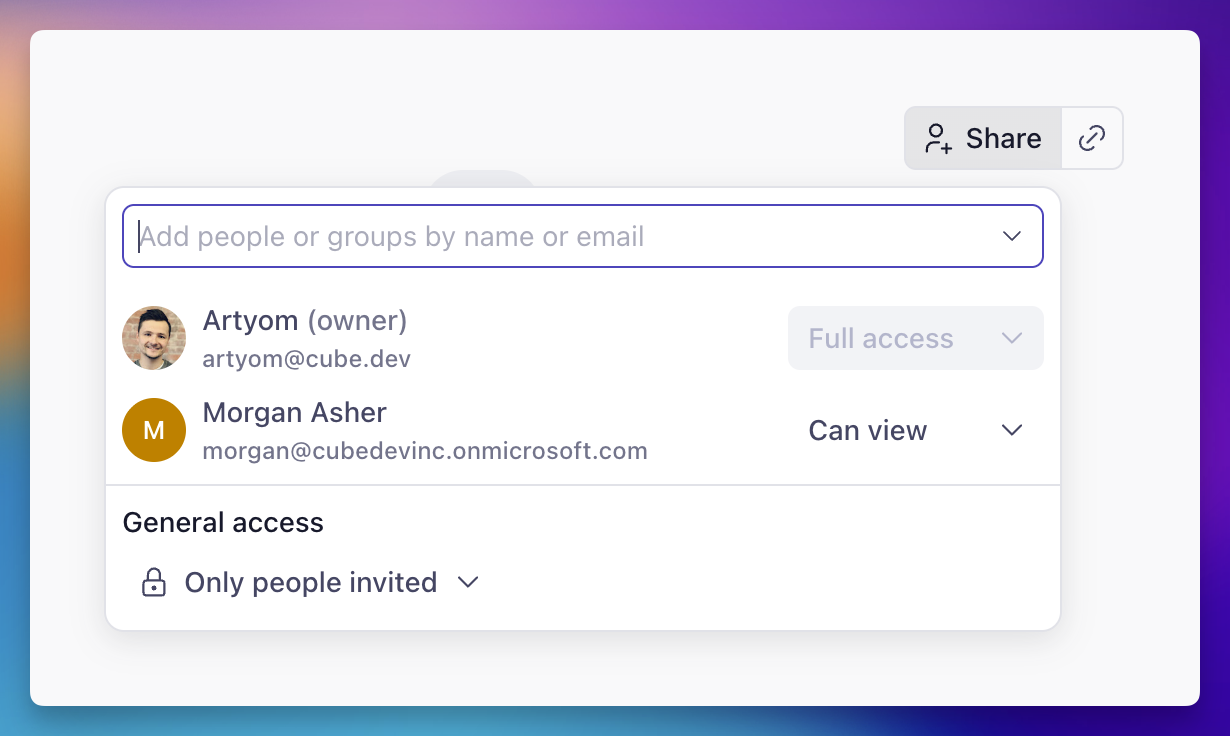
Click **Share** in the chat header to grant view access to other members
of your account. You can pick individual users, a user group, or flip
**General access** to **Organization** to make the chat visible to
everyone. Use the **Copy link** button next to **Share** to grab a direct
URL once access is set up. Recipients still need to have access to the
deployment and the data the agent used; otherwise they'll see a "Chat
not available" page.
 Recipients open the chat at the same URL as the owner and can scroll
through the full conversation, expand the agent's reasoning and tool
calls, and explore the charts and tables it produced — but they can't
send new messages. Only the owner can continue the thread, and the
header shows a "Shared by …" label so viewers always know whose
conversation they're reading.
If the owner asks more questions later, those messages — and the
agent's replies — show up for viewers on the next load.
## Embedding
Analytics Chat can be [embedded](/embedding) into your applications for customer-facing analytics, internal tools, or white-label solutions.
## Learn more
* [Workbooks](/docs/explore-analyze/workbooks) – Build and organize reports with AI assistance
* [Embedding](/embedding) – Embed analytics in your applications
* [Cube Agentic Analytics announcement](https://cube.dev/blog/cube-agentic-analytics) – Learn about the vision behind agentic analytics
Recipients open the chat at the same URL as the owner and can scroll
through the full conversation, expand the agent's reasoning and tool
calls, and explore the charts and tables it produced — but they can't
send new messages. Only the owner can continue the thread, and the
header shows a "Shared by …" label so viewers always know whose
conversation they're reading.
If the owner asks more questions later, those messages — and the
agent's replies — show up for viewers on the next load.
## Embedding
Analytics Chat can be [embedded](/embedding) into your applications for customer-facing analytics, internal tools, or white-label solutions.
## Learn more
* [Workbooks](/docs/explore-analyze/workbooks) – Build and organize reports with AI assistance
* [Embedding](/embedding) – Embed analytics in your applications
* [Cube Agentic Analytics announcement](https://cube.dev/blog/cube-agentic-analytics) – Learn about the vision behind agentic analytics