> ## Documentation Index
> Fetch the complete documentation index at: https://docs.cube.dev/llms.txt
> Use this file to discover all available pages before exploring further.
# Query from a BI tool
> Use the SQL API and Semantic Layer Sync from a Databricks-oriented Cube Cloud setup so BI tools consume your semantic layer.
You can query Cube using a BI or visualization tool through the Cube SQL API. To
provide a good end-user experience in your BI tool, we recommend mapping the
BI's data model to Cube's semantic layer. This can be done automatically with
Semantic Layer Sync or manually.
## Semantic Layer Sync
Semantic Layer Sync programmatically connects a BI tool to Cube and creates or
updates BI-specific entities that correspond to entities within the data model
in Cube, such as cubes, views, measures, and dimensions.
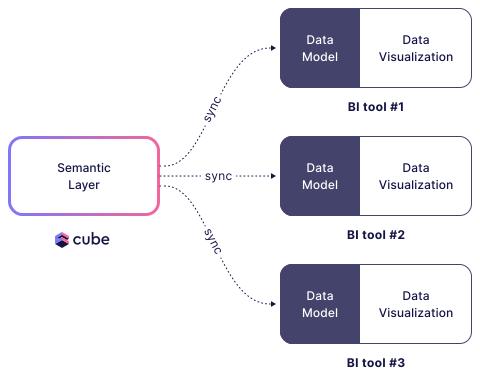 Semantic Layer Sync will synchronize all public cubes and views with connected
BI tools. We recommend making your cubes private and only exposing views. Both
cubes and views are public by default. To make cubes private, set the
[public](/reference/data-modeling/cube#public) parameter to `false`.
```yaml theme={"dark"}
cubes:
- name: orders
sql_table: ECOM.ORDERS
public: false
```
Let’s create our first Semantic Layer Sync with
[Apache Superset](https://superset.apache.org/)!
You can create a new sync by navigating to the **Semantic Layer Sync**
tab on the **BI Integrations** page and clicking **+ Create
Sync**. Follow the steps in the wizard to create a sync.
Under the hood, Semantic Layer Sync is configured using the `semantic_layer_sync`
option in the `cube.py` configuration file.
Cube uses the Superset API, which requires a `user` and `password` for
authentication. You can use your own username and password or create a new
service account. You can copy a `URL` from any page of your Superset workspace.
Example configuration for Superset:
```python title="Python" theme={"dark"}
from cube import config
@config('semantic_layer_sync')
def semantic_layer_sync(ctx: dict) -> list[dict]:
return [
{
'type': 'superset',
'name': 'Superset Sync',
'config': {
'user': 'mail@example.com',
'password': '4dceae-606a03-93ae6dc7',
'url': 'superset.example.com',
'database': 'Cube Cloud: production-deployment'
}
}
]
```
```javascript title="JavaScript" theme={"dark"}
module.exports = {
semanticLayerSync: ({ securityContext }) => {
return [
{
type: "superset",
name: "Superset Sync",
config: {
user: "mail@example.com",
password: "4dceae-606a03-93ae6dc7",
url: "superset.example.com",
database: "Cube Cloud: production-deployment"
}
}
]
}
}
```
Replace the fields for user, password, and URL with your Superset credentials,
then click on **Save All**. You can now go to the **BI
Integrations** page and trigger the synchronization of your newly created
semantic layer.
After running the sync, navigate to your Superset instance. You should see the
`orders_view` dataset that was created in Superset. Cube automatically maps all
metrics and dimensions in Superset to measures and dimensions in the Cube data
model.
## Manual Setup
Alternatively, you can connect to Cube and create all the mappings manually. To
do this, navigate to your Apache Superset instance and connect to Cube Cloud as
if it were a Postgres database.
You can find the credentials to connect to Cube on the **BI
Integrations** page under the **SQL API Connection** tab.
After connecting, create a new dataset in Superset and select "orders\_view" as a
table. Now you can map Superset metrics and columns to Cube's measures and
dimensions.
Semantic Layer Sync will synchronize all public cubes and views with connected
BI tools. We recommend making your cubes private and only exposing views. Both
cubes and views are public by default. To make cubes private, set the
[public](/reference/data-modeling/cube#public) parameter to `false`.
```yaml theme={"dark"}
cubes:
- name: orders
sql_table: ECOM.ORDERS
public: false
```
Let’s create our first Semantic Layer Sync with
[Apache Superset](https://superset.apache.org/)!
You can create a new sync by navigating to the **Semantic Layer Sync**
tab on the **BI Integrations** page and clicking **+ Create
Sync**. Follow the steps in the wizard to create a sync.
Under the hood, Semantic Layer Sync is configured using the `semantic_layer_sync`
option in the `cube.py` configuration file.
Cube uses the Superset API, which requires a `user` and `password` for
authentication. You can use your own username and password or create a new
service account. You can copy a `URL` from any page of your Superset workspace.
Example configuration for Superset:
```python title="Python" theme={"dark"}
from cube import config
@config('semantic_layer_sync')
def semantic_layer_sync(ctx: dict) -> list[dict]:
return [
{
'type': 'superset',
'name': 'Superset Sync',
'config': {
'user': 'mail@example.com',
'password': '4dceae-606a03-93ae6dc7',
'url': 'superset.example.com',
'database': 'Cube Cloud: production-deployment'
}
}
]
```
```javascript title="JavaScript" theme={"dark"}
module.exports = {
semanticLayerSync: ({ securityContext }) => {
return [
{
type: "superset",
name: "Superset Sync",
config: {
user: "mail@example.com",
password: "4dceae-606a03-93ae6dc7",
url: "superset.example.com",
database: "Cube Cloud: production-deployment"
}
}
]
}
}
```
Replace the fields for user, password, and URL with your Superset credentials,
then click on **Save All**. You can now go to the **BI
Integrations** page and trigger the synchronization of your newly created
semantic layer.
After running the sync, navigate to your Superset instance. You should see the
`orders_view` dataset that was created in Superset. Cube automatically maps all
metrics and dimensions in Superset to measures and dimensions in the Cube data
model.
## Manual Setup
Alternatively, you can connect to Cube and create all the mappings manually. To
do this, navigate to your Apache Superset instance and connect to Cube Cloud as
if it were a Postgres database.
You can find the credentials to connect to Cube on the **BI
Integrations** page under the **SQL API Connection** tab.
After connecting, create a new dataset in Superset and select "orders\_view" as a
table. Now you can map Superset metrics and columns to Cube's measures and
dimensions.
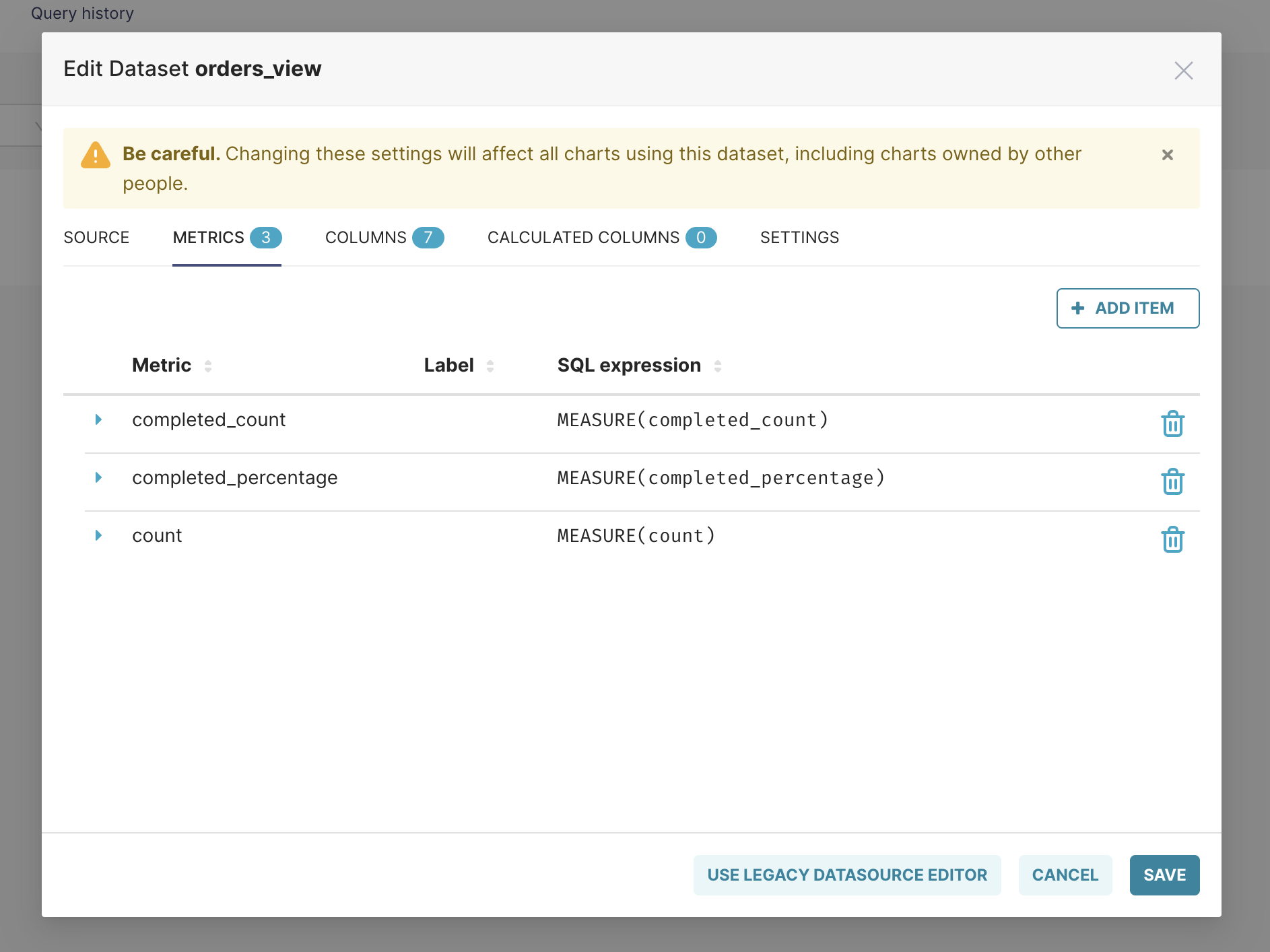 As you can see, we use the `MEASURE` function in the "SQL expression" field.
This function informs Cube that we are querying the measure and that it should
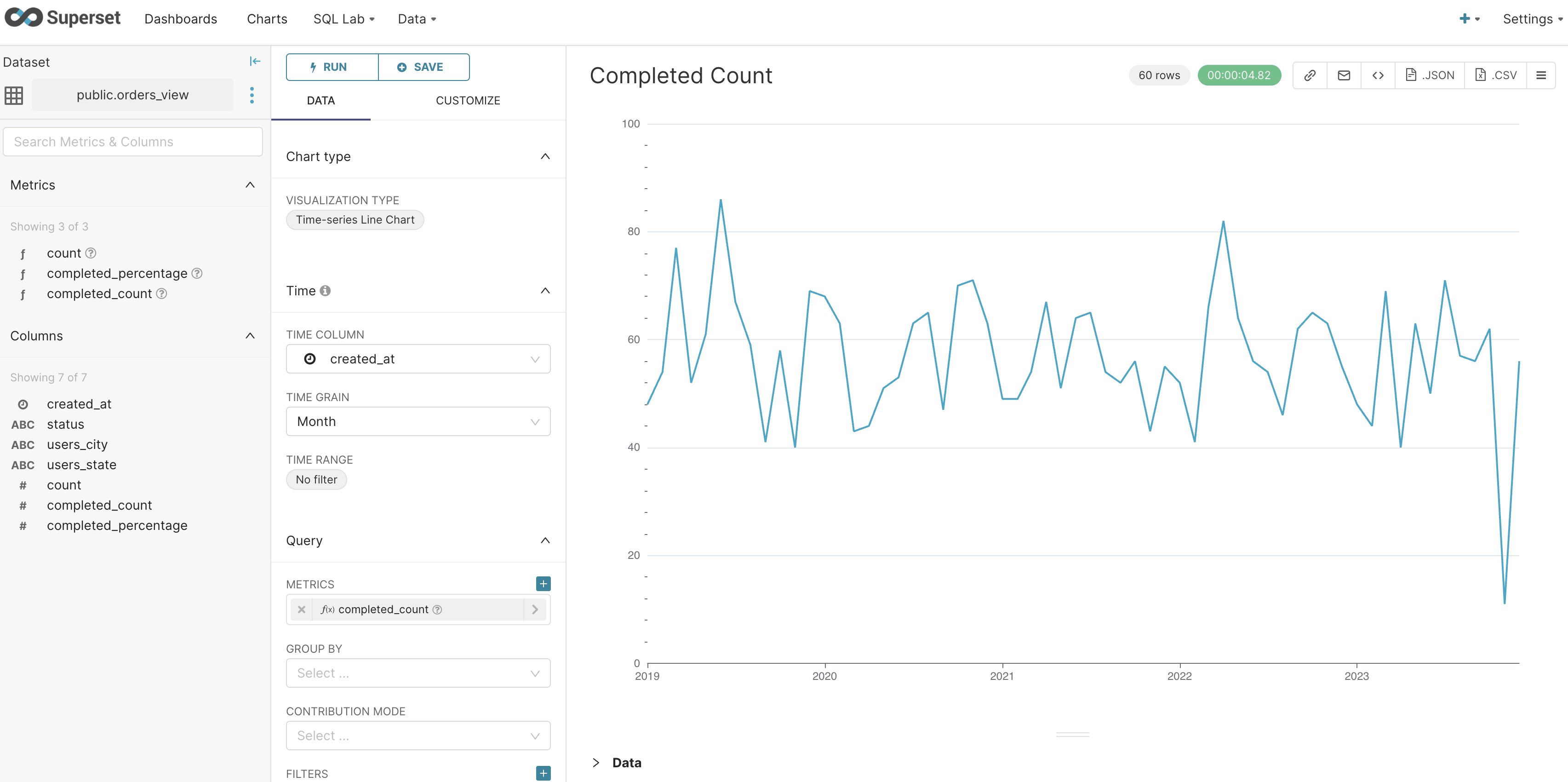
be evaluated based on Cube's data model. You can now query Cube from Superset,
as shown in the image below.
As you can see, we use the `MEASURE` function in the "SQL expression" field.
This function informs Cube that we are querying the measure and that it should
be evaluated based on Cube's data model. You can now query Cube from Superset,
as shown in the image below.
 In the next section, we will learn how to use Cube's REST (JSON) API to query our view
from a React app.
In the next section, we will learn how to use Cube's REST (JSON) API to query our view
from a React app.