> ## Documentation Index
> Fetch the complete documentation index at: https://docs.cube.dev/llms.txt
> Use this file to discover all available pages before exploring further.
# Calculating share of total
> Compute each dimension member's contribution to the grand total—or to a fixed subtotal—using calculated fields or multi-stage measures.
## Use case
A common analytics need is to show each row's contribution to the overall
total. For example, given revenue broken down by product brand, you might want
to display what percentage of all revenue each brand represents:
| brand | revenue | share of total |
| ---------------- | -------: | -------------: |
| American Apparel | \$5,930 | 28.98% |
| Patagonia | \$239 | 1.17% |
| Columbia | \$14,302 | 69.85% |
There are two ways to achieve this in Cube:
* **[Calculated fields](#using-calculated-fields)** — add a % of total column
directly in a workbook without any data model changes. Best for ad-hoc
exploration.
* **[Data modeling](#data-modeling)** — define the share measure in the
semantic model so it is available everywhere: APIs, embedded analytics, AI
agents, and Explore. Best for a metric that should be reusable across the
product.
## Using calculated fields
[Calculated fields][ref-calculated-fields] let you add derived columns to a
workbook report without touching the data model.
To add a % of total column:
1. Build a table with the `products.brand` dimension and the
`order_items.total_sale_price` measure.
2. Open the header menu on the `Total Sale Price` column.
3. Choose **Calculations → % of total**.
Cube adds a calculated field that divides each row's value by the sum across
all rows in the result.
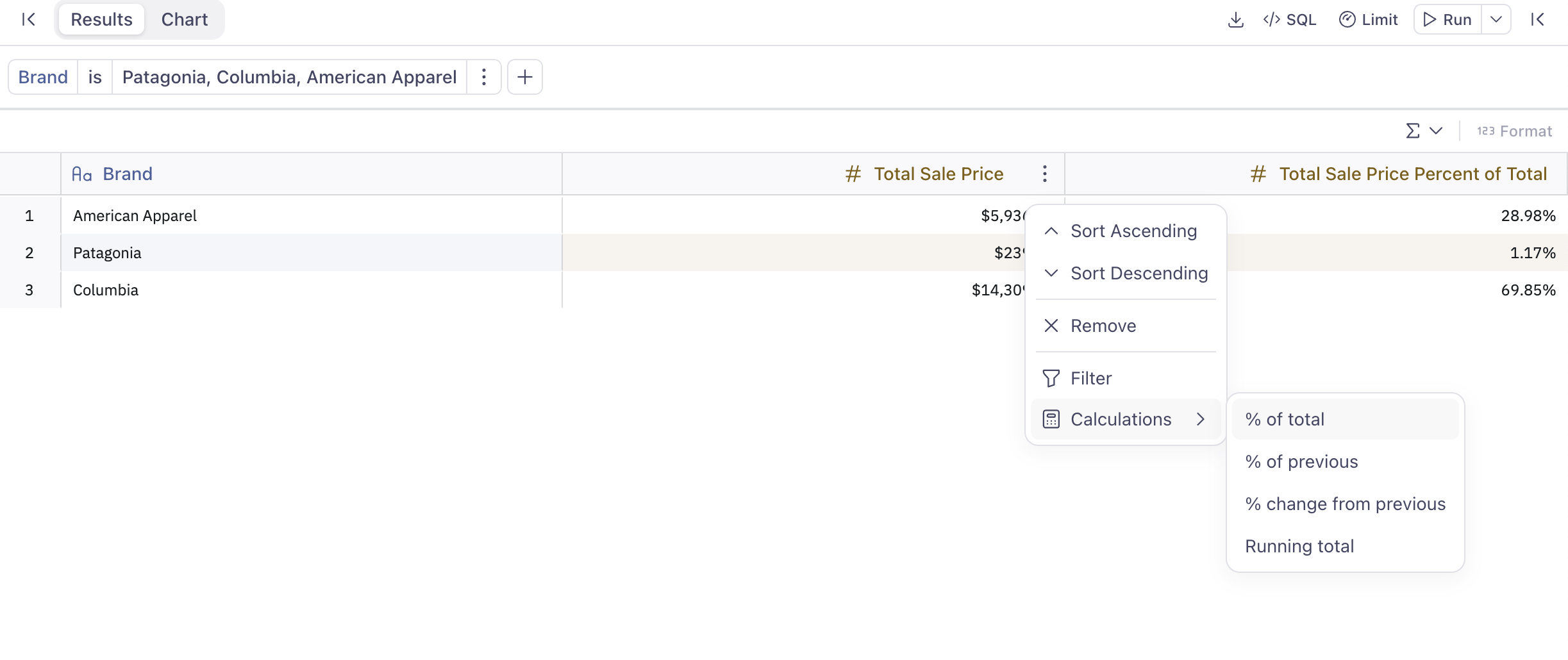 `% of total` is available for measures with **Count** or **Sum** aggregation
types. See [Calculated fields][ref-calculated-fields] for the full list of
built-in calculations and how to edit them.
## Data modeling
When the share measure needs to be part of the semantic model — so it is
returned by the API, visible in Explore, or accessible to AI agents — define
it using multi-stage measures powered by [Tesseract][link-tesseract].
The key building block is the [`grain`][ref-grain] parameter with `keep_only`:
when set to an empty list, the inner aggregation stage groups by *nothing*,
computing the grand total across all rows. The outer stage then joins that total
back and groups by the query's dimensions as usual.
Multi-stage calculations are powered by Tesseract, the [next-generation data
modeling engine][link-tesseract]. In versions before v1.7.0, it was not enabled by default.
Calculating share of total requires three measures:
1. A **base measure** — the regular aggregate, e.g., `total_sale_price`.
2. A **helper measure** — a multi-stage measure that re-aggregates the base
measure with `grain` set to `keep_only: []`, fixing the inner `GROUP BY` to
nothing (the grand total). This measure is internal and should be hidden from
views.
3. A **ratio measure** — a multi-stage measure that divides the base by the
helper total.
The examples below extend the `order_items` cube from the
[ecommerce demo model][link-ecommerce-demo]. The `brand` and `category`
dimensions are proxied from the joined `products` cube so they can be
referenced by `grain`.
### Share of grand total
Add the three measures to `order_items`:
```yaml title="YAML" theme={"dark"}
cubes:
- name: order_items
sql_table: ECOMMERCE.ORDER_ITEMS
joins:
- name: products
sql: "{CUBE.product_id} = {products.id}"
relationship: many_to_one
dimensions:
- name: id
sql: ID
type: number
primary_key: true
- name: brand
sql: "{products.brand}"
type: string
measures:
- name: total_sale_price
sql: SALE_PRICE
type: sum
format: currency
- name: total_revenue_grand_total
multi_stage: true
sql: "{total_sale_price}"
type: sum
grain:
keep_only: []
- name: revenue_share
multi_stage: true
sql: "1.0 * {total_sale_price} / NULLIF({total_revenue_grand_total}, 0)"
type: number
format: percent
```
```javascript title="JavaScript" theme={"dark"}
cube(`order_items`, {
sql_table: `ECOMMERCE.ORDER_ITEMS`,
joins: {
products: {
sql: `${CUBE.product_id} = ${products.id}`,
relationship: `many_to_one`
}
},
dimensions: {
id: {
sql: `ID`,
type: `number`,
primary_key: true
},
brand: {
sql: `${products.brand}`,
type: `string`
}
},
measures: {
total_sale_price: {
sql: `SALE_PRICE`,
type: `sum`,
format: `currency`
},
total_revenue_grand_total: {
multi_stage: true,
sql: `${total_sale_price}`,
type: `sum`,
grain: {
keep_only: []
}
},
revenue_share: {
multi_stage: true,
sql: `1.0 * ${total_sale_price} / NULLIF(${total_revenue_grand_total}, 0)`,
type: `number`,
format: `percent`
}
}
})
```
`keep_only: []` tells Tesseract that the inner stage for `total_revenue_grand_total`
should group by no dimensions, producing a single grand-total row. The outer stage
joins it back and groups by whatever dimensions are in the query (e.g., `brand`),
so every row receives the same total denominator.
### Hiding the helper measure from views
`total_revenue_grand_total` is a computation artifact — its value never changes
with dimension grouping, so it is meaningless to end users on its own. Exclude it
from the view using the `excludes` key while keeping `includes: "*"` for everything
else:
```yaml theme={"dark"}
views:
- name: orders_transactions
cubes:
- join_path: order_items
includes: "*"
excludes:
- total_revenue_grand_total
- join_path: order_items.products
prefix: true
includes: "*"
# ... other join paths
```
Only `total_sale_price` and `revenue_share` are exposed to consumers of the view.
### Share of a fixed subtotal
Sometimes you want each row's share *within a category* rather than the
overall total — for example, each brand's share of its product category's
revenue.
Use `grain` with `keep_only` set to the dimension you want to *fix* as the
subtotal boundary. The inner stage will group only by that dimension, and the
outer stage will group by the full set of query dimensions:
```yaml title="YAML" theme={"dark"}
cubes:
- name: order_items
sql_table: ECOMMERCE.ORDER_ITEMS
joins:
- name: products
sql: "{CUBE.product_id} = {products.id}"
relationship: many_to_one
dimensions:
- name: id
sql: ID
type: number
primary_key: true
- name: brand
sql: "{products.brand}"
type: string
- name: category
sql: "{products.category}"
type: string
measures:
- name: total_sale_price
sql: SALE_PRICE
type: sum
format: currency
- name: category_revenue_grand_total
multi_stage: true
sql: "{total_sale_price}"
type: sum
grain:
keep_only:
- category
- name: revenue_share_of_category
multi_stage: true
sql: "1.0 * {total_sale_price} / NULLIF({category_revenue_grand_total}, 0)"
type: number
format: percent
```
```javascript title="JavaScript" theme={"dark"}
cube(`order_items`, {
sql_table: `ECOMMERCE.ORDER_ITEMS`,
joins: {
products: {
sql: `${CUBE.product_id} = ${products.id}`,
relationship: `many_to_one`
}
},
dimensions: {
id: {
sql: `ID`,
type: `number`,
primary_key: true
},
brand: {
sql: `${products.brand}`,
type: `string`
},
category: {
sql: `${products.category}`,
type: `string`
}
},
measures: {
total_sale_price: {
sql: `SALE_PRICE`,
type: `sum`,
format: `currency`
},
category_revenue_grand_total: {
multi_stage: true,
sql: `${total_sale_price}`,
type: `sum`,
grain: {
keep_only: [`category`]
}
},
revenue_share_of_category: {
multi_stage: true,
sql: `1.0 * ${total_sale_price} / NULLIF(${category_revenue_grand_total}, 0)`,
type: `number`,
format: `percent`
}
}
})
```
With `keep_only: [category]`, the inner stage computes revenue per category.
The outer stage groups by both `category` and `brand`, so each brand row
divides its revenue by the right category total. Exclude
`category_revenue_grand_total` from the view the same way as shown above.
## Result
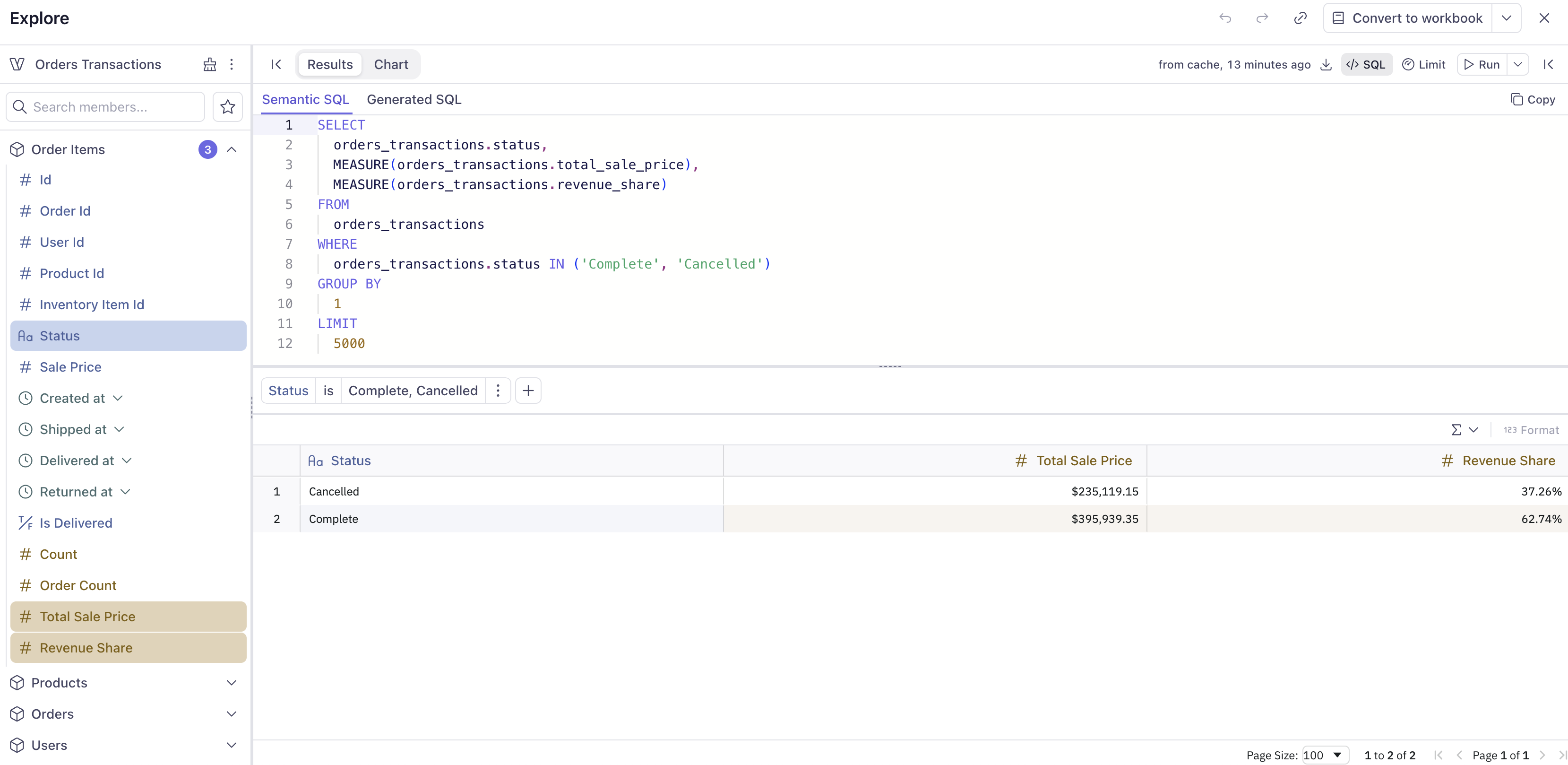
Because `total_revenue_grand_total` is excluded from the view, only the
meaningful measures — `total_sale_price` and `revenue_share` — are visible
to end users in Explore, workbooks, and the API.
`% of total` is available for measures with **Count** or **Sum** aggregation
types. See [Calculated fields][ref-calculated-fields] for the full list of
built-in calculations and how to edit them.
## Data modeling
When the share measure needs to be part of the semantic model — so it is
returned by the API, visible in Explore, or accessible to AI agents — define
it using multi-stage measures powered by [Tesseract][link-tesseract].
The key building block is the [`grain`][ref-grain] parameter with `keep_only`:
when set to an empty list, the inner aggregation stage groups by *nothing*,
computing the grand total across all rows. The outer stage then joins that total
back and groups by the query's dimensions as usual.
Multi-stage calculations are powered by Tesseract, the [next-generation data
modeling engine][link-tesseract]. In versions before v1.7.0, it was not enabled by default.
Calculating share of total requires three measures:
1. A **base measure** — the regular aggregate, e.g., `total_sale_price`.
2. A **helper measure** — a multi-stage measure that re-aggregates the base
measure with `grain` set to `keep_only: []`, fixing the inner `GROUP BY` to
nothing (the grand total). This measure is internal and should be hidden from
views.
3. A **ratio measure** — a multi-stage measure that divides the base by the
helper total.
The examples below extend the `order_items` cube from the
[ecommerce demo model][link-ecommerce-demo]. The `brand` and `category`
dimensions are proxied from the joined `products` cube so they can be
referenced by `grain`.
### Share of grand total
Add the three measures to `order_items`:
```yaml title="YAML" theme={"dark"}
cubes:
- name: order_items
sql_table: ECOMMERCE.ORDER_ITEMS
joins:
- name: products
sql: "{CUBE.product_id} = {products.id}"
relationship: many_to_one
dimensions:
- name: id
sql: ID
type: number
primary_key: true
- name: brand
sql: "{products.brand}"
type: string
measures:
- name: total_sale_price
sql: SALE_PRICE
type: sum
format: currency
- name: total_revenue_grand_total
multi_stage: true
sql: "{total_sale_price}"
type: sum
grain:
keep_only: []
- name: revenue_share
multi_stage: true
sql: "1.0 * {total_sale_price} / NULLIF({total_revenue_grand_total}, 0)"
type: number
format: percent
```
```javascript title="JavaScript" theme={"dark"}
cube(`order_items`, {
sql_table: `ECOMMERCE.ORDER_ITEMS`,
joins: {
products: {
sql: `${CUBE.product_id} = ${products.id}`,
relationship: `many_to_one`
}
},
dimensions: {
id: {
sql: `ID`,
type: `number`,
primary_key: true
},
brand: {
sql: `${products.brand}`,
type: `string`
}
},
measures: {
total_sale_price: {
sql: `SALE_PRICE`,
type: `sum`,
format: `currency`
},
total_revenue_grand_total: {
multi_stage: true,
sql: `${total_sale_price}`,
type: `sum`,
grain: {
keep_only: []
}
},
revenue_share: {
multi_stage: true,
sql: `1.0 * ${total_sale_price} / NULLIF(${total_revenue_grand_total}, 0)`,
type: `number`,
format: `percent`
}
}
})
```
`keep_only: []` tells Tesseract that the inner stage for `total_revenue_grand_total`
should group by no dimensions, producing a single grand-total row. The outer stage
joins it back and groups by whatever dimensions are in the query (e.g., `brand`),
so every row receives the same total denominator.
### Hiding the helper measure from views
`total_revenue_grand_total` is a computation artifact — its value never changes
with dimension grouping, so it is meaningless to end users on its own. Exclude it
from the view using the `excludes` key while keeping `includes: "*"` for everything
else:
```yaml theme={"dark"}
views:
- name: orders_transactions
cubes:
- join_path: order_items
includes: "*"
excludes:
- total_revenue_grand_total
- join_path: order_items.products
prefix: true
includes: "*"
# ... other join paths
```
Only `total_sale_price` and `revenue_share` are exposed to consumers of the view.
### Share of a fixed subtotal
Sometimes you want each row's share *within a category* rather than the
overall total — for example, each brand's share of its product category's
revenue.
Use `grain` with `keep_only` set to the dimension you want to *fix* as the
subtotal boundary. The inner stage will group only by that dimension, and the
outer stage will group by the full set of query dimensions:
```yaml title="YAML" theme={"dark"}
cubes:
- name: order_items
sql_table: ECOMMERCE.ORDER_ITEMS
joins:
- name: products
sql: "{CUBE.product_id} = {products.id}"
relationship: many_to_one
dimensions:
- name: id
sql: ID
type: number
primary_key: true
- name: brand
sql: "{products.brand}"
type: string
- name: category
sql: "{products.category}"
type: string
measures:
- name: total_sale_price
sql: SALE_PRICE
type: sum
format: currency
- name: category_revenue_grand_total
multi_stage: true
sql: "{total_sale_price}"
type: sum
grain:
keep_only:
- category
- name: revenue_share_of_category
multi_stage: true
sql: "1.0 * {total_sale_price} / NULLIF({category_revenue_grand_total}, 0)"
type: number
format: percent
```
```javascript title="JavaScript" theme={"dark"}
cube(`order_items`, {
sql_table: `ECOMMERCE.ORDER_ITEMS`,
joins: {
products: {
sql: `${CUBE.product_id} = ${products.id}`,
relationship: `many_to_one`
}
},
dimensions: {
id: {
sql: `ID`,
type: `number`,
primary_key: true
},
brand: {
sql: `${products.brand}`,
type: `string`
},
category: {
sql: `${products.category}`,
type: `string`
}
},
measures: {
total_sale_price: {
sql: `SALE_PRICE`,
type: `sum`,
format: `currency`
},
category_revenue_grand_total: {
multi_stage: true,
sql: `${total_sale_price}`,
type: `sum`,
grain: {
keep_only: [`category`]
}
},
revenue_share_of_category: {
multi_stage: true,
sql: `1.0 * ${total_sale_price} / NULLIF(${category_revenue_grand_total}, 0)`,
type: `number`,
format: `percent`
}
}
})
```
With `keep_only: [category]`, the inner stage computes revenue per category.
The outer stage groups by both `category` and `brand`, so each brand row
divides its revenue by the right category total. Exclude
`category_revenue_grand_total` from the view the same way as shown above.
## Result
Because `total_revenue_grand_total` is excluded from the view, only the
meaningful measures — `total_sale_price` and `revenue_share` — are visible
to end users in Explore, workbooks, and the API.
 Query filters applied to the dimension used in share calculations (e.g.,
filtering to a specific brand) will also filter the data used to compute
the total, making that row's share appear as 100%. To keep the total
unaffected by such filters, use the [`filter`][ref-filter] parameter to
exclude them from the helper measure — see [share of total (filter
override)][ref-share-filter].
[link-tesseract]: https://cube.dev/blog/introducing-next-generation-data-modeling-engine
[link-ecommerce-demo]: https://github.com/cubedevinc/ecommerce_demo
[ref-grain]: /reference/data-modeling/measures#grain
[ref-filter]: /reference/data-modeling/measures#filter
[ref-share-filter]: /docs/data-modeling/measures#share-of-total-filter-override
[ref-dynamic-params]: /recipes/data-modeling/passing-dynamic-parameters-in-a-query
[ref-calculated-fields]: /docs/explore-analyze/workbooks/calculated-fields
Query filters applied to the dimension used in share calculations (e.g.,
filtering to a specific brand) will also filter the data used to compute
the total, making that row's share appear as 100%. To keep the total
unaffected by such filters, use the [`filter`][ref-filter] parameter to
exclude them from the helper measure — see [share of total (filter
override)][ref-share-filter].
[link-tesseract]: https://cube.dev/blog/introducing-next-generation-data-modeling-engine
[link-ecommerce-demo]: https://github.com/cubedevinc/ecommerce_demo
[ref-grain]: /reference/data-modeling/measures#grain
[ref-filter]: /reference/data-modeling/measures#filter
[ref-share-filter]: /docs/data-modeling/measures#share-of-total-filter-override
[ref-dynamic-params]: /recipes/data-modeling/passing-dynamic-parameters-in-a-query
[ref-calculated-fields]: /docs/explore-analyze/workbooks/calculated-fields