

Available on the Enterprise plan.
Prerequisites
- The Cube tenant has OIDC enabled and an
AWStoken config exists under Admin → OIDC. - IAM access to your AWS account sufficient to register an IAM OIDC provider and create / update IAM roles.
- Your tenant slug — the leftmost label of your tenant’s console URL.
Throughout this guide it’s referenced as
<tenant-name>(and the full issuer URL ashttps://<tenant-name>.cubecloud.dev). Substitute your actual slug everywhere it appears.
Step 1: Register Cube as an OIDC provider in AWS
This is a one-time setup per AWS account. Once registered, every IAM role in this account can be configured to trust deployments in your Cube tenant.AWS no longer requires a TLS thumbprint for HTTPS OIDC providers. The
--thumbprint-list parameter is accepted for compatibility but ignored —
AWS validates the issuer’s certificate chain against its own trust store.Federated principal in every trust policy
below. From AWS’s point of view, this provider is your Cube tenant.
Step 2: Set the deployment identity
AddAWS_ROLE_ARN to your deployment’s environment variables under
Settings → Environment variables. This is the IAM role Cube assumes by
default for every AWS SDK call inside the deployment — drivers, export
bucket I/O, custom code in cube.py / cube.js. You can either grant this
role direct access to your data, or use it as the entry point for further
AssumeRole hops.
sts:AssumeRoleWithWebIdentity does not accept sts:ExternalId. Trust
policies for OIDC-federated roles can only condition on the standard OIDC
claims (aud, sub, iss). If you copy a trust policy from a non-federated
role assumption (cross-account access keys, for example) and it includes
sts:ExternalId, remove it — STS will reject the federation call. Use the
sub claim to pin the role to a specific deployment or component instead.Step 3: Build the trust policy
Every IAM role you want Cube to assume needs a trust policy with this shape:aud condition pins the audience to AWS STS — exactly what Cube’s aws
token config emits. The sub condition is what scopes the trust to a
specific deployment (and optionally a specific Cube component). Patterns:
Cube’s default
sub claim is cube:deployment:<deployment_id>. To match
the :component:<component> patterns in the table above (or to add
:region:<region>), open your AWS token config in Admin → OIDC and
paste one of these templates into the Subject Claim Format field:
cube:deployment:{deployment_id}:component:{component}— for the patterns in the table above.cube:deployment:{deployment_id}:component:{component}:region:{region}— to additionally pin a Cube Cloud region, useful when you have dedicated regions per environment.
Athena
Configure an IAM role with permissions to query Athena and read query results from your S3 results bucket.1
Create the IAM role
Trust policy — substitute your AWS account ID, tenant slug, and
deployment ID for the angle-bracket placeholders:
2
Attach the Athena permissions
Athena needs permission to start queries, read Glue metadata, and
read / write the S3 results bucket. The example below scopes the S3
permissions to a single bucket; tighten the resource list as needed.
3
Configure the deployment
Set the deployment-level Athena env vars. With If Athena lives in a different role / account from the deployment’s
default identity, set
AWS_ROLE_ARN in place,
the Athena driver automatically assumes the role via OIDC federation —
no static credentials needed.CUBEJS_AWS_ATHENA_ASSUME_ROLE_ARN
in addition to AWS_ROLE_ARN. The Athena driver uses the deployment
identity to perform a second AssumeRole hop into the Athena role.Redshift
Configure an IAM role that can obtain temporary Redshift database credentials. The Redshift driver uses the deployment’s federated identity to callredshift:GetClusterCredentialsWithIAM — no database password is
stored anywhere.
1
Create the IAM role
Use the same trust policy shape as Athena — federated
principal,
aud pinned to sts.amazonaws.com, and sub pinned to your
deployment.2
Attach the Redshift permissions
The role needs to fetch temporary credentials and describe the cluster:Tighten
Resource to your cluster and database ARNs in production.3
Configure the deployment
Set the Redshift driver env vars for IAM
authentication and omit
CUBEJS_DB_USER /
CUBEJS_DB_PASS. With AWS_ROLE_ARN in place, the driver assumes the
role via OIDC federation and exchanges it for temporary database
credentials:S3 export bucket
If your data source uses an export bucket for pre-aggregation unloads (Snowflake, Redshift, Athena, BigQuery, …), Cube needss3:PutObject / s3:GetObject / s3:ListBucket on the bucket. The
deployment’s default identity is the simplest place to put this.
1
Grant export bucket access to the deployment role
Add an inline statement to the policy attached to your deployment’s
AWS_ROLE_ARN:2
Configure the export bucket env vars
Set the export bucket env vars on the deployment — leave the AWS access
key vars empty so the SDK falls back to the OIDC-derived credentials:See the export bucket reference for the full set
of variables.
Cube Store CSPS bucket
Cube Store CSPS lets you store pre-aggregations in your own S3 bucket. Cube Store gets a separate OIDC token whosesub claim ends in
component:cube_store, so the trust policy can be locked down to that
component — even if the same role were ever shared with the rest of the
deployment, only Cube Store would be able to assume it.
Because every Cube Store worker emits a sub of the form
cube:deployment:<deployment-id>:component:cube_store, the trust policy’s
StringLike condition controls how broadly the role is shared:
cube:deployment:*:component:cube_store— one role + one bucket for the whole tenant. Every deployment in the tenant writes pre-aggregations to the same bucket, isolated only by Cube Store’s own per-deployment path prefix. Easiest to operate and the most common setup.cube:deployment:<deployment-id>:component:cube_store— per-deployment isolation. Pin the role to one deployment so its pre-aggregations live in a dedicated bucket that no other deployment can read or write.
* for a specific
deployment ID if you want isolation.
1
Create the Cube Store IAM role
Trust policy — note the
StringLike condition pinning the component
and using * so every deployment in the tenant can assume the role:2
Attach the bucket permissions
Allow the role to read, write, and list objects in your CSPS bucket.
Cube Store needs all of the actions below — including the multipart
upload primitives — to handle large pre-aggregation partitions:
3
Enable CSPS on each deployment
For each deployment that should use this bucket, go to Settings →
Pre-Aggregation Storage on the deployment and: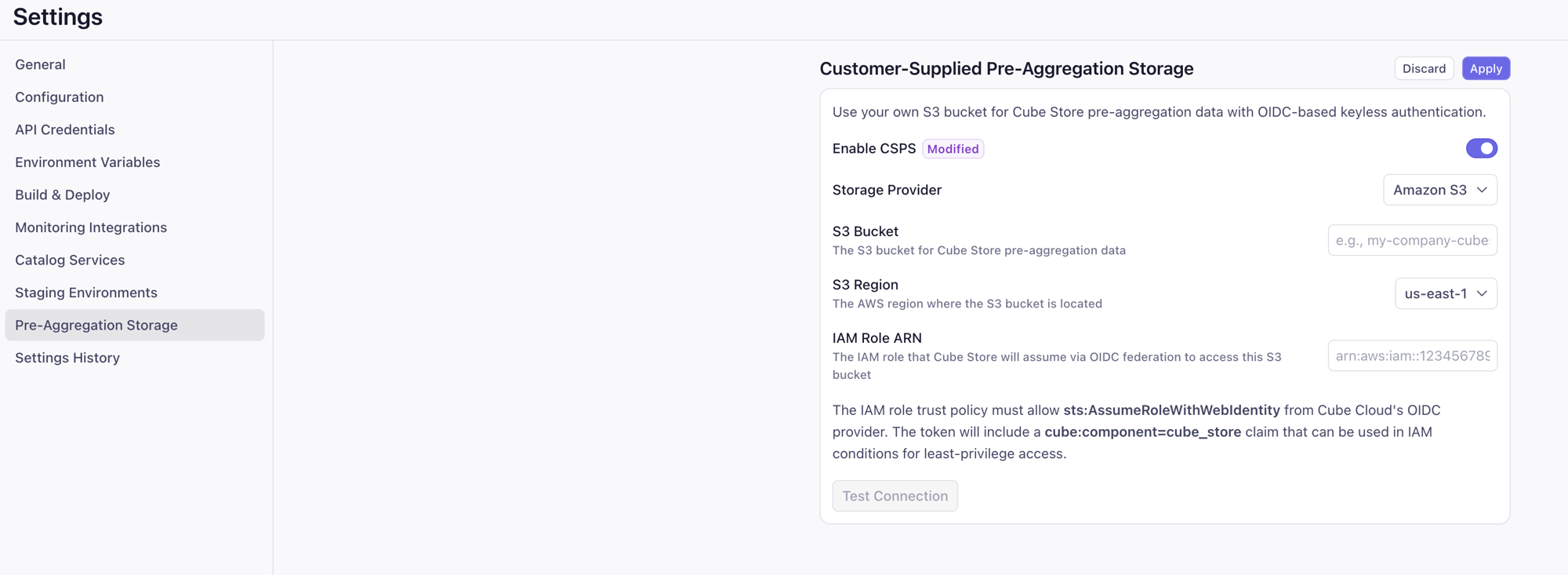
- Toggle Enable CSPS on.
- Storage Provider: Amazon S3.
- S3 Bucket:
my-csps-bucket. - S3 Region: e.g.
us-east-1. - IAM Role ARN:
arn:aws:iam::<aws-account-id>:role/cube-cubestore-<tenant-name>.
Bedrock for bring-your-own LLM
Bring-your-own LLM lets the AI engineer service call Bedrock through your own AWS account. The AI engineer’ssub claim ends in
component:ai_engineer, so the trust policy uses a StringLike match on
cube:deployment:*:component:ai_engineer to grant access tenant-wide
(every deployment’s AI engineer assumes the same role and writes against
the same Bedrock account).
1
Create the Bedrock IAM role
Trust policy — note the
StringLike condition pinning the component:2
Attach Bedrock invoke permissions
Grant access only to the foundation models and inference profiles you
intend to use:Cross-region inference profiles need access to the foundation model in
every region the profile routes through, hence the
* region in the
foundation-model ARN.3
Configure the BYO LLM provider in the AI engineer
Under Admin → AI → Models, click Add Model and configure: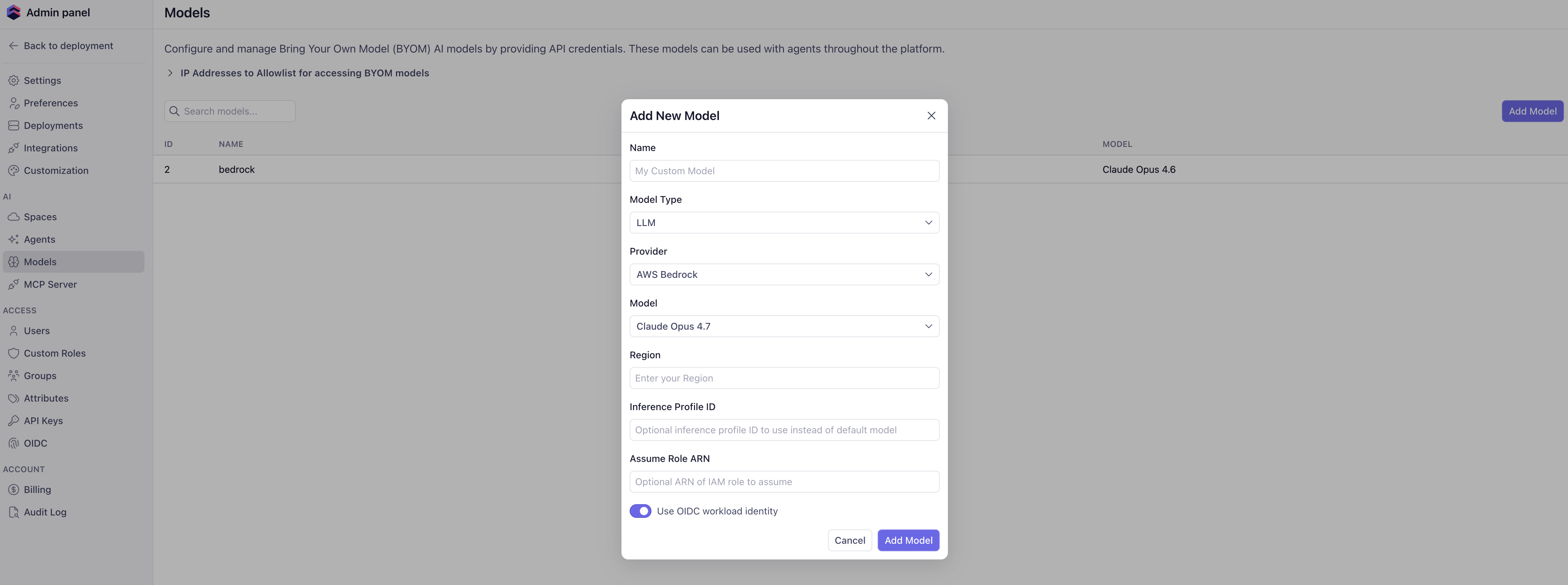
- Name — a human-readable label for this BYOM entry.
- Model Type —
LLM. - Provider —
AWS Bedrock. - Model — the Claude (or other) model you want the AI engineer to call.
- Region — the Bedrock region (e.g.
us-east-1). - Inference Profile ID — optional; leave blank to call the foundation model directly, or set to a cross-region inference profile ID.
- Assume Role ARN — the role you created above.
- Use OIDC workload identity — toggle on. With this on, the AI engineer authenticates via the deployment’s OIDC token instead of static AWS credentials.
Monitoring integrations (CloudWatch, S3)
Monitoring integrations can ship deployment logs to AWS without a static access key pair. The Vector agent that performs the export reads the deployment’s OIDC token and assumes an IAM role, exactly like the targets above — so the[sinks.*.auth] block disappears from vector.toml
entirely.
The credentials are resolved by the AWS SDK’s default chain for the whole
Vector agent, not per sink, so one role serves every AWS sink you configure —
aws_cloudwatch_logs, aws_s3, and the aws_s3
sink used by Query History export. Grant that single
role whatever those sinks need.
Vector authenticates as the deployment’s cube_api component, so the trust
policy is the standard one from Step 3 with
sub set to cube:deployment:<deployment-id>:component:cube_api.
1
Create the CloudWatch role
Create a role with that trust policy and attach a permissions policy that
can write to your log group:Add
logs:CreateLogGroup to the first statement if you set
create_missing_group = true in the sink.If the same agent also writes to S3 (the S3 or
Query History export sinks), add the bucket
permissions those need to this same role: s3:PutObject on
arn:aws:s3:::<bucket>/*, plus s3:ListBucket on arn:aws:s3:::<bucket>
if you enable the sink’s healthcheck. Both S3 examples in the docs ship with
[sinks.aws_s3.healthcheck] enabled = false, so s3:PutObject alone is
enough as written — but Vector’s aws_s3 healthcheck issues a HeadBucket,
which AWS authorizes as s3:ListBucket on the bucket ARN (not /*).2
Point the deployment at the role
Set these on the deployment under Settings → Environment variables:Setting the role ARN is what enables keyless authentication. The region for
the credential exchange is taken from the sink’s own
region; set
CUBE_CLOUD_MONITORING_AWS_REGION only to override it.Then drop the auth block from your vector.toml — see
Integration with Amazon CloudWatch for the sink
configuration.This role is separate from the deployment’s default
AWS_ROLE_ARN. Because
both are assumed by the same cube_api identity, a trust policy written for
one will also admit the other — scope each role’s permissions policy
tightly rather than relying on the trust policy to separate them.Verifying the setup
The fastest way to confirm the trust policy is wired up correctly is the Test connection button on the relevant settings page (data source wizard, CSPS settings, BYO LLM provider). Behind the scenes, this issues a real Cube OIDC token, runsAssumeRoleWithWebIdentity against AWS STS, and
returns a precise error if the trust policy rejects it.
If the test fails:
AssumeRoleWithWebIdentity events show up in CloudTrail with the deployment
subject in the userIdentity.webIdFederationData.federatedProvider and
...attributes fields — useful for auditing which deployments are
authenticating against which roles.